Developer technologies | Transact-SQL
A Microsoft extension to the ANSI SQL language that includes procedural programming, local variables, and various support functions.
This browser is no longer supported.
Upgrade to Microsoft Edge to take advantage of the latest features, security updates, and technical support.
' cx='32' cy='32' r='32' /%3E%3Ctext x='50%25' y='55%25' dominant-baseline='middle' text-anchor='middle' fill='%23FFF' %3ECP%3C/text%3E%3C/svg%3E)
Hello Community,
I have couple samples below showing howt get determine the data distribution of a record in a field.
For example the following code will show that record, 'FIESTA' in the 'model' field represents 59.52% of all the records
SELECT
  vehicles.model
 ,COUNT(*) AS cnt
 ,CAST(COUNT(*) * 100.0 / SUM(COUNT(*)) OVER () AS DEC(5, 2)) AS distribution
FROM dbo.vehicles
GROUP BY vehicles.model
ORDER BY distribution DESC
Likewise the following code will show that record '1.7' in the 'engine_size' field represents 15.08% of all records in the 'engine_size' field
SELECT
  vehicles.engine_size
 ,COUNT(*) AS cnt
 ,CAST(COUNT(*) * 100.0 / SUM(COUNT(*)) OVER () AS DEC(5, 2)) AS distribution
FROM dbo.vehicles
GROUP BY vehicles.engine_size
ORDER BY distribution DESC
Can someone let me know how to combine the code samples above to allow me to get the distribution of both the 'model' and 'engine_size'?
The sample data follows:
CREATE TABLE vehicles (
     registration varchar(50),
     make varchar(50),
     model varchar(50),
     engine_size float)

 INSERT vehicles VALUES
 ('JjFw5a0','SKODA','OCTAVIA',1.8),
 ('VkfCDpZ','FORD','FIESTA',1.7),
 ('5E93ZEq','SKODA','OCTAVIA',1.3),
 ('L2PPN0m','FORD','FIESTA',1.1),
 ('9xKghxp','FORD','FIESTA',1.5),
 ('WHShdBm','FORD','FIESTA',1.4),
 ('TNRHyy7','NISSAN','QASHQAI',1.2),
 ('6RNX0XG','SKODA','OCTAVIA',1.4),
 ('tJ9bOD8','FORD','FIESTA',1.1),
 ('ablFUSC','FORD','FIESTA',1),
 ('4B7RLYL','MERCEDED_BENZ','E CLASS',1.3),
 ('tlJiwVY','FORD','FIESTA',1),
 ('Fb9lcvG','FORD','FIESTA',1.4),
 ('nW4lqBC','FORD','FIESTA',1.6),
 ('LggTmL5','HYUNDAI','I20',1),
 ('2mGgSjS','FORD','FIESTA',1.1),
 ('IDvOzcM','FORD','FIESTA',1.3),
 ('JefpXK2','FORD','FIESTA',1.5),
 ('0h1uWfZ','MERCEDED_BENZ','E CLASS',1.4),
 ('ylBoGbV','MERCEDED_BENZ','E CLASS',1.7),
 ('XzoILDK','VAUXHALL','CORSA',1.8),
 ('Xhocs1Z','FORD','FIESTA',1.5),
 ('Lh2yWGa','KIA','RIO',1.5),
 ('hM5GWA0','FORD','FIESTA',1.3),
 ('PbpxkFt','FORD','FIESTA',1.7),
 ('SDHWV2r','FORD','FIESTA',1.2),
 ('n83Je2D','FORD','FIESTA',1.8),
 ('sDN0gex','FORD','FIESTA',1.2),
 ('7EICOZY','KIA','RIO',1.5),
 ('PUuMmIH','FORD','FIESTA',1),
 ('HiBwSg2','FORD','FIESTA',1.8),
 ('1yk1vDm','KIA','RIO',1.7),
 ('cMpH72R','HYUNDAI','I20',1.1),
 ('ZgQL0gt','MERCEDED_BENZ','E CLASS',1.3),
 ('jhpamQG','KIA','RIO',1.1),
 ('pk0lU2F','VAUXHALL','CORSA',1.4),
 ('fDCUeq1','FORD','FIESTA',1.1),
 ('ono5QFC','FORD','FIESTA',1.7),
 ('VohWwGR','FORD','FIESTA',1.5),
 ('Hih8dKc','SUZUKI','SWIFT',1.2),
 ('D2RNn3h','SUZUKI','SWIFT',1.2),
 ('QaYQulE','FORD','FIESTA',1.1),
 ('xmQPxAG','FORD','FIESTA',1.8),
 ('vmTqkTO','FORD','FIESTA',1.2),
 ('lvUtVUA','MERCEDED_BENZ','E CLASS',1),
 ('SFoj00d','FORD','FIESTA',1),
 ('9S6wrWV','MERCEDED_BENZ','E CLASS',1),
 ('0SBnW0z','FORD','FIESTA',1.1),
 ('HnDHdfj','MERCEDED_BENZ','E CLASS',1),
 ('RV7q947','FORD','FIESTA',1.4),
 ('JZqCtTg','FORD','FIESTA',1.7),
 ('XVgBwgi','FORD','FIESTA',1.8),
 ('iqJDsIF','FORD','FIESTA',1.6),
 ('CMbpRFa','FORD','FIESTA',1.6),
 ('vF7K5Xg','SUZUKI','SWIFT',1.1),
 ('3j6XGDH','FORD','FIESTA',1.5),
 ('ommqugM','FORD','FIESTA',1.1),
 ('LMQkPnw','NISSAN','QASHQAI',1.4),
 ('1dKgcdd','FORD','FIESTA',1.5),
 ('hC8BxiP','MERCEDED_BENZ','E CLASS',1.1),
 ('wLTWol7','FORD','FIESTA',1.6),
 ('TY8ChYN','FORD','FIESTA',1.6),
 ('Gw1CpI8','FORD','FIESTA',1.4),
 ('L4OPAJq','FORD','FIESTA',1.1),
 ('6TyYpfi','NISSAN','QASHQAI',1.6),
 ('ozoOcGL','FORD','FIESTA',1.4),
 ('6IME19U','FORD','FIESTA',1.4),
 ('BxpmJO5','FORD','FIESTA',1.4),
 ('0zc2n5A','FORD','FIESTA',1.3),
 ('FqbBZE2','FIAT','500',1.7),
 ('2EkTOTz','FORD','FIESTA',1.4),
 ('fNBvIvg','MERCEDED_BENZ','C CLASS',1.2),
 ('u5j4R4S','KIA','RIO',1.4),
 ('zpWaUZo','FORD','FIESTA',1.1),
 ('FQPVQYc','NISSAN','QASHQAI',1.7),
 ('8RBQADq','KIA','RIO',1.7),
 ('TOz2bcT','HYUNDAI','I20',1.7),
 ('jebhCex','FORD','FIESTA',1.3),
 ('cdHA1gL','FORD','FIESTA',1.2),
 ('FoaN4AT','FORD','FIESTA',1.7),
 ('atGn288','FORD','FIESTA',1.5),
 ('es8VNdW','FIAT','500',1.3),
 ('hDWoMXa','KIA','RIO',1.4),
 ('Q9C6Br1','KIA','RIO',1.5),
 ('mFSy4aF','FORD','FIESTA',1.6),
 ('bbbKnrM','SKODA','OCTAVIA',1.5),
 ('qY7lz6I','FORD','FIESTA',1),
 ('8Ch2OeU','VAUXHALL','CORSA',1.3),
 ('dcWsjJv','VAUXHALL','CORSA',1.3),
 ('bnnoBPg','SKODA','OCTAVIA',1.8),
 ('mvDyYkK','FORD','FIESTA',1.4),
 ('KpWDYap','FORD','FIESTA',1.3),
 ('7EK9K4z','FORD','FIESTA',1.3),
 ('ZPLHtlP','FORD','FIESTA',1.6),
 ('4EpYeSB','FORD','FIESTA',1.6),
 ('O1eZ20M','FORD','FIESTA',1),
 ('WfVntKk','FORD','FIESTA',1.7),
 ('6VlkBdi','FORD','FIESTA',1.1),
 ('hFQfKjk','KIA','RIO',1.4),
 ('3Y4njNP','KIA','RIO',1),
 ('3UuNqG0','FORD','FIESTA',1.7),
 ('qpvMYAu','FORD','FIESTA',1.1),
 ('NCYJUqx','FORD','FIESTA',1.3),
 ('M0AvWzg','FORD','FIESTA',1.6),
 ('XbVmtFf','FORD','FIESTA',1.3),
 ('l8qZy0H','SKODA','OCTAVIA',1.3),
 ('EDUbxaU','MERCEDED_BENZ','E CLASS',1.6),
 ('nWLd82o','FORD','FIESTA',1.7),
 ('4AkoyWx','FORD','FIESTA',1),
 ('nOoO25v','FORD','FIESTA',1.3),
 ('VAm5aV8','NISSAN','QASHQAI',1.4),
 ('zbd3cie','FORD','FIESTA',1.5),
 ('hyAN71W','NISSAN','QASHQAI',1),
 ('FxACHDf','FIAT','500',1.7),
 ('wOZdaeV','FORD','FIESTA',1.6),
 ('gfxZl99','VAUXHALL','CORSA',1.1),
 ('06HhwEJ','SKODA','OCTAVIA',1.7),
 ('PCTgYiG','KIA','RIO',1.7),
 ('U54WXZQ','KIA','RIO',1.6),
 ('FHgrRiF','FORD','FIESTA',1.6),
 ('R3jP73p','SKODA','OCTAVIA',1.5),
 ('etVPKX9','SUZUKI','SWIFT',1.1),
 ('BE3yReB','FORD','FIESTA',1.7),
 ('zXmX878','FORD','FIESTA',1.6),
 ('wdM3P2m','FORD','FIESTA',1.7),
 ('tb727BM','FORD','FIESTA',1.1)
Thanks
Carlton

Can someone let me know how to combine the code samples above to allow me to get the distribution of both the 'model' and 'engine_size'?
And what does that mean more exactly? That is, what result do you want back?
Hi Erland,
Thanks for getting in touch. Sorry for the delayed response (I'm not getting email notifications)
Anyway, the output I would like to see is like the following:

As always your help is very much appreciated.
Cheers
Sorry, I don't understand this. The above suggests that of the above almost 60% of the material is Fiesta with a 1.7 engine. But in fact in the material, the Fiestas range from 1.1 to 1.8 in their engine sizes.
So what links Fiesta particularly to 1.7? And what does engine_cnt = 19 mean? As far as I can tell there 10 Fiestas with size 1.7 in the material.
Hi,
Thanks again for responding.
Let me try and explain.
The following query
SELECT
vehicles.engine_size
,COUNT() AS cnt
,CAST(COUNT() * 100.0 / SUM(COUNT(*)) OVER () AS DEC(5, 2)) AS distribution
FROM dbo.vehicles
GROUP BY vehicles.engine_size
ORDER BY distribution DESC
gives me an output as follows:

The following query:
SELECT
   vehicles.model
  ,COUNT(*) AS cnt
  ,CAST(COUNT(*) * 100.0 / SUM(COUNT(*)) OVER () AS DEC(5, 2)) AS distribution
 FROM dbo.vehicles
 GROUP BY vehicles.model
 ORDER BY distribution DESC
gives me the following output:

The queries use the same dataset
I would like to combine both queries such that they give me something like the following output:

No wait, I made a mistake in the output image...I need to change it.

If you really need such results, then try this query:
;
with M as
(
    select model,
        count(*) as model_cnt,
        count(*) * 100.0 / (select count(*) from vehicles) as model_distribution
    from vehicles
    group by model
),
MN as
(
    select *, row_number() over (order by model_cnt desc) as rn
    from M
),
S as
(
    select engine_size,
        count(*) as engine_size_cnt,
        count(*) * 100.0 / (select count(*) from vehicles) as engine_size_distribution
    from vehicles
    group by engine_size
),
SN as
(
    select *, row_number() over (order by engine_size_cnt desc) as rn
    from S
)
select model, engine_size, model_cnt, engine_size_cnt,
    cast( model_distribution as decimal(30, 2)),
    cast( engine_size_distribution as decimal(30, 2))
from MN
full outer join SN on SN.rn = MN.rn
This is perfect.
Thanks Viorel-1
And thanks for ignoring Erland, and still helping me...
I do not think that this is an accurate comment.

Hi @Carlton Patterson ,
Thank you for posting here in Microsoft Q&A.
You could also refer below method which is to use the IDENTITY function in order to generate a Rownum and is similar with ROW_NUMBER function.
drop table if exists #temp1,#temp2

SELECT ID = IDENTITY(INT,1,1),
vehicles.model
,COUNT(*) AS cnt
,CAST(COUNT(*) * 100.0 / SUM(COUNT(*)) OVER () AS DEC(5, 2)) AS distribution
into #temp1
FROM dbo.vehicles
GROUP BY vehicles.model
ORDER BY distribution DESC

 SELECT ID = IDENTITY(INT,1,1),
vehicles.engine_size
,COUNT(*) AS cnt
,CAST(COUNT(*) * 100.0 / SUM(COUNT(*)) OVER () AS DEC(5, 2)) AS distribution
into #temp2
FROM dbo.vehicles
GROUP BY vehicles.engine_size
ORDER BY distribution DESC

 select a.model,b.engine_size,a.cnt model_cnt,b.cnt engine_size_cnt
 ,a.distribution model_distribution,b.distribution engine_size_distribution
 from #temp1 a
 full join #temp2 b on a.ID=b.ID
Output:
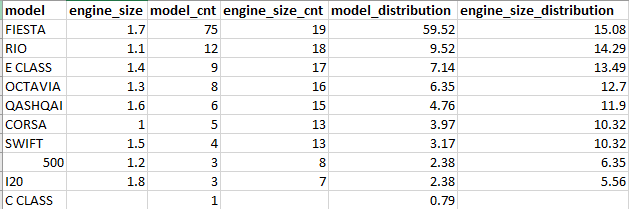
 model	engine_size	model_cnt	engine_size_cnt	model_distribution	engine_size_distribution
FIESTA	1.7	75	19	59.52	15.08
RIO	1.1	12	18	9.52	14.29
E CLASS	1.4	9	17	7.14	13.49
OCTAVIA	1.3	8	16	6.35	12.70
QASHQAI	1.6	6	15	4.76	11.90
CORSA	1	5	13	3.97	10.32
SWIFT	1.5	4	13	3.17	10.32
500	1.2	3	8	2.38	6.35
I20	1.8	3	7	2.38	5.56
C CLASS	NULL	1	NULL	0.79	NULL
Best regards
Melissa
If the answer is helpful, please click "Accept Answer" and upvote it.
Note: Please follow the steps in our documentation to enable e-mail notifications if you want to receive the related email notification for this thread.
I think the answer to your question is: you don't. It can be achieved, but the error here is really the idea as such. A row in a result set should describe an instance of an entity. That is the values in the rows should belong together, and not be unrelated random data.
For this reason I am not going to show you any query - and I hope no on else does for that matter.
I have understood that from your previous questions that your knowledge of SQL is on a fairly basic level. Learning to use a powerful tool like SQL is not only about learning syntax an operators - it is also about learning what you use the tool for - and what you don't use it for.
Erland,
I must say your comment is harsh and unnecessary....
I feel like I shouldn't have even asked the question...
I always tell my kids, there is no such thing as a bad question, but here you are, someone that understands my level of knowledge but still refusing to help....
So if your kids ask which is the best way to sneak out of the sweet shop without paying, do you show them how to to it, or do you tell them "don't do that!"?
The result set you want includes a line with CORSA and an engine size of 1, but there is no such car in the material. That is very misleading.
And I did not mean to say that it was a bad question. It was just that the answer was not the one you expected.
Hi Erland,
You have helped me out so much in the past that I know you don't mean anything bad for me.
So, lets move on - I have many follow up questions to ask, that I hope you will help me with.
cheers
I need the output to look like the following:
' cx='32' cy='32' r='32' /%3E%3Ctext x='50%25' y='55%25' dominant-baseline='middle' text-anchor='middle' fill='%23FFF' %3ECP%3C/text%3E%3C/svg%3E)
OMG! Melissa this amazing... Its' exactly what I needed in the format that I needed as well.
I say 'format' because I use a query builder by a company called Devart, the application is called dbForge. Unfortunately, the query builder cannot copy with 'WITH' statements, therefore I was going ask someone if they could achieve the same result as Viorel-1 above but without the 'WITH' statement and you have done exactly that.
Thank you soooooo much
Hi @Carlton Patterson ,
Thanks for your update.
I found that there was some issues with this case that you already accepted the answer but it is not in Accepted status in Q&A.
Could you please re-accept that answer?Thanks.
Besides, you could refer this link for email notifications.
Best regards
Melissa