Strange startup program called "Program"

Anonymous
2013-12-08T19:45:05+00:00

I have discovered a weird entry in my startup programs. A program with the name "Program" that has neither publisher nor can I open its location. See the following screenshot:

To me it seems to be some kind of "zombie" entry. When I right click on it the options "Open file location" and "Properties" are both grayed out. Nevertheless I was concerned a little bit that it could be some kind of malicious software, so I disabled the entry when it first occured. Now, after some time, the entry occured again and this time even twice (so now I have it 3 times in the startup list, one time disabled and two times enabled). This puzzles me a bit. I guess if I disable it again it will occur again once more.

Is there a way to find out where this startup entry is really located in the system (registry, startup folders...), permanently remove it, or even find out by which program it was created?

Best regards

Bastian Weber

Windows for home | Previous Windows versions | Performance and system failures

Locked Question. This question was migrated from the Microsoft Support Community. You can vote on whether it's helpful, but you can't add comments or replies or follow the question.

0 comments No comments
{count} votes

9 answers

Sort by: Most helpful
  1. @CmdrKeene 90,456 Reputation points Volunteer Moderator
    2013-12-08T20:01:50+00:00

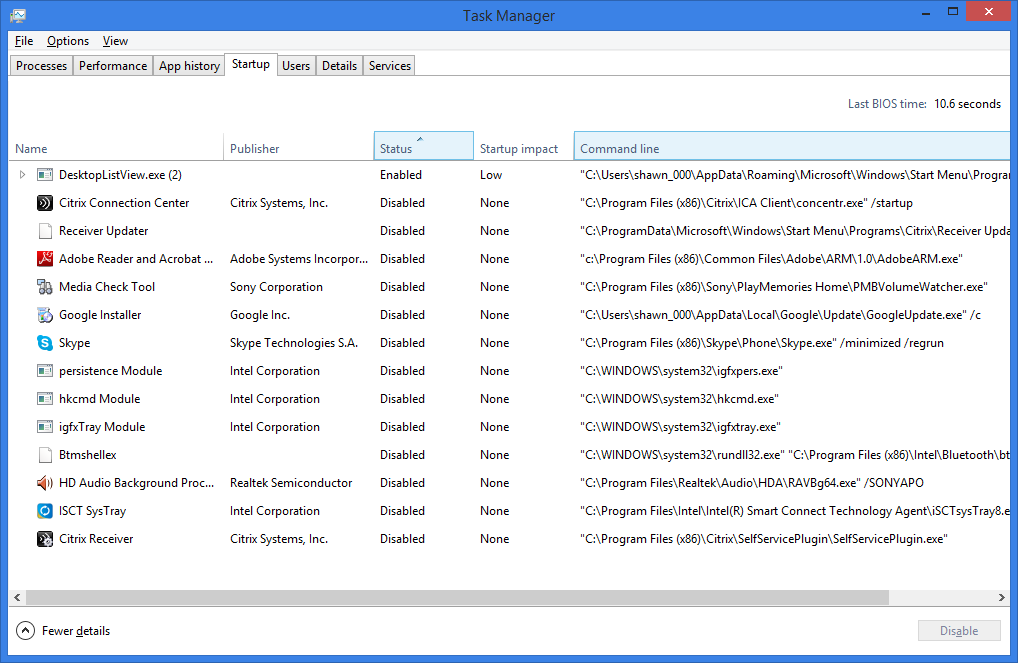
    In addition to running a scan as ZigZag recommended, you can investigate a little further by right-clicking the column headers in Task Manager. Right-click and choose "Command Line" for example, and you can see what the full path to the program is being used to run that program:
    910 people found this answer helpful.
    0 comments No comments
  2. Anonymous
    2013-12-08T19:56:36+00:00

    Please download the free version of Malwarebytes.

    Update it immediately.

    Do a full system scan

    Let us know the results at the end.

    http://www.malwarebytes.org/products

    83 people found this answer helpful.
    0 comments No comments
  3. Anonymous
    2013-12-08T21:07:51+00:00

    In addition to running a scan as ZigZag recommended, you can investigate a little further by right-clicking the column headers in Task Manager. Right-click and choose "Command Line" for example, and you can see what the full path to the program is being used to run that program:

    Oh, of course. I wonder why I didn't get the idea that there are more columns that can be displayed.

    After investigating the commands it seems to be quite harmless. On of the programs apparently is Realtek HD-Audio, the other two belonged to another program that I recently installed but uninstalled again.

    So why is the name "Program" shown? Well, there is a mistake in the filepaths which is a quotationmark that doesn't belong there. One example:

    "C:\Program" Files\Realtek\Audio\HDA\RAVCpl64.exe -s

    As you can see, the quotation mark after Program is not supposed to be there. It causes the path to end there, so that "Program" is being interpreted as the file name. Why this error occured for multiple entries independently and whether it is caused by a problem of my system or it is due to an error in the programs that created them I can not explain. I will see if in the future more such erroneous entries occur.

    Nevertheless I'm going to do the malware scan. It won't hurt. Theoretically it could also be malicious software trying to disguise itself as harmless and broadly used programs.

    308 people found this answer helpful.
    0 comments No comments
  4. Anonymous
    2014-05-01T14:05:13+00:00

    In addition to running a scan as ZigZag recommended, you can investigate a little further by right-clicking the column headers in Task Manager. Right-click and choose "Command Line" for example, and you can see what the full path to the program is being used to run that program:

    Oh, of course. I wonder why I didn't get the idea that there are more columns that can be displayed.

    After investigating the commands it seems to be quite harmless. On of the programs apparently is Realtek HD-Audio, the other two belonged to another program that I recently installed but uninstalled again.

    So why is the name "Program" shown? Well, there is a mistake in the filepaths which is a quotationmark that doesn't belong there. One example:

    "C:\Program" Files\Realtek\Audio\HDA\RAVCpl64.exe -s

    As you can see, the quotation mark after Program is not supposed to be there. It causes the path to end there, so that "Program" is being interpreted as the file name. Why this error occured for multiple entries independently and whether it is caused by a problem of my system or it is due to an error in the programs that created them I can not explain. I will see if in the future more such erroneous entries occur.

    Nevertheless I'm going to do the malware scan. It won't hurt. Theoretically it could also be malicious software trying to disguise itself as harmless and broadly used programs.

    OK, same issue here with a different program (GROOVE.exe).  How do you edit the command line to correct the issue?

    58 people found this answer helpful.
    0 comments No comments
  5. Anonymous
    2015-10-06T08:47:42+00:00

    Please download the free version of Malwarebytes.

    Update it immediately.

    Do a full system scan

    Let us know the results at the end.

    http://www.malwarebytes.org/products

    This would be an incorrect course of action.

    clearly you're advertising, not diagnosing. Shawn 'Cmdr' Keene [MVP] ,  thank you for your solution. I thought it'd be a removed app (redundant file info usually indicates this). atleast now, I'm sure of it

    169 people found this answer helpful.
    0 comments No comments