Microsoft Security | Microsoft Entra | Microsoft Entra ID
A cloud-based identity and access management service for securing user authentication and resource access

This browser is no longer supported.
Upgrade to Microsoft Edge to take advantage of the latest features, security updates, and technical support.

Hi,
The link, https://learn.microsoft.com/en-us/learn/modules/manage-users-and-groups-in-aad/2-create-aad says, Instead, if you're already using a Windows AD server, you can connect it to Azure AD to extend your directory into Azure.
Please elaborate and let us know,
Thank you for giving your time.
Best Regards
NndnG
' cx='32' cy='32' r='32' /%3E%3Ctext x='50%25' y='55%25' dominant-baseline='middle' text-anchor='middle' fill='%23FFF' %3EVS%3C/text%3E%3C/svg%3E)
Start by reading this about how to Integrate on-premises AD with Azure
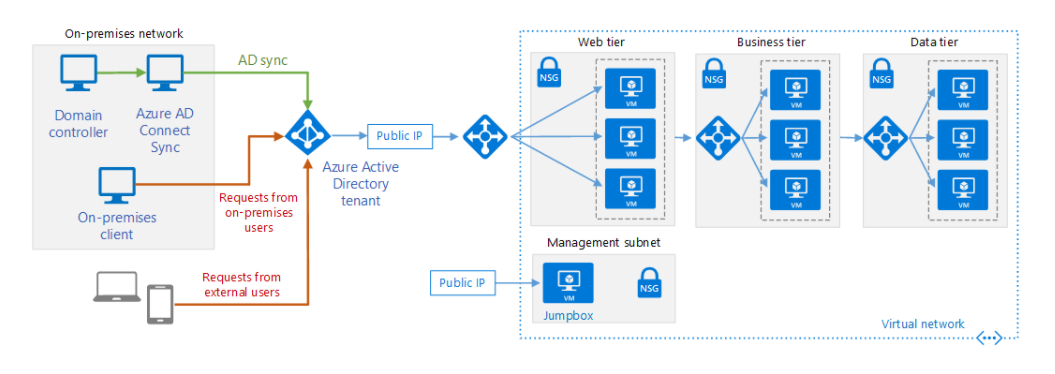
When you already have a local AD, you can use a tool called Azure AD connect to sync your identities on Azure AD, so that they can also access Azure protected services/resources without having to create new identity. You can read more about the process here. You can also check our complete Hybrid identity documentation
Here is the integration document which should give you a more clear idea about how to integrate domains with AzureAD.
-----------------------------------------------------------------------------------------------------------------
If the suggested response helped you resolve your issue, please do not forget to accept the response as Answer and "Up-Vote" for the answer that helped you for benefit of the community.
@Vipul Sparsh thank you for giving time and replying with links and diagram.
As of now, I click Accept Answer. Later on, if I have any doubts related to your reply, I'll comment. I hope you'll reply.
Best Regards
NndnG
' cx='32' cy='32' r='32' /%3E%3Ctext x='50%25' y='55%25' dominant-baseline='middle' text-anchor='middle' fill='%23FFF' %3EVW%3C/text%3E%3C/svg%3E)
Hi,
Thank you for posting in our forum.
The question looks like an AAD question, I recommend you to post on the AAD forum, they can give you more professional answers
Hope this information can help you
Best wishes
Vicky
@Vicky Wang pls suggest me the link of AAD forum.
