Developer technologies | Windows Forms
A set of .NET Framework managed libraries for developing graphical user interfaces.
This browser is no longer supported.
Upgrade to Microsoft Edge to take advantage of the latest features, security updates, and technical support.
' cx='32' cy='32' r='32' /%3E%3Ctext x='50%25' y='55%25' dominant-baseline='middle' text-anchor='middle' fill='%23FFF' %3ERK%3C/text%3E%3C/svg%3E)
Dear all ,
In my winform application i want to populate my charts where the data source is a stored procedure having multiple parameters , the values for the parameter will be provided from the winform controls.
But when i click the filter button on the date criteria is getting evaluated and all the others are not , kindly verify my below images and code and kindly guide me where i am wrong:
Image of my winform: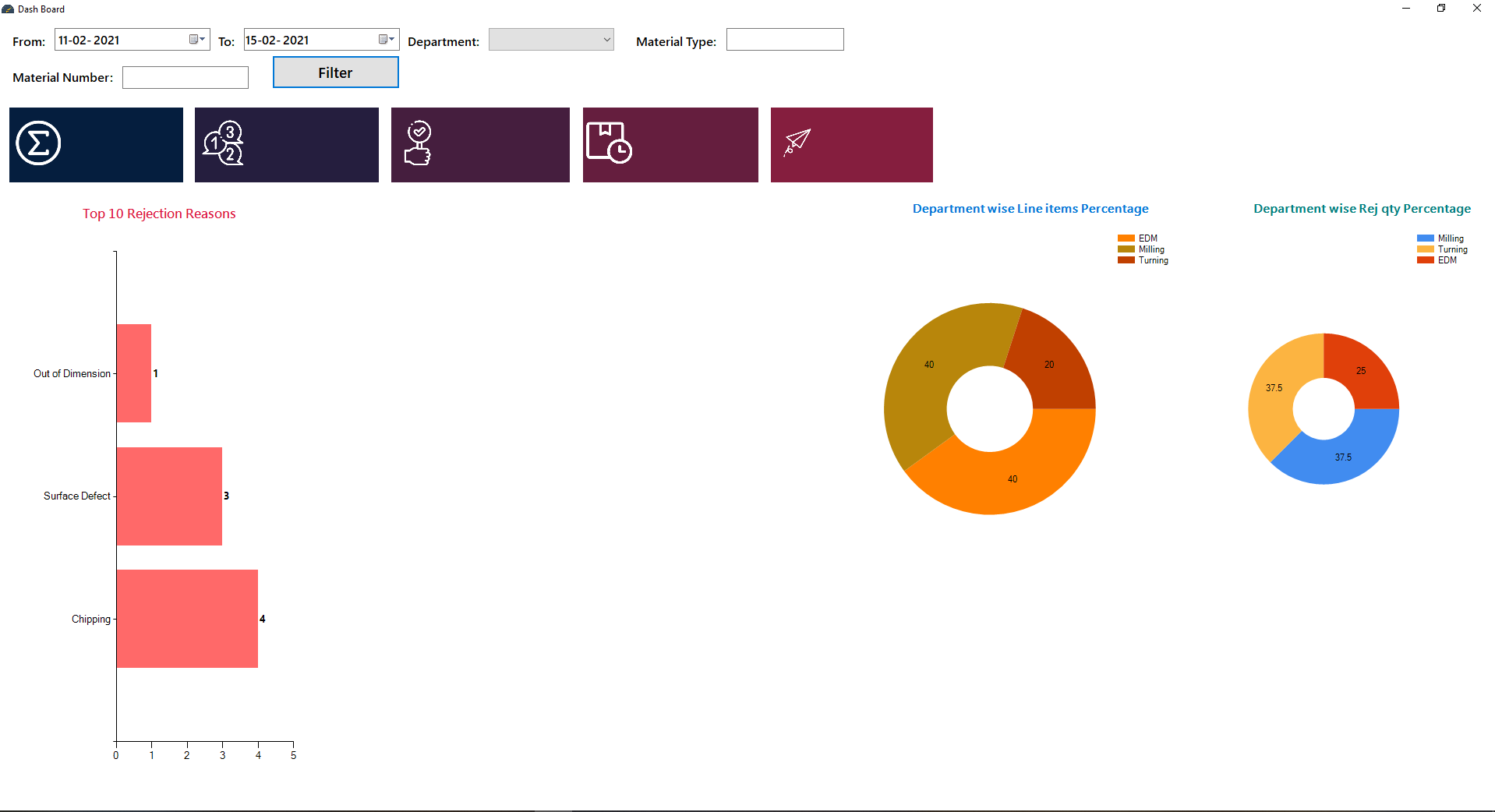
code for chart data :
ArrayList deptname = new ArrayList();
        ArrayList deptcount = new ArrayList();

        ArrayList deptname2 = new ArrayList();
        ArrayList deptsum2 = new ArrayList();

        ArrayList rejcat = new ArrayList();
        ArrayList rejsum = new ArrayList();

        private void btnfilter_Click(object sender, EventArgs e)
        {
            deptname.Clear();
            deptcount.Clear();
            deptpercentage();
            deptname2.Clear();
            deptsum2.Clear();
            deptrejqty();
            rejcat.Clear();
            rejsum.Clear();
            toprejreason();
        }

        private void toprejreason()
        {
            SqlConnection con = new SqlConnection(cs);
            SqlCommand cmd = new SqlCommand("toprejreason", con);
            cmd.Parameters.AddWithValue("@fromDate", dtfrom.Value);
            cmd.Parameters.AddWithValue("@toDate", dtto.Value);
            cmd.Parameters.AddWithValue("@depname", comboBox1.Text);
            cmd.Parameters.AddWithValue("@mattype", textBox1.Text);
            cmd.Parameters.AddWithValue("@matnum", textBox2.Text);
            cmd.CommandType = CommandType.StoredProcedure;
            con.Open();
            SqlDataReader dr = cmd.ExecuteReader();
            while (dr.Read())
            {
                rejcat.Add(dr.GetString(0));
                rejsum.Add(dr.GetInt32(1));
            }
            chart1.Series[0].Points.DataBindXY(rejcat, rejsum);
            dr.Close();
            con.Close();
        }

        private void deptrejqty()
        {
            SqlConnection con = new SqlConnection(cs);
            SqlCommand cmd = new SqlCommand("deptrejqty", con);
            cmd.Parameters.AddWithValue("@fromDate", dtfrom.Value);
            cmd.Parameters.AddWithValue("@toDate", dtto.Value);
            cmd.Parameters.AddWithValue("@depname", comboBox1.Text);
            cmd.Parameters.AddWithValue("@mattype", textBox1.Text);
            cmd.Parameters.AddWithValue("@matnum", textBox2.Text);
            cmd.CommandType = CommandType.StoredProcedure;
            con.Open();
            SqlDataReader dr = cmd.ExecuteReader();
            while (dr.Read())
            {
                deptname2.Add(dr.GetString(0));
                deptsum2.Add(dr.GetDecimal(1));
            }
            deptrej.Series[0].Points.DataBindXY(deptname2, deptsum2);
            dr.Close();
            con.Close();
        }


        private void deptpercentage()
        {
            SqlConnection con = new SqlConnection(cs);
            SqlCommand cmd = new SqlCommand("deptpercentage", con);
            cmd.Parameters.AddWithValue("@fromDate", dtfrom.Value);
            cmd.Parameters.AddWithValue("@toDate", dtto.Value);
            cmd.Parameters.AddWithValue("@depname", comboBox1.Text);
            cmd.Parameters.AddWithValue("@mattype", textBox1.Text);
            cmd.Parameters.AddWithValue("@matnum", textBox2.Text);
            cmd.CommandType = CommandType.StoredProcedure;
            con.Open();
            SqlDataReader dr = cmd.ExecuteReader();
            while (dr.Read())
            {
                deptname.Add(dr.GetString(0));
                deptcount.Add(dr.GetDecimal(1));
            }
            chartdeptper.Series[0].Points.DataBindXY(deptname, deptcount);
            dr.Close();
            con.Close();
        }

        private void FormDashboard_FormClosed(object sender, FormClosedEventArgs e)
        {
            Application.Exit();
        }
    }
}
code of stored procedure:
create proc toprejreason
@fromDate Date,
@toDate Date,
@depname varchar,
@mattype varchar,
@matnum varchar
as
select top 10 Reason_Brief as Reason, Sum(Rejection_Qty) as Quantity
from Semicon_NPD
Where Date between  @fromDate  and  @toDate or Department=@depname or Material_Type=@mattype or Material_Number=@matnum
group by Reason_Brief
order by Sum(Rejection_Qty) desc
go
when i add the parameter in my combo box or text box and then click the filter button no change is happening. Please help me.

Writing that kind of code is tedious and error-prone. Thankfully there is an easier option:
WHERE (Date > @fromdate OR @fromdate IS NULL)
   AND  (Date < @todate OR @todate IS NULL)
   AND  (Material_type = @matname OR @matname IS NULL)
 ...
OPTION (RECOMPILE)
This is a single SELECT - no need for all those IF.
The hint OPTION (RECOMPILE) requests a recompile every time. This permits SQL Server to use any index there is on the columns. For this type of query there is no single one-size-fits-all plan.
I have an article on my web site, Dynamic Search Conditions where I discuss these kind of searches in more detail.
Thank you so much it now solved my problem..!!!

I would look at this in line the stored procedure. It will pull all records in the data range or has a record with the right deptname, mattype, or matnum
Where Date between @fromDate and @toDate or Department=@depname or Material_Type=@mattype or Material_Number=@matnum
I am thinking it should be this.
Where Date between @fromDate and @toDate and (Department=@depname or Material_Type=@mattype or Material_Number=@matnum)
@Ken Tucker thank you so much for your help ...executing the above code make at least 1 parameter is mandatory for (Department=@depname or Material_Type=@mattype or Material_Number=@matnum) but i want to execute even if these 3 parameters are not provided.
for example:
ok you probably have to do something like this then
Where Date between @fromDate and @toDate or (Department=@depname and Date between @fromDate and @toDate) or (Material_Type=@mattype and Date between @fromDate and @toDate) or (Material_Number=@matnum and Date between @fromDate and @toDate)
This is the bug:
@depname varchar,
@mattype varchar,
@matnum varchar
Only varchar is the same as varchar(1). Thus, your input gets truncated and this is why you don't get any hits.
@Erland Sommarskog as i couldn't post the code under comments i have pasted in answer section pls help me.
hi @Erland Sommarskog and @Ken Tucker thank you so much for your inputs , with your suggestions i have coded like below , now the it is working like this:
USE [PINQC]
 GO
 /****** Object:  StoredProcedure [dbo].[toprejreason]    Script Date: 16-02-2021 09:42:56 ******/
 SET ANSI_NULLS ON
 GO
 SET QUOTED_IDENTIFIER ON
 GO
 ALTER proc [dbo].[toprejreason]
 @fromDate Date,
 @toDate Date,
 @depname varchar(50),
 @mattype varchar(50),
 @matnum varchar(50)
 as
 if (@depname is null or @depname='') and (@mattype is null or @mattype='') and (@matnum is null or @matnum='')
     select top 10 Reason_Brief as Reason, Sum(Rejection_Qty) as Quantity
     from Semicon_NPD
     Where Date between  @fromDate  and  @toDate
     group by Reason_Brief
     order by Sum(Rejection_Qty) desc
 else
 begin
 if (@depname is null or @depname='')
     select top 10 Reason_Brief as Reason, Sum(Rejection_Qty) as Quantity
     from Semicon_NPD
     Where (Date between  @fromDate  and  @toDate) and (Material_Type=@mattype) and (Material_Number=@matnum)
     group by Reason_Brief
     order by Sum(Rejection_Qty) desc
 else
 begin
 if (@mattype is null or @mattype='')
     select top 10 Reason_Brief as Reason, Sum(Rejection_Qty) as Quantity
     from Semicon_NPD
     Where (Date between  @fromDate  and  @toDate) and (Department=@depname) and (Material_Number=@matnum)
     group by Reason_Brief
     order by Sum(Rejection_Qty) desc
 else
 begin
 if (@matnum is null or @matnum='')
     select top 10 Reason_Brief as Reason, Sum(Rejection_Qty) as Quantity
     from Semicon_NPD
     Where (Date between  @fromDate  and  @toDate) and (Department=@depname) and (Material_Type=@mattype)
     group by Reason_Brief
     order by Sum(Rejection_Qty) desc
 else
 begin
 if (@mattype is null or @mattype='') and (@matnum is null or @matnum='')
     select top 10 Reason_Brief as Reason, Sum(Rejection_Qty) as Quantity
     from Semicon_NPD
     Where (Date between  @fromDate  and  @toDate) and (Department=@depname)
     group by Reason_Brief
     order by Sum(Rejection_Qty) desc
 else
 begin
 if (@depname is null or @depname='') and (@matnum is null or @matnum='')
     select top 10 Reason_Brief as Reason, Sum(Rejection_Qty) as Quantity
     from Semicon_NPD
     Where (Date between  @fromDate  and  @toDate) and (Material_Type=@mattype)
     group by Reason_Brief
     order by Sum(Rejection_Qty) desc
 else
 begin
 if  (@depname is null or @depname='') and (@mattype is null or @mattype='')
     select top 10 Reason_Brief as Reason, Sum(Rejection_Qty) as Quantity
     from Semicon_NPD
     Where (Date between  @fromDate  and  @toDate) and (Material_Number=@matnum)
     group by Reason_Brief
     order by Sum(Rejection_Qty) desc
 else
     select top 10 Reason_Brief as Reason, Sum(Rejection_Qty) as Quantity
     from Semicon_NPD
     Where (Date between  @fromDate  and  @toDate) and (Material_Type=@mattype) and (Material_Number=@matnum) and (Department=@depname)
     group by Reason_Brief
     order by Sum(Rejection_Qty) desc
     end
     end
     end
     end
     end
     end
     go
@fromDate , @toDate , @depname & @mattype parameters filled and @matnum kept null. @fromDate , @toDate & @mattype parameters filled and @depname kept null. @depname is kept null **no values is getting returned kindly look at my code please guide me pls.