Azure Virtual Machines
An Azure service that is used to provision Windows and Linux virtual machines.
This browser is no longer supported.
Upgrade to Microsoft Edge to take advantage of the latest features, security updates, and technical support.
' cx='32' cy='32' r='32' /%3E%3Ctext x='50%25' y='55%25' dominant-baseline='middle' text-anchor='middle' fill='%23FFF' %3ET%3C/text%3E%3C/svg%3E)
Hi... I am new at Azure and not familiar with PowerShell scripts. I found following method to reduce the OS disk size via script. I want to know is it safe and secure to run this script? Since the script seems granting some permissions (with admin rights), any possible security, data theft/lost etc or any other issues? I just want to make sure script is COMPLETELY safe and secure to run.
Looking for kind feedback please.
https://jrudlin.github.io/2019-08-27-shrink-azure-vm-osdisk/
https://github.com/jrudlin/Azure/blob/master/General/Shrink-AzDisk.ps1
Thanks.

Hi @TechGuy_MS1 ,
The script is pretty straight forward and is not doing something suspicious.
After everything is done and the VM is up and running again without any issues I would recommend to check if the temporary created storage account still exists (not deleted). If the temporary created storage account still exist just delete this.
----------
(If the reply was helpful please don't forget to upvote and/or accept as answer, thank you)
Regards
Andreas Baumgarten
Excellent!
Thanks for the info.

Hello @TechGuy_MS1 ,
Thanks for reaching out
I have reviewed and executed each line from this script individually and didn't find anything suspicious or problematic from security standpoint except below error which caused due to Az/ Azure RM modules were coexist on my system and when I updated Az module after removing Azure RM module which started working as expected without any issue.
Error: Update-AzVM : Required parameter 'bootDiagnostics.storageAccountUri' is missing (null).
Resolution: Uninstall the AzureRM and install Az module
I had tested this one on my azure VM, was able to Shrink Az disk. Here, I am attaching PS success outcome for your reference.
I hope this help you, If you have any additional queries, feel free to reach out to us, I would be happy to help you out. Thanks.
PowerShell Outcome:
PS C:\> # Variables
$DiskID = "/subscriptions/xxxxx-xxx-xxxx-xxxx-xxxxxxfff/resourceGroups/CXP/providers/Microsoft.Compute/disks/testvm_OsDisk_1_93481399ceeb487e8ab46c4830ccc036"# eg. "/subscriptions/xxxxx-xxx-xxxx-xxxx-xxxxxxfff/resourcegroups/rg-server1-prod-1/providers/Microsoft.Compute/disks/Server1-Server1"
$VMName = "testvm"
$DiskSizeGB = 32
$AzSubscription = "Microsoft Azure Internal Consumption"

PS C:\> Connect-AzAccount

Account                    SubscriptionName                     TenantId                             Environment
-------                    ----------------                     --------                             -----------
******@xxxxx.onmicrosoft.com Microsoft Test Sub xxxxx-xxx-xxxx-xxxx-xxxxxxfff        AzureCloud


PS C:\> Select-AzSubscription -Subscription $AzSubscription
PS C:\> $VM = Get-AzVm | ? Name -eq $VMName
PS C:\> $VM = Get-AzVm | ? Name -eq $VMName
PS C:\> $resourceGroupName = $VM.ResourceGroupName
PS C:\> $Disk = Get-AzDisk | ? Id -eq $DiskID
PS C:\> $HyperVGen = $Disk.HyperVGeneration
PS C:\> $DiskName = $Disk.Name
PS C:\> $SAS = Grant-AzDiskAccess -ResourceGroupName $resourceGroupName -DiskName $DiskName -Access 'Read' -DurationInSecond 600000;
PS C:\> $storageAccountName = "shrink" + [system.guid]::NewGuid().tostring().replace('-','').substring(1,18)
PS C:\> $storageContainerName = $storageAccountName
PS C:\> $destinationVHDFileName = "$($VM.StorageProfile.OsDisk.Name).vhd"
PS C:\> $StorageAccount = New-AzStorageAccount -ResourceGroupName $resourceGroupName -Name $storageAccountName -SkuName Standard_LRS -Location $VM.Location
PS C:\> $destinationContext = $StorageAccount.Context
PS C:\> $container = New-AzStorageContainer -Name $storageContainerName -Permission Off -Context $destinationContext

PS C:\> Start-AzStorageBlobCopy -AbsoluteUri $SAS.AccessSAS -DestContainer $storageContainerName -DestBlob $destinationVHDFileName -DestContext $destinationContext
while(($state = Get-AzStorageBlobCopyState -Context $destinationContext -Blob $destinationVHDFileName -Container $storageContainerName).Status -ne "Success") { $state; Start-Sleep -Seconds 20 }
$state

PS C:\> Revoke-AzDiskAccess -ResourceGroupName $resourceGroupName -DiskName $DiskName

PS C:\> $destinationVHDFileName = "$($VM.StorageProfile.OsDisk.Name).vhd"

PS C:\> $destinationVHDFileName
testvm_OsDisk_1_93481399ceeb487e8ab46c4830ccc036.vhd

PS C:\> $emptydiskforfootername = "$($VM.StorageProfile.OsDisk.Name)-empty.vhd"


PS C:\> $diskConfig = New-AzDiskConfig `
    -Location $VM.Location `
    -CreateOption Empty `
    -DiskSizeGB $DiskSizeGB `
    -HyperVGeneration $HyperVGen

PS C:\> $dataDisk = New-AzDisk `
    -ResourceGroupName $resourceGroupName `
    -DiskName $emptydiskforfootername `
    -Disk $diskConfig

PS C:\> $VM = Add-AzVMDataDisk `
    -VM $VM `
    -Name $emptydiskforfootername `
    -CreateOption Attach `
    -ManagedDiskId $dataDisk.Id `
    -Lun 63

PS C:\> Update-AzVM -ResourceGroupName $resourceGroupName -VM $VM


RequestId IsSuccessStatusCode StatusCode ReasonPhrase
--------- ------------------- ---------- ------------
                         True         OK OK

PS C:\> $VM | Stop-AzVM -Force
OperationId : 499dc01f-b5ce-4753-b1cc-5f06bfe1109c
Status      : Succeeded
StartTime   : 24-Feb-21 5:39:56 PM
EndTime     : 24-Feb-21 5:40:08 PM
Error       :

PS C:\> $SAS = Grant-AzDiskAccess -ResourceGroupName $resourceGroupName -DiskName $emptydiskforfootername -Access 'Read' -DurationInSecond 600000;

PS C:\> Start-AzStorageBlobCopy -AbsoluteUri $SAS.AccessSAS -DestContainer $storageContainerName -DestBlob $emptydiskforfootername -DestContext $destinationContext
while(($state = Get-AzStorageBlobCopyState -Context $destinationContext -Blob $emptydiskforfootername -Container $storageContainerName).Status -ne "Success") { $state; Start-Sleep -Seconds 20 }
$state

   AccountName: shrinkc95365ba3f7498991f, ContainerName: shrinkc95365ba3f7498991f


CopyId                  : c0864f4c-8475-487e-802d-2f89a8b06af4
CompletionTime          : 24-Feb-21 12:26:27 PM +00:00
Status                  : Success
Source                  : https://md-mvj44jsj*********************
BytesCopied             : 34359738880
TotalBytes              : 34359738880
StatusDescription       :
DestinationSnapshotTime :

PS C:\> Revoke-AzDiskAccess -ResourceGroupName $resourceGroupName -DiskName $emptydiskforfootername

Name      : d3a96c26-189a-4246-aca4-2b8bb0b2ff5c
StartTime : 24-Feb-21 5:57:24 PM
EndTime   : 24-Feb-21 5:57:55 PM
Status    : Succeeded
Error     :

PS C:\> Remove-AzVMDataDisk -VM $VM -DataDiskNames $emptydiskforfootername

ResourceGroupName   Name   Location       VmSize  OsType       NIC ProvisioningState Zone
-----------------   ----   --------       ------  ------       --- ----------------- ----
CXP               testvm westeurope Standard_B1s Windows testvm761         Succeeded


PS C:\> Update-AzVM -ResourceGroupName $resourceGroupName -VM $VM

RequestId IsSuccessStatusCode StatusCode ReasonPhrase
--------- ------------------- ---------- ------------
                         True         OK OK

PS C:\> Remove-AzDisk -ResourceGroupName $resourceGroupName -DiskName $emptydiskforfootername -Force;

Name      : d547bbc4-a1f4-45cf-a9e7-ca3452865baf
StartTime : 24-Feb-21 6:02:16 PM
EndTime   : 24-Feb-21 6:02:47 PM
Status    : Succeeded
Error     :

PS C:\> $emptydiskforfootername
testvm_OsDisk_1_93481399ceeb487e8ab46c4830ccc036-empty.vhd

PS C:\> $emptyDiskblob = Get-AzStorageBlob -Context $destinationContext -Container $storageContainerName -Blob $emptydiskforfootername
PS C:\> $emptyDiskblob

   AccountName: shrinkc95365ba3f7498991f, ContainerName: shrinkc95365ba3f7498991f

Name                 BlobType  Length          ContentType                    LastModified         AccessTier SnapshotTime                 IsDeleted  VersionId
----                 --------  ------          -----------                    ------------         ---------- ------------                 ---------  ---------
testvm_OsDisk_1_9... PageBlob  34359738880     application/octet-stream       2021-02-24 12:26:27Z Unknown                                 False

PS C:\> $osdisk = Get-AzStorageBlob -Context $destinationContext -Container $storageContainerName -Blob $destinationVHDFileName

PS C:\> $osdisk

   AccountName: shrinkc95365ba3f7498991f, ContainerName: shrinkc95365ba3f7498991f

Name                 BlobType  Length          ContentType                    LastModified         AccessTier SnapshotTime                 IsDeleted  VersionId
----                 --------  ------          -----------                    ------------         ---------- ------------                 ---------  ---------
testvm_OsDisk_1_9... PageBlob  136367309312    application/octet-stream       2021-02-24 10:37:51Z Unknown                                 False


PS C:\> $footer = New-Object -TypeName byte[] -ArgumentList 512

PS C:\> write-output "Get footer of empty disk"
Get footer of empty disk

PS C:\> $downloaded = $emptyDiskblob.ICloudBlob.DownloadRangeToByteArray($footer, 0, $emptyDiskblob.Length - 512, 512)

PS C:\> $osDisk.ICloudBlob.Resize($emptyDiskblob.Length)

PS C:\> $footerStream = New-Object -TypeName System.IO.MemoryStream -ArgumentList (,$footer)

PS C:\> write-output "Write footer of empty disk to OSDisk"

Write footer of empty disk to OSDisk

PS C:\> $osDisk.ICloudBlob.WritePages($footerStream, $emptyDiskblob.Length - 512)

PS C:\> Write-Output -InputObject "Removing empty disk blobs"

Removing empty disk blobs

PS C:\> $emptyDiskblob | Remove-AzStorageBlob -Force

PS C:\> $NewDiskName = "$DiskName" + "-new"

PS C:\> $NewDiskName
testvm_OsDisk_1_93481399ceeb487e8ab46c4830ccc036-new

PS C:\> $accountType = $Disk.Sku.Name

PS C:\> $accountType
Standard_LRS

PS C:\> $vhdUri = $osdisk.ICloudBlob.Uri.AbsoluteUri

PS C:\> $vhdUri
https://shrinkc95365ba3f7498991f.blob.core.windows.net/shrinkc95365ba3f7498991f/testvm_OsDisk_1_93481399ceeb487e8ab46c4830ccc036.vhd

PS C:\> $diskConfig = New-AzDiskConfig -AccountType $accountType -Location $VM.location -DiskSizeGB $DiskSizeGB -SourceUri $vhdUri -CreateOption Import -StorageAccountId $StorageAccount.Id -HyperVGeneration $HyperVGen

PS C:\> $NewManagedDisk = New-AzDisk -DiskName $NewDiskName -Disk $diskConfig -ResourceGroupName $resourceGroupName

PS C:\> $VM | Stop-AzVM -Force

OperationId : 74c8ebee-160e-4673-9abb-6fc8847db2d4
Status      : Succeeded
StartTime   : 24-Feb-21 6:08:52 PM
EndTime     : 24-Feb-21 6:09:03 PM
Error       :

PS C:\> Set-AzVMOSDisk -VM $VM -ManagedDiskId $NewManagedDisk.Id -Name $NewManagedDisk.Name


ResourceGroupName   Name   Location       VmSize  OsType       NIC ProvisioningState Zone
-----------------   ----   --------       ------  ------       --- ----------------- ----
CXP               testvm westeurope Standard_B1s Windows testvm761         Succeeded


PS C:\> Update-AzVM -ResourceGroupName $resourceGroupName -VM $VM

RequestId IsSuccessStatusCode StatusCode ReasonPhrase
--------- ------------------- ---------- ------------
                         True         OK OK


PS C:\> $VM | Start-AzVM

OperationId : 3ae920a5-17c6-4ae9-9cf4-008048f11c15
Status      : Succeeded
StartTime   : 24-Feb-21 6:10:38 PM
EndTime     : 24-Feb-21 6:14:31 PM
Error       :


PS C:\> $DiskName
testvm_OsDisk_1_93481399ceeb487e8ab46c4830ccc036

PS C:\> Remove-AzDisk -ResourceGroupName $resourceGroupName -DiskName $DiskName -Force;


Name      : d7dacb0f-9842-4efd-a8af-921d9452d056
StartTime : 24-Feb-21 6:18:12 PM
EndTime   : 24-Feb-21 6:18:43 PM
Status    : Succeeded
Error     :


PS C:\> $DiskName
testvm_OsDisk_1_93481399ceeb487e8ab46c4830ccc036

PS C:\> $osdisk | Remove-AzStorageBlob -Force

PS C:\> $osdisk

   AccountName: shrinkc95365ba3f7498991f, ContainerName: shrinkc95365ba3f7498991f

Name                 BlobType  Length          ContentType                    LastModified         AccessTier SnapshotTime                 IsDeleted  VersionId
----                 --------  ------          -----------                    ------------         ---------- ------------                 ---------  ---------
testvm_OsDisk_1_9... PageBlob  136367309312    application/octet-stream       2021-02-24 10:37:51Z Unknown                                 False


PS C:\> $StorageAccount | Remove-AzStorageAccount -Force

PS C:\>
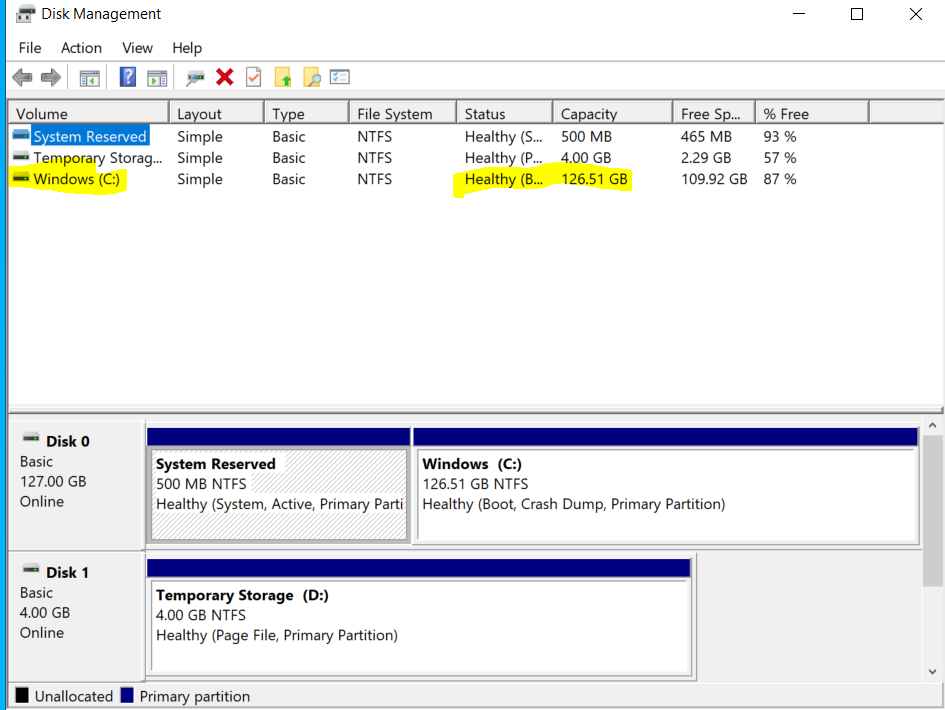
Before executing PS script:
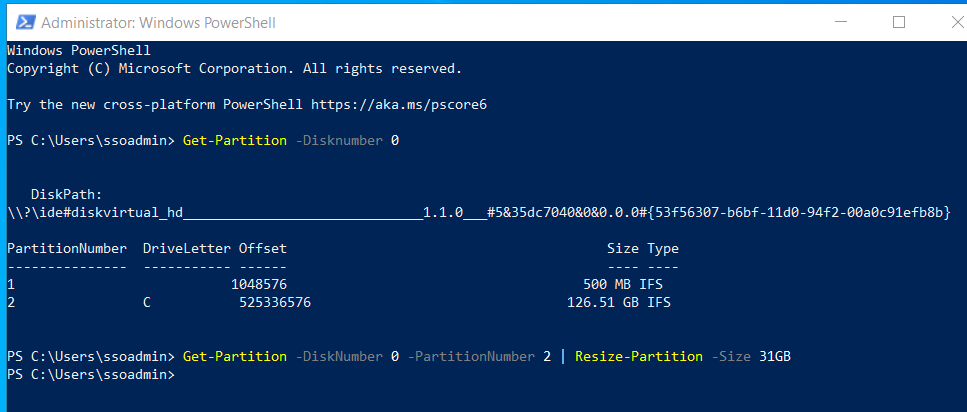
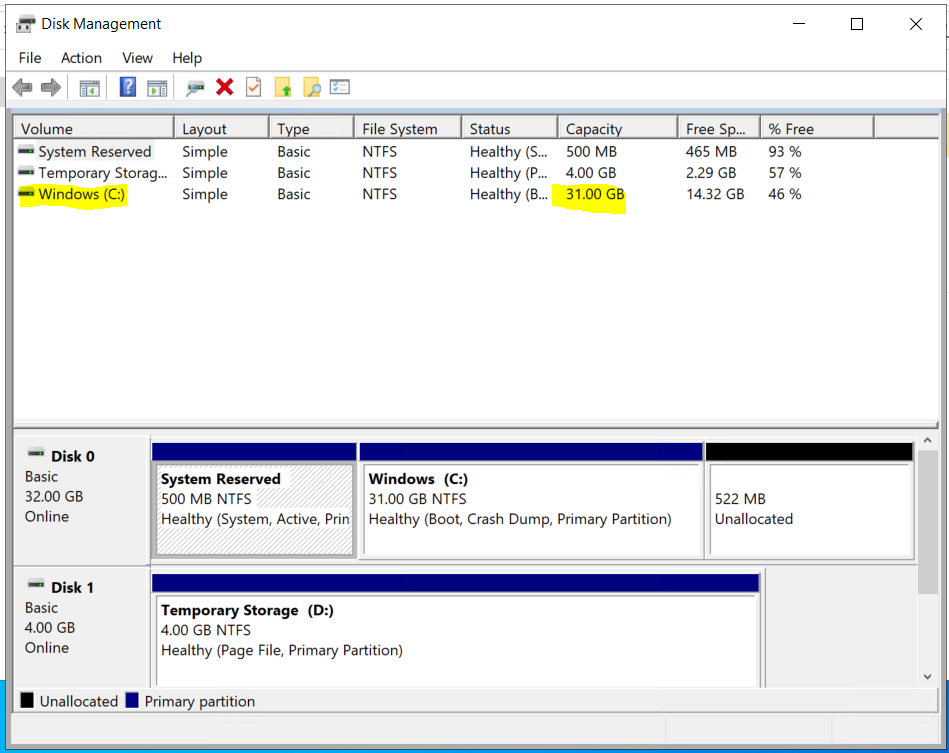
After successful PS script execution:
------------------------------------------------------------------------------------------------------------------------------
Please "Accept the answer" if the information helped you. This will help us and others in the community as well.
' cx='32' cy='32' r='32' /%3E%3Ctext x='50%25' y='55%25' dominant-baseline='middle' text-anchor='middle' fill='%23FFF' %3EM%3C/text%3E%3C/svg%3E)
Fantastic!
Many thanks for your confirmation and help.
Regards,

Hello @TechGuy_MS1
Shrink Azure VM disk size officially is not supported. However there are multiple workarounds
https://social.technet.microsoft.com/wiki/contents/articles/52487.azure-vm-decrease-the-disk-size.aspx
https://devblogs.microsoft.com/premier-developer/how-to-shrink-a-managed-disk/
Your link https://github.com/jrudlin/Azure/blob/master/General/Shrink-AzDisk.ps1 relates to the article https://jrudlin.github.io/2019-08-27-shrink-azure-vm-osdisk/
that clearly describes the disk resize process
Hi @Andriy Bilous .,
Thanks for your early response. I will try your referred method, I hope I will work to reduce OS disk size.
Actually I am looking to know if the script mentioned in the above link is secure to run? Anything suspicious or problematic from safety and security of data?
Thanks.
In the method you referred, any idea how can I change or assign drive letter to the new volume from outside VM?
Thanks.
No way to do that outside of the VM
Ok. So is it possible to reduce OS disk size by this method? I am actually confused on the last part. After copying the disk, how to rename the disk volume to "C:\".
Thanks
' cx='32' cy='32' r='32' /%3E%3Ctext x='50%25' y='55%25' dominant-baseline='middle' text-anchor='middle' fill='%23FFF' %3ENB%3C/text%3E%3C/svg%3E)
The link you shared talks about reducing data disk. Can we use the same for OS disk as well?
