Microsoft Security | Active Directory Federation Services
Federated identity management using Active Directory Federation Services

This browser is no longer supported.
Upgrade to Microsoft Edge to take advantage of the latest features, security updates, and technical support.
' cx='32' cy='32' r='32' /%3E%3Ctext x='50%25' y='55%25' dominant-baseline='middle' text-anchor='middle' fill='%23FFF' %3EMB%3C/text%3E%3C/svg%3E)
Hi
1 - https://learn.microsoft.com/en-us/windows-server/identity/ad-fs/overview/ad-fs-openid-connect-oauth-flows-scenarios#client-credentials-grant-flow
[2] - https://tools.ietf.org/html/rfc6749#section-4.4
My goal is to use the OAuth 2.0 client credentials grant specified in RFC 6749 [2], to access web-hosted resources by using the identity of an application. This type of grant is commonly used for server-to-server interactions that must run in the background, without immediate interaction with a user. I'm trying to set Second case: Access token request with a certificate described in the Microsoft Learn 1
Testing on Windows Server 2019 with AD FS role.
I've setup the Application Group with a Server Application configured to use a certificate for JWT token verification.
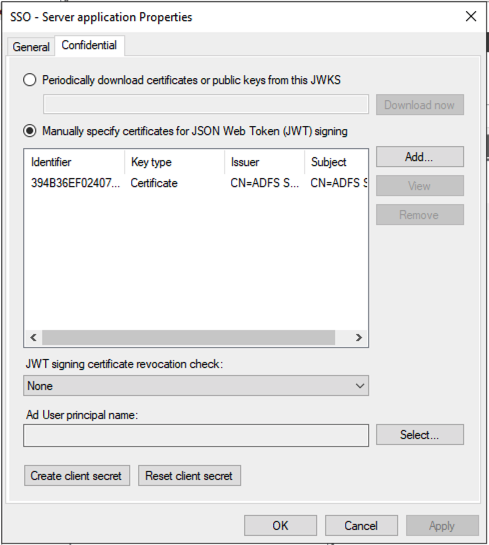
I've tried to issue tokens for client_assertion with two different IDP systems, ADFS and RedHat SSO. But the result is the same.
If anybody had the same issue and have any direction to resolve this?
When I send a request as shown in documentation 1:
    POST /adfs/oauth2/token HTTP/1.1

    // Line breaks for clarity

    Host: https://adfs.contoso.com
    Content-Type: application/x-www-form-urlencoded

    &client_id=1dfc3dfe-5146-41d0-b32d-9b6019f2f7fd
    &client_assertion_type=urn:ietf:params:oauth:client-assertion-type:jwt-bearer
&client_assertion=<JWS TOKEN>
    &grant_type=client_credentials
The response is:
{
    "error": "invalid_client",
    "error_description": "MSIS9622: Client authentication failed. Please verify the credential provided for client authentication is valid."
}
In the server log I see this error:
Log Name: AD FS/Admin
Source: AD FS
Date: 2/21/2021 11:02:05 PM
Event ID: 1021
Task Category: None
Level: Error
Keywords: AD FS
User: MOTO\grp-MAS-ADFS$
Computer: server3.moto.lab.mbctg.com
Description:
Encountered error during OAuth token request.
Additional Data
Exception details:
Microsoft.IdentityServer.Web.Protocols.OAuth.Exceptions.OAuthClientCredentialAuthenticationException: MSIS9344: OAuth Client JsonWebSecurityToken validation failed for the client 'http://sts.moto.lab.mbctg.com/adfs/services/trust'. Unable to find a certificate or public key configured under the client which can validate the signature.
at Microsoft.IdentityServer.Web.Protocols.OAuth.OAuthClientSigningKeyResolver.TryResolveTokenCore(SecurityKeyIdentifierClause keyIdentifierClause, SecurityToken& token)
at Microsoft.IdentityServer.Web.Protocols.OAuth.OAuthClientSigningKeyResolver.TryResolveTokenCore(SecurityKeyIdentifier keyIdentifier, SecurityToken& token)
at Microsoft.IdentityModel.Tokens.JSON.JsonWebSecurityTokenHandler.ReadToken(String rawToken)
at Microsoft.IdentityServer.Web.Protocols.OAuth.OAuthClientJsonWebSecurityTokenHandler.ReadToken(String rawToken)
at Microsoft.IdentityServer.Web.Protocols.OAuth.OAuthToken.OAuthTokenRequestContext.ValidateCore()
at Microsoft.IdentityServer.Web.Protocols.OAuth.OAuthToken.OAuthClientCredentialsContext.ValidateCore()
Event Xml:
<Event xmlns="http://schemas.microsoft.com/win/2004/08/events/event">
<System>
<Provider Name="AD FS" Guid="{2ffb687a-1571-4ace-8550-47ab5ccae2bc}" />
<EventID>1021</EventID>
<Version>0</Version>
<Level>2</Level>
<Task>0</Task>
<Opcode>0</Opcode>
<Keywords>0x8000000000000001</Keywords>
<TimeCreated SystemTime="2021-02-21T23:02:05.808907600Z" />
<EventRecordID>7767</EventRecordID>
<Correlation ActivityID="{8af03d56-becc-4b4f-1300-0080000000af}" />
<Execution ProcessID="4444" ThreadID="3908" />
<Channel>AD FS/Admin</Channel>
<Computer>server3.moto.lab.mbctg.com</Computer>
<Security UserID="S-1-5-21-118681301-3582131884-591599284-2103" />
</System>
<UserData>
<Event xmlns="http://schemas.microsoft.com/ActiveDirectoryFederationServices/2.0/Events">
<EventData>
<Data>Microsoft.IdentityServer.Web.Protocols.OAuth.Exceptions.OAuthClientCredentialAuthenticationException: MSIS9344: OAuth Client JsonWebSecurityToken validation failed for the client 'http://sts.moto.lab.mbctg.com/adfs/services/trust'. Unable to find a certificate or public key configured under the client which can validate the signature.
at Microsoft.IdentityServer.Web.Protocols.OAuth.OAuthClientSigningKeyResolver.TryResolveTokenCore(SecurityKeyIdentifierClause keyIdentifierClause, SecurityToken& token)
at Microsoft.IdentityServer.Web.Protocols.OAuth.OAuthClientSigningKeyResolver.TryResolveTokenCore(SecurityKeyIdentifier keyIdentifier, SecurityToken& token)
at Microsoft.IdentityModel.Tokens.JSON.JsonWebSecurityTokenHandler.ReadToken(String rawToken)
at Microsoft.IdentityServer.Web.Protocols.OAuth.OAuthClientJsonWebSecurityTokenHandler.ReadToken(String rawToken)
at Microsoft.IdentityServer.Web.Protocols.OAuth.OAuthToken.OAuthTokenRequestContext.ValidateCore()
at Microsoft.IdentityServer.Web.Protocols.OAuth.OAuthToken.OAuthClientCredentialsContext.ValidateCore()
</Data>
</EventData>
</Event>
</UserData>
</Event>
======================================================
In addition, I tested the same Application client to use a secret and it works perfectly as expected.
    POST /adfs/oauth2/token HTTP/1.1
    //Line breaks for clarity

    Host: https://adfs.contoso.com
    Content-Type: application/x-www-form-urlencoded

    client_id=535fb089-9ff3-47b6-9bfb-4f1264799865
    &client_secret=qWgdYAmab0YSkuL1qKv5bPX
    &grant_type=client_credentials
Response with token:
{
    "access_token": "eyJ0eXAiOiJKV1QiLCJhbGciOiJSUzI1NiIsIng1dCI6Ik9VczI3d0pBYzAwQ0NMRzVuWW05SnlER0ZUOCIsImtpZCI6Ik9VczI3d0pBYzAwQ0NMRzVuWW05SnlER0ZUOCJ9.eyJhdWQiOiJ1cm46bWljcm9zb2Z0OnVzZXJpbmZvIiwiaXNzIjoiaHR0cDovL3N0cy5tb3RvLmxhYi5tYmN0Zy5jb20vYWRmcy9zZXJ2aWNlcy90cnVzdCIsImlhdCI6MTYxMzk0OTc2MSwibmJmIjoxNjEzOTQ5NzYxLCJleHAiOjE2MTM5NTMzNjEsImFwcHR5cGUiOiJDb25maWRlbnRpYWwiLCJhcHBpZCI6IjFkZmMzZGZlLTUxNDYtNDFkMC1iMzJkLTliNjAxOWYyZjdmZCIsImF1dGhtZXRob2QiOiJodHRwOi8vc2NoZW1hcy5taWNyb3NvZnQuY29tL3dzLzIwMDgvMDYvaWRlbnRpdHkvYXV0aGVudGljYXRpb25tZXRob2QvcGFzc3dvcmQiLCJhdXRoX3RpbWUiOiIyMDIxLTAyLTIxVDIzOjIyOjQxLjQ4NloiLCJ2ZXIiOiIxLjAifQ.Izcx1KIpZGFK6ewKcZiv2g4mNn6lTXGZQCxjIYG24PrPRRr_3qUoYedWnoXfysqGzE0NdS-Bh3Y9CwHBdWBp5QHttedz9NEg9pNsjjRP209Qc75A4z0TdoIrxbpKFXQ4HfmgOu0miWXNCHbky28Z2ILGg8TWsYC7z6Kf1jHInmxUk96rJOEn1CaJ2AdL_Excic0B_v3FxkVQt-sOlzha71Q5jw2lBNyhR2wu108OwZ3MKN2iyqGl0Q6TJ5PAasBjJsy45L2CPTSaljFQcPmv_-ncXAIV-kYKVn4uvT5aRAGW9zLHtR4zatpozgBPXrWu-FycG7grkNl7DZoVxJXNbg",
    "token_type": "bearer",
    "expires_in": 3600
}
1 - https://learn.microsoft.com/en-us/windows-server/identity/ad-fs/overview/ad-fs-openid-connect-oauth-flows-scenarios#client-credentials-grant-flow
[2] - https://tools.ietf.org/html/rfc6749#section-4.4
This was the issue. After fixing iss and aud values, everything works.
These are the token values that worked for me:
{
  "alg": "RS256",
  "typ": "JWT",
  "x5t": "2KH9+Z53/7xUsazFJA1xPotDKeU"
}
.
{
  "iat": 1614089892,
  "exp": 1614176292,
  "aud": "https://sts.server/adfs/oauth2/token",
  "iss": "97e0a5b7-d745-40b6-94fe-5f77d35c6e05",
  "sub": "97e0a5b7-d745-40b6-94fe-5f77d35c6e05",
  "jti": "22b3bb26-e046-42df-9c96-65dbd72c1c81"
}
.
f_1OGCEtZ1P0elu5srPi3rEVlTUq...
Also, the assertion sample described in this doc [1]
Thanks!

In your screenshot, it looks like you are using the Token Signing certificate of the ADFS farm in there.
How could your app sign a request with this one? Only the ADFS has the private key.
You need your own cert in there.
For testing, we use a token issued by ADFS for another client application. ADFS signed the token with a private key. And we want to check the signature with the public key that was downloaded from ADFS JWKS. From my understanding, it should work.
I checked the signature validation in jwt.io [1], and it's working.
[1] - https://jwt.io/
I am not sure I am following. Let's recap :)

That works just fine on my lab!
Thanks for the clarification.
And yes, I'm totally aware of the process you've described.
In order to be fully aligned with your description, I've created a simple app and generated the cert.
The validation checks out with node script
#node jwt-script.js
Token :eyJhbGciOiJSUzI1NiIsInR5cCI6IkpXVCIsIng1dCI6IjJLSDkrWjUzLzd4VXNhekZKQTF4UG90REtlVSJ9.eyJkYXRhMSI6IkRhdGEgMSIsImlhdCI6MTYxNDAzNzEwOCwiZXhwIjoxNjE0MTIzNTA4LCJhdWQiOiJodHRwOi8vbXlzb2Z0LmluIiwiaXNzIjoiTXlzb2Z0Iiwic3ViIjoic29tZUB1c2VyLmNvbSJ9.IWZutbxrftzOIlaYjYiQJbYW39aiiJEeAx3mm2zFCH_BKrS7QLTymgYVDSRZcxIzqWZjmxbeDpZciETpcKiHZJDjjfEJDKDiKffS2hCGUBx2_Uek_dcVf9FZEEC3NkYIUwPzU_RjiozBdQ3SE9Q_90r2hyv8mzOmXRWD9yEyaTvpRUtEKXcGk0cgQERgjJeRKAt639KSB1Se8nXZmULrqm8x4BvfrmEnIGctcZDYQNa7zPdxJJU8KY6hxaHb5BgZem7U1rofCwxebOIWB5fNQrcxDX1jRAOE525fGidt0n6xJkquFZSoxl2JNLmqgES7YQDCBsO6nlQGtJrRkSx7BQ
JWT verification result: {"data1":"Data 1","iat":1614037108,"exp":1614123508,"aud":"http://mysoft.in","iss":"Mysoft","sub":"some@USER .com"}
These are the cert and key used in the token sign process.
-----BEGIN CERTIFICATE-----
MIICojCCAYoCCQDyhdUv9PZiKjANBgkqhkiG9w0BAQsFADATMREwDwYDVQQDDAhT
aWduQ2VydDAeFw0yMTAyMjIyMjMwMzdaFw0yMjAyMjIyMjMwMzdaMBMxETAPBgNV
BAMMCFNpZ25DZXJ0MIIBIjANBgkqhkiG9w0BAQEFAAOCAQ8AMIIBCgKCAQEA2jLP
NEyQHxAxo/cO3S1qGrt+/6QqgQu0d3JwEgbDsTw+QHObyC4XI5aZcvBIjDwNrZrh
O8zOyG+EW79pKovXgf94MPWoojCpm1PyKyvFmRXXGE5PW7WpoImsuAczfMgWPsjW
kwD/P9Zz9Vl0bHZyzkwIp6V65JDbbQ8LVTSNK7m6PtUNN2TyWX3gwEy9DgTr0p2F
zj0xOsxxXd37eO5Q4YwYuqhMWZOtvI3KUmcEXXk+6AeB0kbNeQi+cgxjziiMwKeM
IYWm/GKW584tMpU5N//UFfOAk76ERrILEbxMbl/nltB1dyESIDp5G9SRwJbwgB5X
oTDDDJHxA6CFI5O81QIDAQABMA0GCSqGSIb3DQEBCwUAA4IBAQAuYkciFFyYDilP
QOk6crJ7VKTnpKMD/cnZhtg63VkOGGKdT/X/OziZ14JCr7hQT/mg5HtsXroLlhv8
dEKk6ibSYJbPSHiPV9nqIJpfhzylPH01wj9Yd9f/hNPOQge471+qvrSKd78uZGM6
1Dng/F1u6OZkF+WwyF4Fya3mn7ZeA+EBojuT6BTKZmykDeUy4A2CoblOX++R3Ci4
/3LtXdnBK3tJi5UAY2xo6YS5SU41BULocxRSFZrEXLdN6S+rDzP9Rr3pb0WpEGEx
NTou/UWNEPgy6AOQCj93/SUhLI+Xf+ufF3qFHSCb+u3fsOERsheHR+qCOn6NQLek
D4o0Z3p3
-----END CERTIFICATE-----
-----BEGIN PRIVATE KEY-----
MIIEvQIBADANBgkqhkiG9w0BAQEFAASCBKcwggSjAgEAAoIBAQDaMs80TJAfEDGj
9w7dLWoau37/pCqBC7R3cnASBsOxPD5Ac5vILhcjlply8EiMPA2tmuE7zM7Ib4Rb
v2kqi9eB/3gw9aiiMKmbU/IrK8WZFdcYTk9btamgiay4BzN8yBY+yNaTAP8/1nP1
WXRsdnLOTAinpXrkkNttDwtVNI0rubo+1Q03ZPJZfeDATL0OBOvSnYXOPTE6zHFd
3ft47lDhjBi6qExZk628jcpSZwRdeT7oB4HSRs15CL5yDGPOKIzAp4whhab8Ypbn
zi0ylTk3/9QV84CTvoRGsgsRvExuX+eW0HV3IRIgOnkb1JHAlvCAHlehMMMMkfED
oIUjk7zVAgMBAAECggEBAL1b+NwvUafTmvDr2Hd0ES/v5bAfnU9uhAhhRQcv3aaz
XGb8rYYVEbmt2a+Y/azN9STjU3JdNFtYBCrHO5JT2AwWVA1RNC7FQnvtZy22B/7p
qEiMtWwmhHYw5La0cSdqUXvdOfJLnDifePTE1DfIt6t26s/q2XMAj5zewHwKZjU5
l2rYHz0GsMK431nMqyJ/aQkN8Xpwp4VU/gZJgSF/38Ak1ssqsHK04CuilBTANGk4
e2RB83x8Ap5eH0kR+e+WV64ujfrUOBmFiajhLBGcjPuuUwfJXeAKNUNua1xOMOtE
yLocbUvEne7+SP//AXkzu8rcCzXXG11htS17IKTa0GUCgYEA+/5PdV0VIo07p2Yh
4u+FVMXTwKwudYz/zoadvO6yyJHxQ3lNCuxnM6SD8A9hEnuOe7Rp8i46tUhYLKSF
OYKJw2Ppct9r8T9xqKBXtQraKeO6PaiUUZ9PSeEcp6KnLIbZwLg+82gFYAhmnJw3
dyEyzqg1rFQLRHK0LK0I2eXEncsCgYEA3arxgtq/qjv+4NXH7oIkKnMpR+3COT8B
yt9RrNgItZ1LrnXWTKHl7WDU1d4EbDmV3nhvjCn79SSXiTbA5XLT/QTe/fGdidXj
SqhnWIypGjGcqstRJDoUYY2xu5bUSQiKejd7fu8zRhYiWfzkixc0eFfEj56//UTN
3v0IYDjBu98CgYBTMBIFGZR3ko5F5eZ75zxpzuDnsy+nKMPt5uy9yUMGCX/PGYVA
fOhY2Q+hOUJ/eoCAAAAVrgM9g0NwgWNlp91Yvmv7uxwESUB5PW2W251HxODfp/5G
r8PaDNGL2Zs8jMvn3isR6Z4UpNFTFBMPZctDA66sVBZgI0mtkfXhEQQGXwKBgExS
gGditB2EHMUDNpyrmJI5JpyKg5Y8WHymmbOeipkluJowHoIyOD2cWovsrq8owK5h
315uUj9cwwROouoduFnk5HahS3HbADCDfVnizJKlRGEWMjD8Amp4ZBrH2v3uf+eG
1PGmoIvgMSG0zmgJrFpHNfmRWl904kGF8+1VfXcXAoGAKqCUya93o1QxjsETg0mZ
pEmVbBfB1qBppjFsulabtrggndST3GEr589ylxkdF5sqGrhVnZho9Mb0j6wxCFVb
k9ANzym8WOD+bnM199+y+QfEObOeoVrSEc8WodkQu78n5x7uKn/5eg53Mj24Walr
5vMPtP2rID2czv5dP5TIzu0=
-----END PRIVATE KEY-----
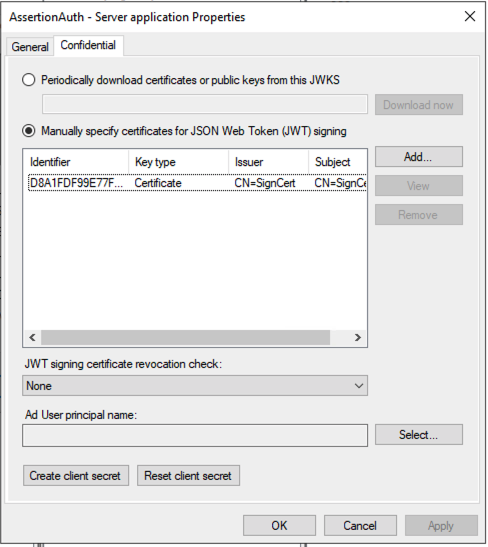
Updated the ADFS config with a new public cert:
This is the request generated with Postman:
curl --location --request POST 'https://sts.moto.lab.mbctg.com/adfs/oauth2/token' \
--header 'Content-Type: application/x-www-form-urlencoded' \
--data-urlencode 'client_id=1dfc3dfe-5146-41d0-b32d-9b6019f2f7fd' \
--data-urlencode 'grant_type=client_credentials' \
--data-urlencode 'client_assertion_type=urn:ietf:params:oauth:client-assertion-type:jwt-bearer' \
--data-urlencode 'client_assertion=eyJhbGciOiJSUzI1NiIsInR5cCI6IkpXVCIsIng1dCI6IjJLSDkrWjUzLzd4VXNhekZKQTF4UG90REtlVSJ9.eyJkYXRhMSI6IkRhdGEgMSIsImlhdCI6MTYxNDAzNzEwOCwiZXhwIjoxNjE0MTIzNTA4LCJhdWQiOiJodHRwOi8vbXlzb2Z0LmluIiwiaXNzIjoiTXlzb2Z0Iiwic3ViIjoic29tZUB1c2VyLmNvbSJ9.IWZutbxrftzOIlaYjYiQJbYW39aiiJEeAx3mm2zFCH_BKrS7QLTymgYVDSRZcxIzqWZjmxbeDpZciETpcKiHZJDjjfEJDKDiKffS2hCGUBx2_Uek_dcVf9FZEEC3NkYIUwPzU_RjiozBdQ3SE9Q_90r2hyv8mzOmXRWD9yEyaTvpRUtEKXcGk0cgQERgjJeRKAt639KSB1Se8nXZmULrqm8x4BvfrmEnIGctcZDYQNa7zPdxJJU8KY6hxaHb5BgZem7U1rofCwxebOIWB5fNQrcxDX1jRAOE525fGidt0n6xJkquFZSoxl2JNLmqgES7YQDCBsO6nlQGtJrRkSx7BQ'
And the response from the ADFS:
{"error":"invalid_client","error_description":"MSIS9622: Client authentication failed. Please verify the credential provided for client authentication is valid."}%
Here is the server side log error:
Log Name: AD FS/Admin
Source: AD FS
Date: 2/22/2021 11:22:07 PM
Event ID: 1021
Task Category: None
Level: Error
Keywords: AD FS
User: MOTO\grp-MAS-ADFS$
Computer: server3.moto.lab.mbctg.com
Description:
Encountered error during OAuth token request.
Additional Data
Exception details:
Microsoft.IdentityServer.Web.Protocols.OAuth.Exceptions.OAuthClientCredentialAuthenticationException: MSIS9344: OAuth Client JsonWebSecurityToken validation failed for the client 'Mysoft'. Unable to find a certificate or public key configured under the client which can validate the signature.
at Microsoft.IdentityServer.Web.Protocols.OAuth.OAuthClientSigningKeyResolver.TryResolveTokenCore(SecurityKeyIdentifierClause keyIdentifierClause, SecurityToken& token)
at Microsoft.IdentityServer.Web.Protocols.OAuth.OAuthClientSigningKeyResolver.TryResolveTokenCore(SecurityKeyIdentifier keyIdentifier, SecurityToken& token)
at Microsoft.IdentityModel.Tokens.JSON.JsonWebSecurityTokenHandler.ReadToken(String rawToken)
at Microsoft.IdentityServer.Web.Protocols.OAuth.OAuthClientJsonWebSecurityTokenHandler.ReadToken(String rawToken)
at Microsoft.IdentityServer.Web.Protocols.OAuth.OAuthToken.OAuthTokenRequestContext.ValidateCore()
at Microsoft.IdentityServer.Web.Protocols.OAuth.OAuthToken.OAuthClientCredentialsContext.ValidateCore()
Event Xml:
<Event xmlns="http://schemas.microsoft.com/win/2004/08/events/event">
<System>
<Provider Name="AD FS" Guid="{2ffb687a-1571-4ace-8550-47ab5ccae2bc}" />
<EventID>1021</EventID>
<Version>0</Version>
<Level>2</Level>
<Task>0</Task>
<Opcode>0</Opcode>
<Keywords>0x8000000000000001</Keywords>
<TimeCreated SystemTime="2021-02-22T23:22:07.781724200Z" />
<EventRecordID>7925</EventRecordID>
<Correlation ActivityID="{d5fa49f8-1d9c-4493-bf00-0080000000b0}" />
<Execution ProcessID="5836" ThreadID="1356" />
<Channel>AD FS/Admin</Channel>
<Computer>server3.moto.lab.mbctg.com</Computer>
<Security UserID="S-1-5-21-118681301-3582131884-591599284-2103" />
</System>
<UserData>
<Event xmlns="http://schemas.microsoft.com/ActiveDirectoryFederationServices/2.0/Events">
<EventData>
<Data>Microsoft.IdentityServer.Web.Protocols.OAuth.Exceptions.OAuthClientCredentialAuthenticationException: MSIS9344: OAuth Client JsonWebSecurityToken validation failed for the client 'Mysoft'. Unable to find a certificate or public key configured under the client which can validate the signature.
at Microsoft.IdentityServer.Web.Protocols.OAuth.OAuthClientSigningKeyResolver.TryResolveTokenCore(SecurityKeyIdentifierClause keyIdentifierClause, SecurityToken& token)
at Microsoft.IdentityServer.Web.Protocols.OAuth.OAuthClientSigningKeyResolver.TryResolveTokenCore(SecurityKeyIdentifier keyIdentifier, SecurityToken& token)
at Microsoft.IdentityModel.Tokens.JSON.JsonWebSecurityTokenHandler.ReadToken(String rawToken)
at Microsoft.IdentityServer.Web.Protocols.OAuth.OAuthClientJsonWebSecurityTokenHandler.ReadToken(String rawToken)
at Microsoft.IdentityServer.Web.Protocols.OAuth.OAuthToken.OAuthTokenRequestContext.ValidateCore()
at Microsoft.IdentityServer.Web.Protocols.OAuth.OAuthToken.OAuthClientCredentialsContext.ValidateCore()
</Data>
</EventData>
</Event>
</UserData>
</Event>
Any ideas?
Thank you!
Max
The iss should be a GUID, the GUID you see in your Application Group. Else ADFS doesn't know where to go to check the ceritificate.
And the audience could be the oauth2/token endpoint too.