Microsoft 365 and Office | SharePoint Server | For business
A family of Microsoft on-premises document management and storage systems.

This browser is no longer supported.
Upgrade to Microsoft Edge to take advantage of the latest features, security updates, and technical support.

I'm trying to resolve an issue for some of our users.
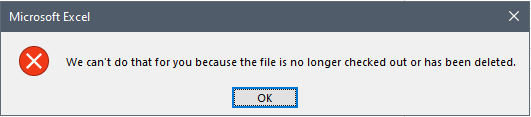
If they password protect an Excel sheet stored in a SharePoint 2010 document library, the file cannot be checked in and throws "We can't do that for you because the file is no longer checked out or has been deleted".
If the password protection is removed the check in works exactly as you'd expect.
Has anyone seen this behaviour before?
[UPDATE] I've tried deleting the cached objects in the Office Document Cache "%localappdata%\Microsoft\Office\16.0\OfficeFileCache" but it makes no difference.
' cx='32' cy='32' r='32' /%3E%3Ctext x='50%25' y='55%25' dominant-baseline='middle' text-anchor='middle' fill='%23FFF' %3EAE%3C/text%3E%3C/svg%3E)
Have you been able to find the root cause for this problem? I am facing the same issue
Not yet Andre. I've asked Elsie, from Microsoft, who was going to try to recreate the issue in a 2010 farm, if she's managed to get any further.
Keep an eye on this issue for her next update.

Hi @N03L ,
Is this issue only encountered by you or by all users? And you could also check whether ULS logs have any error messages.
Try to clear the cache here to test if it works:
%APPDATA%\Microsoft\Web Server Extensions\Cache
%USERPROFILE%\AppData\Local\Microsoft\WebsiteCache
Similar post for your reference:
We can't do that because the file is no longer checked out or has been deleted - Sharepoint 2010 Excel 2013
If the answer is helpful, please click "Accept Answer" and upvote it.
Note: Please follow the steps in our documentation to enable e-mail notifications if you want to receive the related email notification for this thread.
Thanks Elsie.
It's not just me. I'm the farm administrator and site collection admin and my experience is the same as the users. If it's password protected the check in fails, if it's not, it succeeds.
I've tried emptying that other cache that you've pointed me at and it makes no difference.
If I edit the file and check in without applying a password to the workbook, it completes as expected, if I password protect the file I get the error.
Here's the most relevant entry from the ULS...
**File exception: Microsoft.SharePoint.SPException: The file "http://SharePoint_File_Path/Spreadsheet.XLSX" is not locked.
at Microsoft.SharePoint.Library.SPRequestInternalClass.ReleaseFileLock(String bstrUrl, String bstrWebRelDocUrl, String lockId)
at Microsoft.SharePoint.Library.SPRequest.ReleaseFileLock(String bstrUrl, String bstrWebRelDocUrl, String lockId) -
-- End of inner exception stack trace --- **
A little more info. If I try the Check In from within Excel I get that error that I screen shotted.
If I try the Check In from SharePoint after saving the file back to the library and then closing it, still Checked Out, choosing No when prompted to Check In by Excel, then the mandatory MetaData that's already set is removed and must be added back again, using SharePoint, before the Check In works.
Then the password protected sheet is available in the library with the most recent changes applied and the password is required to open it from then on.
But the problem persists and the whole process must be repeated in order to make any changes.
It seems like the Excel lock and the SharePoint Check Out/In processes are getting in the way of each other maybe?
Also just gone through the exact same process with a Word document and the behaviour is identical.
Hi @N03L ,
I tested in my SP2013 and I cannot reproduce your issue. I will need some time to do more tests in SP2010. I will reply you as soon as possible.
Thanks,
Elsie Lu
Thanks Elsie.
Let me know when you have more to add.
Thank you
Having the exact same issue here. But With Word...
All Passoword protected files, aarently, when saved lose all the Metadata and and that is the reason why the file cannot be checked in (I believe)
Elsie.
Have you managed to recreate this issue yet?
Seeing another customer having the same issue means its not just me or our environment.
Thanks in advance.
N03L
' cx='32' cy='32' r='32' /%3E%3Ctext x='50%25' y='55%25' dominant-baseline='middle' text-anchor='middle' fill='%23FFF' %3EM9%3C/text%3E%3C/svg%3E)
Did you ever get a resolution on this? I have exact same issue but using a password protected Word doc. You can save it but not check it back in from the application. Just have to close the file down then go to sharepoint to check it in and it loses all the mandatory meta data also.