Microsoft Teams
A Microsoft customizable chat-based workspace.

9,059 questions
This browser is no longer supported.
Upgrade to Microsoft Edge to take advantage of the latest features, security updates, and technical support.
' cx='32' cy='32' r='32' /%3E%3Ctext x='50%25' y='55%25' dominant-baseline='middle' text-anchor='middle' fill='%23FFF' %3ESR%3C/text%3E%3C/svg%3E)
Been using Office 365 for about a year now and Outlook's favorite dirty trick is to declare the Teams plug in unworthy and disable it when Outlook loads. Makes it a real PITA to schedule a Teams meeting. I'm open to suggestions. Thanks!
' cx='32' cy='32' r='32' /%3E%3Ctext x='50%25' y='55%25' dominant-baseline='middle' text-anchor='middle' fill='%23FFF' %3EJM%3C/text%3E%3C/svg%3E)
Hi @Steve R ,
Could you find the Teams meeting Add-in in Outlook Com Add-ins?
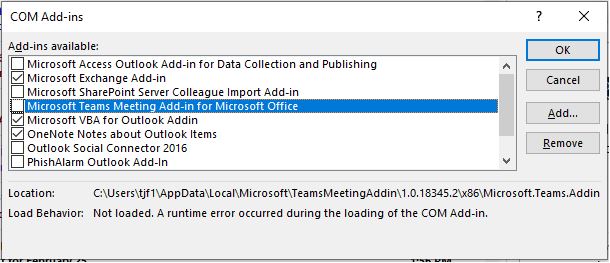
If the add-in still does not show, use the following steps to verify the registry settings.
If the add-in has been disabled, you can try to follow these steps to prevent it:
If the response is helpful, please click "Accept Answer" and upvote it.
Note: Please follow the steps in our documentation to enable e-mail notifications if you want to receive the related email notification for this thread.
The add in is always there, but Outlook marks it as disabled. I did navigate to the key above and there was a key labeled DisabledItems but it currently has nothing listed.
Within TeamsAddin.FastConnect, there was nothing labeled LoadBehavior so I created it and set a value of 3.
Thanks for your advice. I will continue to monitor this.
You're welcome. If you have any update, please feel free to contact with us!
Any update?
' cx='32' cy='32' r='32' /%3E%3Ctext x='50%25' y='55%25' dominant-baseline='middle' text-anchor='middle' fill='%23FFF' %3ES%3C/text%3E%3C/svg%3E)
So far, the issue hasn't returned, so I think it's safe to say you have solved it.
Well, it reared it's ugly head again. Last night, Outlook crashed as I was closing it and this morning Outlook disabled the Teams plug in when I opened it. Does Microsoft have any plans on fixing this? This plagues multiple people in our organization.
' cx='32' cy='32' r='32' /%3E%3Ctext x='50%25' y='55%25' dominant-baseline='middle' text-anchor='middle' fill='%23FFF' %3EES%3C/text%3E%3C/svg%3E)
Thanks for sharing it!
' cx='32' cy='32' r='32' /%3E%3Ctext x='50%25' y='55%25' dominant-baseline='middle' text-anchor='middle' fill='%23FFF' %3EKN%3C/text%3E%3C/svg%3E)
this worked for me , I am able to get teams meetings in outlook now. thanks
' cx='32' cy='32' r='32' /%3E%3Ctext x='50%25' y='55%25' dominant-baseline='middle' text-anchor='middle' fill='%23FFF' %3EFT%3C/text%3E%3C/svg%3E)
If the add-in has been disabled, you can try to follow these steps to prevent it:
Worked perfectly thank you!
' cx='32' cy='32' r='32' /%3E%3Ctext x='50%25' y='55%25' dominant-baseline='middle' text-anchor='middle' fill='%23FFF' %3EIM%3C/text%3E%3C/svg%3E)
This is an awesome solution. It looks permanently fixed, fingers crossed.
I am monitoring it.
' cx='32' cy='32' r='32' /%3E%3Ctext x='50%25' y='55%25' dominant-baseline='middle' text-anchor='middle' fill='%23FFF' %3EP%3C/text%3E%3C/svg%3E)
I had the same issue with a user today.
These steps worked for me:
' cx='32' cy='32' r='32' /%3E%3Ctext x='50%25' y='55%25' dominant-baseline='middle' text-anchor='middle' fill='%23FFF' %3EJ%3C/text%3E%3C/svg%3E)
Finally find a solution that works for me, thanks!
' cx='32' cy='32' r='32' /%3E%3Ctext x='50%25' y='55%25' dominant-baseline='middle' text-anchor='middle' fill='%23FFF' %3EJL%3C/text%3E%3C/svg%3E)
Good one. Fixed our issue too. Thanks!
' cx='32' cy='32' r='32' /%3E%3Ctext x='50%25' y='55%25' dominant-baseline='middle' text-anchor='middle' fill='%23FFF' %3EDM%3C/text%3E%3C/svg%3E)
This worked, thank you!
' cx='32' cy='32' r='32' /%3E%3Ctext x='50%25' y='55%25' dominant-baseline='middle' text-anchor='middle' fill='%23FFF' %3EKH%3C/text%3E%3C/svg%3E)
worked!!!! thank you
' cx='32' cy='32' r='32' /%3E%3Ctext x='50%25' y='55%25' dominant-baseline='middle' text-anchor='middle' fill='%23FFF' %3EMA%3C/text%3E%3C/svg%3E)
I had a user running into this issue. I tried all the recommended fixes and they would either not work, or would only temporarily work (less than a day). In Outlook, I discovered that it was listed in "Slow and Disabled COM Add-ins" found in File > Info. The average delay in my case was 0.66 seconds. I set it to always enable this add-in and that fixed the issue for me. Hopefully this helps someone else. It took me quite some time to find it.
' cx='32' cy='32' r='32' /%3E%3Ctext x='50%25' y='55%25' dominant-baseline='middle' text-anchor='middle' fill='%23FFF' %3EAM%3C/text%3E%3C/svg%3E)
This worked great. It was taking me forever to locate the bug. Thank you, and good catch.
' cx='32' cy='32' r='32' /%3E%3Ctext x='50%25' y='55%25' dominant-baseline='middle' text-anchor='middle' fill='%23FFF' %3EB%3C/text%3E%3C/svg%3E)
Thanks. This was the one that worked for a user of mine. Forgot about the File > Info section.
Glad that worked for you, Brad!
' cx='32' cy='32' r='32' /%3E%3Ctext x='50%25' y='55%25' dominant-baseline='middle' text-anchor='middle' fill='%23FFF' %3EDS%3C/text%3E%3C/svg%3E)
Bravo! That fixed it. Thank you!
' cx='32' cy='32' r='32' /%3E%3Ctext x='50%25' y='55%25' dominant-baseline='middle' text-anchor='middle' fill='%23FFF' %3ERP%3C/text%3E%3C/svg%3E)
Thank you!
Problem fixed
' cx='32' cy='32' r='32' /%3E%3Ctext x='50%25' y='55%25' dominant-baseline='middle' text-anchor='middle' fill='%23FFF' %3EU%3C/text%3E%3C/svg%3E)
I'm seeing multiple users with this issue - we are finding the fixes above aren't permanent. Does anyone know if there is a way to set the "always enable this add-in" perm when deploying the add-in via Intune? We're hoping to make this a non-issue for our users.
Did my post above not solve the issue? Was there no option to always allow?
' cx='32' cy='32' r='32' /%3E%3Ctext x='50%25' y='55%25' dominant-baseline='middle' text-anchor='middle' fill='%23FFF' %3ESA%3C/text%3E%3C/svg%3E)
You may also want to check the "Slow and Disabled Add-in" in the File menu and take corrective action (by stop monitoring).
In my case, Teams add-in slowed Outlook hence it was disabled.
' cx='32' cy='32' r='32' /%3E%3Ctext x='50%25' y='55%25' dominant-baseline='middle' text-anchor='middle' fill='%23FFF' %3EA%3C/text%3E%3C/svg%3E)
I'm facing almost the same issue, but instead of being disabled, the plugin simply is not present in Outlook after each reboot.
The LoadBehavior Registry-Key is set to 3 and there are no entries for disabled AddIns under the Resiliency Key.
Re-Installing does indeed help but only temporary, after a rebbot, the Issue is back.
My current workaround is to register the TeamsAddIn from Autostart before Teams and Outlook have started, by executing this command (32-Bit):
%SystemRoot%\SysWOW64\regsvr32.exe /s /n /i:user %LocalAppData%\Microsoft\TeamsMeetingAddin\1.23.33413\x86\Microsoft.Teams.AddinLoader.dll
If Outlook and Teams had been running, close both applications and start Outlook first, then Teams to make the change active.
Of course this isn't perfect as You'll have to check your TeamsMeetingAddin Version (as it will be silently updated when there's a new version) to make sure the most recent version is loaded.
P.S.: For 64-Bit the command is slightly different:
%SystemRoot%\System32\regsvr32.exe /s /n /i:user %LocalAppData%\Microsoft\TeamsMeetingAddin\1.23.33413\x64\Microsoft.Teams.AddinLoader.dll