Hello @fubar ,
Thank you for posting here.
Based on the descroption above, not sure what PS command you are using and what error message you are receiving.
Here is PS command, I can add flags attribute value to one group (groups1 is the group name, I set the flags value as 2.).
For example:
Set the flags value:
Get-ADGroup -Identity group1 -Properties * | Set-ADGroup -replace @{flags = 2}
View the flags value:
(Get-ADGroup -Identity group1 -Properties *)
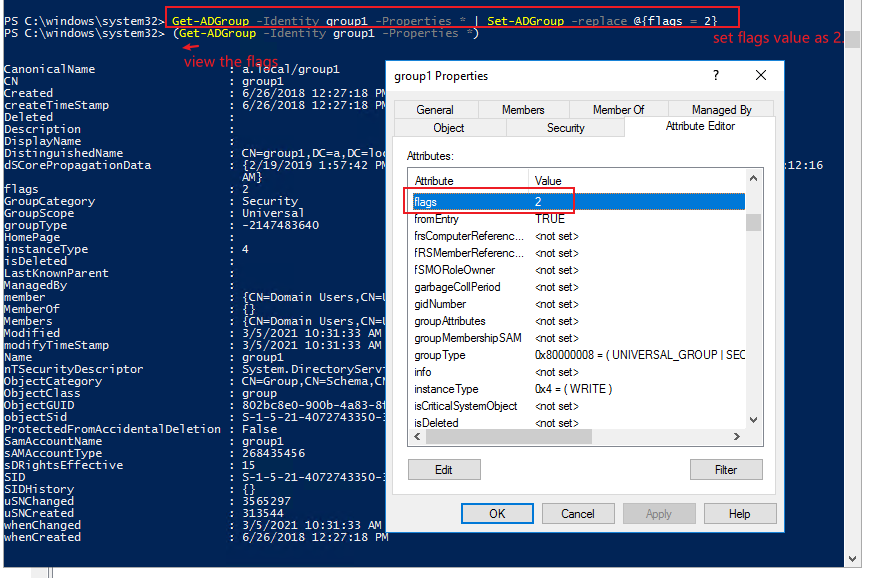
Set-ADGroup
https://learn.microsoft.com/en-us/powershell/module/addsadministration/set-adgroup?view=win10-ps
hope the information above is helpful.
Should you have any question or concern, please feel free to let us know.
Best Regards,
Daisy Zhou
' cx='32' cy='32' r='32' /%3E%3Ctext x='50%25' y='55%25' dominant-baseline='middle' text-anchor='middle' fill='%23FFF' %3EF%3C/text%3E%3C/svg%3E)

' cx='32' cy='32' r='32' /%3E%3Ctext x='50%25' y='55%25' dominant-baseline='middle' text-anchor='middle' fill='%23FFF' %3EA%3C/text%3E%3C/svg%3E)
' cx='32' cy='32' r='32' /%3E%3Ctext x='50%25' y='55%25' dominant-baseline='middle' text-anchor='middle' fill='%23FFF' %3ERM%3C/text%3E%3C/svg%3E)