Hyper-V Version missing on Windows Server 2019

BusyBody2022 121 Reputation points
2021-03-15T12:15:09.567+00:00

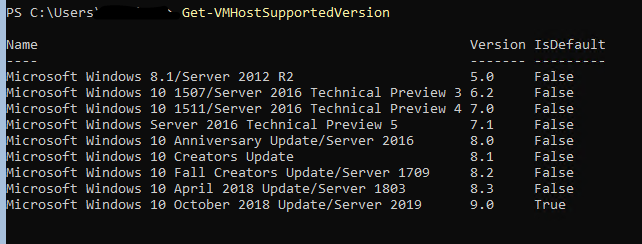
Hello everyone... One some of my Hyper-V servers I am missing Hyper-V version 9.0. (Windows release ID=1809, current build 17763)

In my example, I have two hyper-v servers running on Windows Server 2019 standard.

The first server has been up and running for a while. When I type in the command Get-VMHostSupportedVersion on it I get:

77710-image.png

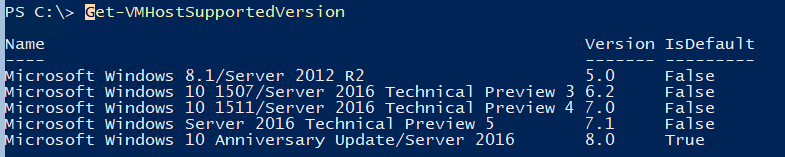
On server #2, which should appears to be up-to-date, was deployed a month or two ago. When I run the same command I get this:

77805-image.png

Could someone please tell me what I have to do to have 9.0 installed? Seems odd, I thought Windows would do this automatically when I am doing the cumulative updates.

Windows for business | Windows Client for IT Pros | Storage high availability | Virtualization and Hyper-V
Windows for business | Windows Server | User experience | Other
0 comments No comments
{count} votes

Answer accepted by question author
  1. BusyBody2022 121 Reputation points
    2021-03-15T16:02:39.43+00:00

    Well, I can't say what happened exactly, but the problem server is now reported "9.0". I had done two things:

    1. Update-ClusterFunctionalLevel
    2. Reboot server.

    But I'm not sure if #1 did anything. You see, the other two nodes in the cluster were already reporting 9.0 existing and I was able to upgrade VMs using "Update-VMVersion".

    Oh well. At least all the VMs are being updated now.

    0 comments No comments

0 additional answers

Sort by: Most helpful

Your answer

Answers can be marked as 'Accepted' by the question author and 'Recommended' by moderators, which helps users know the answer solved the author's problem.