Exchange | Exchange Server | Management
The administration and maintenance of Microsoft Exchange Server to ensure secure, reliable, and efficient email and collaboration services across an organization.
This browser is no longer supported.
Upgrade to Microsoft Edge to take advantage of the latest features, security updates, and technical support.
' cx='32' cy='32' r='32' /%3E%3Ctext x='50%25' y='55%25' dominant-baseline='middle' text-anchor='middle' fill='%23FFF' %3EEB%3C/text%3E%3C/svg%3E)
Hi all
I am running Exchange 2016.
I want to move email of inbox of user to inbox of another user.
How can I do it?
I've tred Search-mailbox but not inbox. all data moved.
' cx='32' cy='32' r='32' /%3E%3Ctext x='50%25' y='55%25' dominant-baseline='middle' text-anchor='middle' fill='%23FFF' %3ELL%3C/text%3E%3C/svg%3E)
Hi @exchange beginner ,
Based on my knowledge, "Search-mailbox" cannot specify a folder, so it cannot meet your needs.
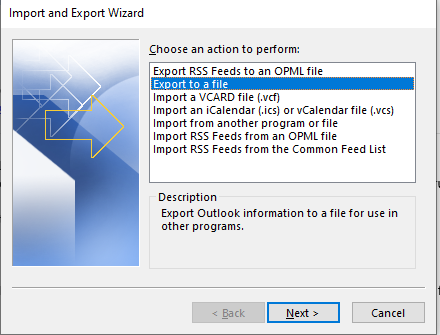
1.You could following the steps export inbox of source mailbox to .pst file, then import the .pst file to target mailbox.
Export: Outlook client -> File -> Open&Export -> Import/Export -> Export to a file -> Outlook date File (.pst).
Import: : Outlook client -> File -> Open&Export -> Import/Export -> Improt from another program or file.
For more information: Back up your email
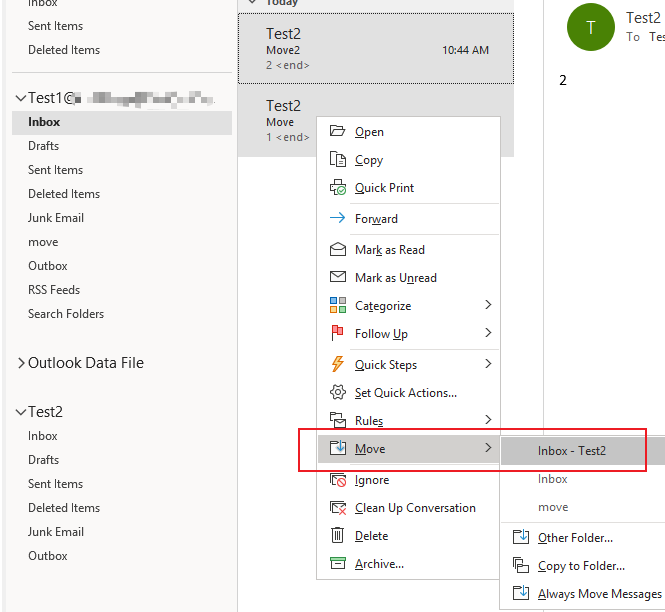
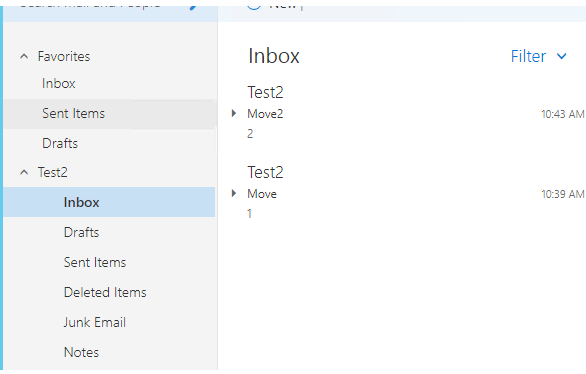
2.You could assgin “Full access” permisson of target mailbox to source mailbox. Log in to the source mailbox in the Outlook client. Then select the Inbox folder of the source mailbox, then hold down the "Ctrl" key and press "A" to select all mails. Then right-click and select to move to “Taget mailbox”. After that, I can view the mail in the inbox of the target mailbox.
If the response is helpful, please click "Accept Answer" and upvote it.
Note: Please follow the steps in our documentation to enable e-mail notifications if you want to receive the related email notification for this thread.
Hi @exchange beginner ,
Do suggestions above help? If the issue has been resolved, please click “Accept as answer” to mark helpful reply as an answer, this will make answer searching in the forum easier and be beneficial to other community members as well.
Thanks for your understanding.
----------
If the response is helpful, please click "Accept Answer" and upvote it.
Note: Please follow the steps in our documentation to enable e-mail notifications if you want to receive the related email notification for this thread.
Hi @exchange beginner ,
I am writing here to confirm with you how thing going now?
----------
If the response is helpful, please click "Accept Answer" and upvote it.
Note: Please follow the steps in our documentation to enable e-mail notifications if you want to receive the related email notification for this thread.