Azure Functions
An Azure service that provides an event-driven serverless compute platform.
This browser is no longer supported.
Upgrade to Microsoft Edge to take advantage of the latest features, security updates, and technical support.
' cx='32' cy='32' r='32' /%3E%3Ctext x='50%25' y='55%25' dominant-baseline='middle' text-anchor='middle' fill='%23FFF' %3EHP%3C/text%3E%3C/svg%3E)
We are developing a mobile app which will call azure functions to get and post data. For our proof of concept, we have deployed a Microsoft sample java function app called HTTPExample which expects a parameter called name. The name value will appear in the response.
The function executes correctly when App Service Authentication is off. I verified using Code + Test and Postman. The authentication level is anonymous.
I'm having issues with the token after App Service Authentication is enabled. The response is 401 Unauthorized - You do not have permission to view this directory or page. This is a common issue on the message boards but haven't found a resolution that works for us.
Below are the steps I'm taking to obtain an token and execute the function app.
Using postman, my first step is to retrieve an authorization code
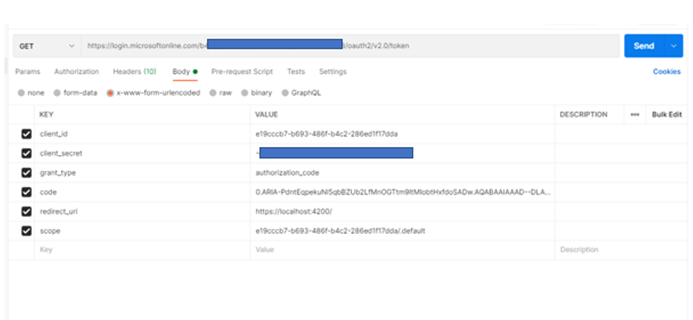
The authorization code is successfully returned. My second step is to get the access token using https://login.microsoftonline.com//oauth2/v2.0/token as shown in the screenshot.
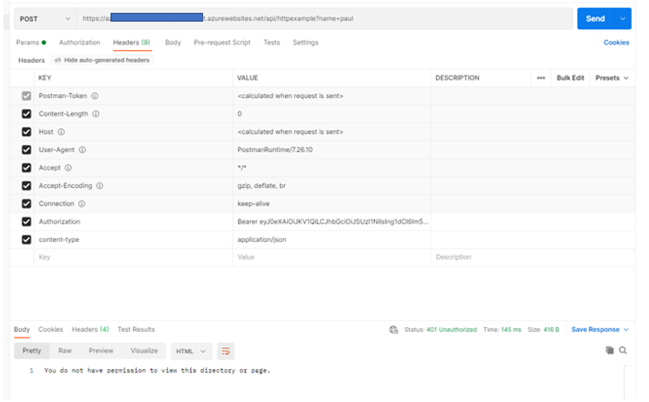
In the final step, I take the access_token provided in the output and pass to my function app in the header. The key is authorization and the value is Bearer . Below is a screenshot. As you can see, it failed.
I inspected the token payload. The aud and appid are the same. The value is the client id. Initially, I excluded scope so aud and appid did not match.

' cx='32' cy='32' r='32' /%3E%3Ctext x='50%25' y='55%25' dominant-baseline='middle' text-anchor='middle' fill='%23FFF' %3EJM%3C/text%3E%3C/svg%3E)
Hello @Hallman, Paul , to isolate the issue, please navigate to https://learn.microsoft.com/en-us/rest/api/appservice/webapps/getfunction --> Click on Try it --> Provide all the mandatory inputs --> you will see an access token generated for you. Try with that token and see if that helps.
Also, you can validate the token generate https://jwt.io/
' cx='32' cy='32' r='32' /%3E%3Ctext x='50%25' y='55%25' dominant-baseline='middle' text-anchor='middle' fill='%23FFF' %3ETA%3C/text%3E%3C/svg%3E)
Hello,
This REST API try it tool automatically uses my user account from the browser that I have logged in to use this tool.
The objective is to authenticate and get a token for an application using the client-id and secret.
I'm seeing the exact same behavior as mentioned by @Hallman, Paul
I've used the MS Identity Library for .NET to acquireToken as mentioned below.
IConfidentialClientApplication builder =
(IConfidentialClientApplication)ConfidentialClientApplicationBuilder.Create(clientId)
.WithAuthority(authority)
.WithClientSecret(clientSecret)
.Build();
authresult = await builder.AcquireTokenForClient(scopes).ExecuteAsync();
The access token is received.
However, when I call the respective API endpoint that is provided in the scopes parameter, I get a 401 Unauthorized.