
Hello claire,
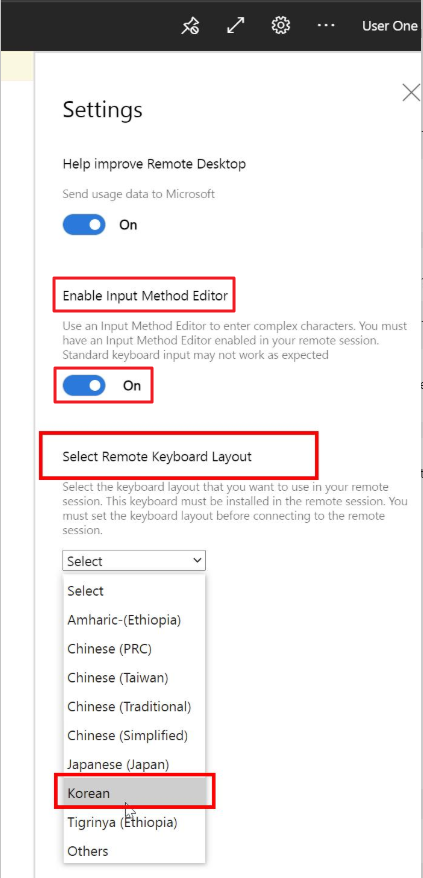
Do you enable IME and try to reinstall Korean language pack successfully?
Do you also select the korean keyboard in the settings menu of the web client?
This browser is no longer supported.
Upgrade to Microsoft Edge to take advantage of the latest features, security updates, and technical support.
' cx='32' cy='32' r='32' /%3E%3Ctext x='50%25' y='55%25' dominant-baseline='middle' text-anchor='middle' fill='%23FFF' %3ECC%3C/text%3E%3C/svg%3E)
Hi.
Im using RDWeb in Azure.
VM image is windows 10 enterprise.
when i using VM through RDWeb,
I added Korean language(settings) and it appeared start menu.
but when I change language to korean, it's not working on Mac.
it is okay to click hangul/english toggle but not working on keyboard.
(right option, shift+space, capslock doesn't work)
how can i use hangul keyboard in RDWeb?
' cx='32' cy='32' r='32' /%3E%3Ctext x='50%25' y='55%25' dominant-baseline='middle' text-anchor='middle' fill='%23FFF' %3ELK%3C/text%3E%3C/svg%3E)
Hello @claire choi ,
We haven’t heard from you in a couple of days.
Is there any update from your side?
Hello claire,
Do you enable IME and try to reinstall Korean language pack successfully?
Do you also select the korean keyboard in the settings menu of the web client?
Hello @claire choi ,
How are things going there on this issue?
Please let me know if you would like further assistance.
Hello @claire choi ,
Just checking in to see if the information provided was helpful.
Please post back at your convenience if we can assist further.