Windows 10
A Microsoft operating system that runs on personal computers and tablets.
10,543 questions
This browser is no longer supported.
Upgrade to Microsoft Edge to take advantage of the latest features, security updates, and technical support.
' cx='32' cy='32' r='32' /%3E%3Ctext x='50%25' y='55%25' dominant-baseline='middle' text-anchor='middle' fill='%23FFF' %3ENB%3C/text%3E%3C/svg%3E)
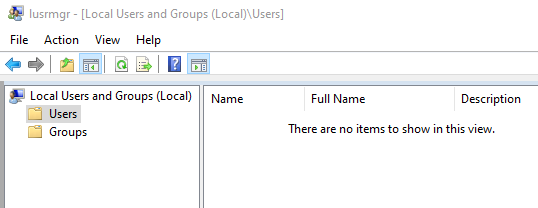
On Windows 10 Enterprise 20H2 (domain joined) we do not see users in "Edit local users and groups. Instead of seeing a list of users, we see "There are no items to show in this view"
We can add a user, still doesn't show up, but when we go to Groups, we can add the user to a group. and see existing users. The groups show up just fine.
If we type in to a command prompt... Net user TestUser we see the normal output (name, dates, group membership etc).
This is happening on about five computers we have found so far, others work fine.
' cx='32' cy='32' r='32' /%3E%3Ctext x='50%25' y='55%25' dominant-baseline='middle' text-anchor='middle' fill='%23FFF' %3EDZ%3C/text%3E%3C/svg%3E)
Hello @Neal Blackie ,
Would you please tell me how things are going on your side. If you have any questions or concerns about the information I provided, please don't hesitate to let us know.
Thanks for your time and have a nice day!
Best Regards,
Daisy Zhou
============================================
If the Answer is helpful, please click "Accept Answer" and upvote it.
Hello @Neal Blackie ,
I just want to confirm the current situations.
Please feel free to let us know if you need further assistance.
Best Regards,
Daisy Zhou
============================================
If the Answer is helpful, please click "Accept Answer" and upvote it.

How did you solve it in the end

You can report this experience using the feedback hub.
https://support.microsoft.com/en-us/windows/send-feedback-to-microsoft-with-the-feedback-hub-app-f59187f8-8739-22d6-ba93-f66612949332
--please don't forget to Accept as answer if the reply is helpful--
Hello @Neal Blackie ,
Thank you for posting here.
Please as below:
1.What account did you logon to this machine? You can try to sign out and sign in again to see if it helps.
2.Or you can try to switch a user account to logon the same machine to see if ot helps.
3.Please check whether there is the same issue before the machine was joined to domain?
4.If possible, please check if you try to disjoin one machine from the domain to workgroup, then check if you can see local users.
Should you have any question or concern, please feel free to let us know.
Best Regards,
Daisy Zhou
' cx='32' cy='32' r='32' /%3E%3Ctext x='50%25' y='55%25' dominant-baseline='middle' text-anchor='middle' fill='%23FFF' %3EJ%3C/text%3E%3C/svg%3E)
I have not see any resolution for this issue. Our system is an airgap standalone system that was upgraded from Windows 10 1809 to Window 10 20H2. Prior to the update I was able to see the users in Computer Management. Just like NealBlackie-3047 stated I can see the groups, but I am unable to see the users. When in Computer Management - Local Users and Groups - Users state "There are no items to show in this view". All Users and Admins are able to log in. All Admins have tried to view the users, but have not had an success.
' cx='32' cy='32' r='32' /%3E%3Ctext x='50%25' y='55%25' dominant-baseline='middle' text-anchor='middle' fill='%23FFF' %3EMJ%3C/text%3E%3C/svg%3E)
Barrett,
I am having the same issue that you are talking about. Disconnected offline system updating from 1809 to 20H2 OR 21H2. Any remedy for this issue?
' cx='32' cy='32' r='32' /%3E%3Ctext x='50%25' y='55%25' dominant-baseline='middle' text-anchor='middle' fill='%23FFF' %3EJD%3C/text%3E%3C/svg%3E)
We have the exact same situation here, hoping for a fix. I found that "net user" from the command prompt does list the users correctly.
' cx='32' cy='32' r='32' /%3E%3Ctext x='50%25' y='55%25' dominant-baseline='middle' text-anchor='middle' fill='%23FFF' %3ETA%3C/text%3E%3C/svg%3E)
I have this exact problem in Windows 10 Enterprise, but my systems are not joined to a domain. When I open Local Users, nothing is listed. Local Groups shows up, and if I open the Administrators group, for example, the Admin Users are shown there, but not in Local Users itself. I also cannot open the Users app on Control Panel.
How did you solve it in the end?

Hi
I had the same problem. I was able to fix this with Hiren's BootCD with these steps:
1- boot your system with Hiren's BootCD
2- open registry editor on the tab "RepairTools" on the application under Windows Recovery (Lazesoft Windows Recovery)
3- you go to the same address as the picture :
HKEY_LOCAL_MACHINE\SAM\SAM\Domains\Account\Users
and it would help if you changed the option "UserDontShowInLogonUI" from 1 to 0 everywhere you see it
I hope it can help you.