Microsoft 365 and Office | SharePoint | For business | Windows
A group of Microsoft Products and technologies used for sharing and managing content, knowledge, and applications.

This browser is no longer supported.
Upgrade to Microsoft Edge to take advantage of the latest features, security updates, and technical support.
' cx='32' cy='32' r='32' /%3E%3Ctext x='50%25' y='55%25' dominant-baseline='middle' text-anchor='middle' fill='%23FFF' %3EVP%3C/text%3E%3C/svg%3E)
Hello,
I was able to successfully create a SPAsyncReadJob and get the manifest.xml file created on azure using the sample here https://gist.github.com/techmadness/484e7de0a7c51e5faf952a79f1eacb85
I then tried to get the context without UserName/Password and instead used a Certificate I uploaded to the same Azure application like this:
var clientContext = authenticationManager.GetAzureADAppOnlyAuthenticatedContext(SiteURL, ClientId, TenantId, Cert, AzureEnvironment.Production);
The context gets created fine but I get a 401 Unauthorized when trying to create the SPAsyncReadJob on the site.
Can you please advice how to get a authenticated context to create SPAsyncReadJob without using UserName/Password and only by using ClientID/ClientSecret/Certificate.

Hi @Vish Pothaganti ,
Instead of Azure AD application, please use the SharePoint application which register in this url:
https://siteurl/_layouts/15/appregnew.aspx
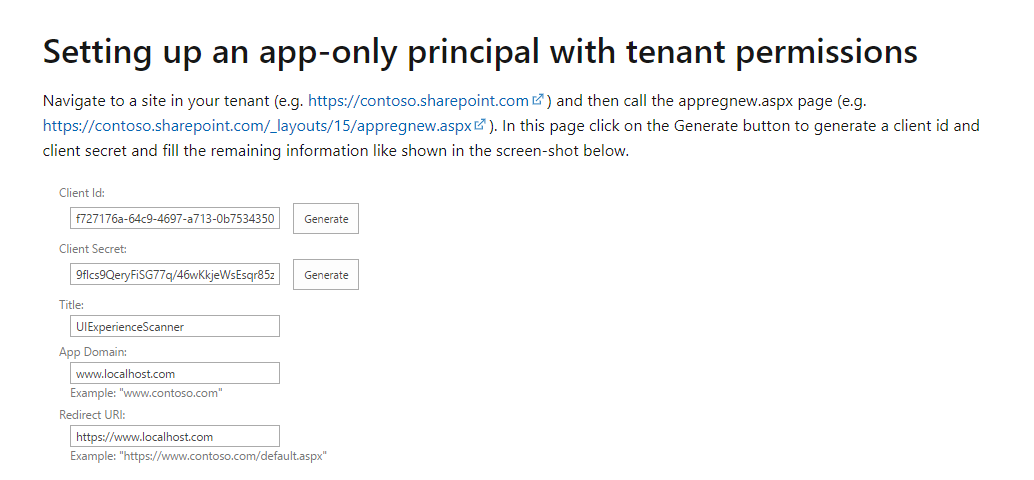
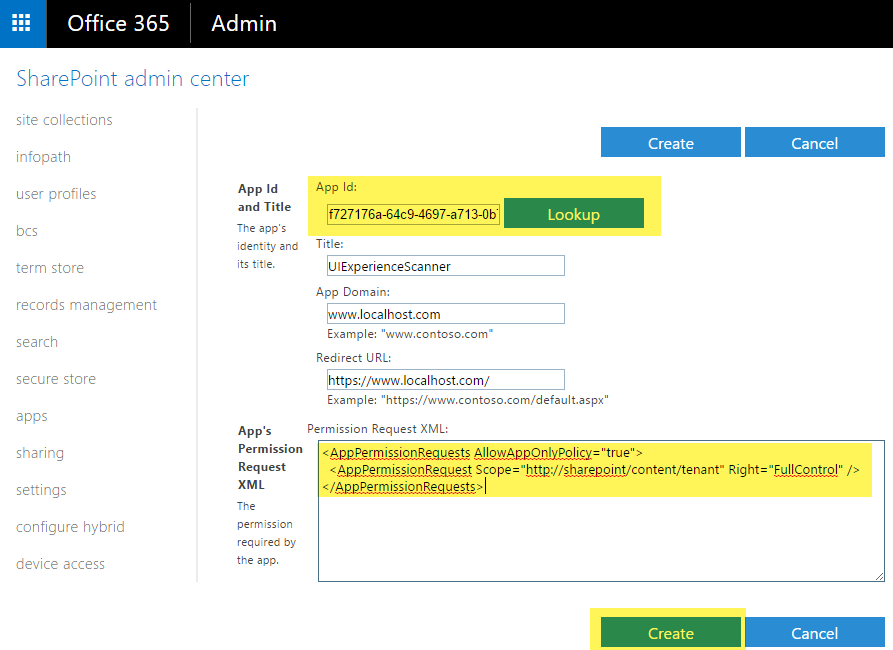
And then grant Full Control permission in SharePoint administration site:
https://tenantname-admin.sharepoint.com/_layouts/15/appinv.aspx
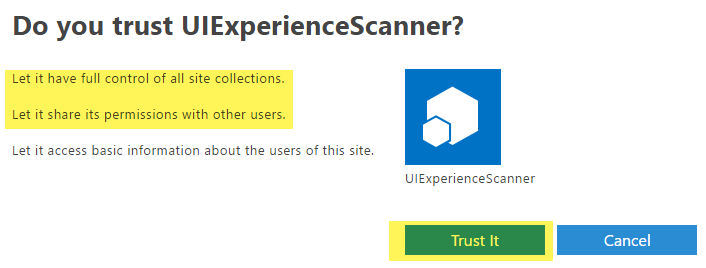
Click Trust:
Then in code snippet, use OfficeDevPnP.Core.AuthenticationManager().GetAppOnlyAuthenticatedContext(siteUrl,clientId,clientSecret) function:
            string siteUrl = "your siteurl";
            string clientId = "your client Id";
            string clientSecret = "your client secret";

            using (var ctx = new OfficeDevPnP.Core.AuthenticationManager().GetAppOnlyAuthenticatedContext(siteUrl,clientId,clientSecret))
            {


            };
Detailed steps to register app and grant permission, please refer this official document, Permission is necessary to set, otherwise, it will also return 401 unauthorized:
Granting access using SharePoint App-Only
Thanks
Best Regards
If the response is helpful, please click "Accept Answer" and upvote it.
Note: Please follow the steps in our documentation to enable e-mail notifications if you want to receive the related email notification for this thread.
Do we have to create the SharePoint application on every Site individually? If I want to run the application on 100 different sites, am I supposed to handle 100 different ClientID/ClientSecret combinations??
No, once the application set with Tenant Full Control, it will have the permission for all sites, only one application is enough.
And you can repeat using the same Client ID and Secret in the code snippet.
What is the least Permission level to create SPAsyncReadJob(). In the example above Right=FullControl. Is there any other permission level lower than this. Please provide a list of options which can be entered in "Right"