' cx='32' cy='32' r='32' /%3E%3Ctext x='50%25' y='55%25' dominant-baseline='middle' text-anchor='middle' fill='%23FFF' %3EA%3C/text%3E%3C/svg%3E)

I guess that would be too complicated for you. Here's another solution that I found. You can use a free tool to add the program in Open with. I just tested it and I was able to add an app immediately on the Open with. The tool doesn't require installation so you would only have to open it.
https://defaultprogramseditor.com
- When the tool opens, click on File Type Settings > Click on "Change Open with programs" (See image below)
- Select .stl file type then click Next
- Click on Add then locate the app
- Once done, click on "Save 'Open With' list
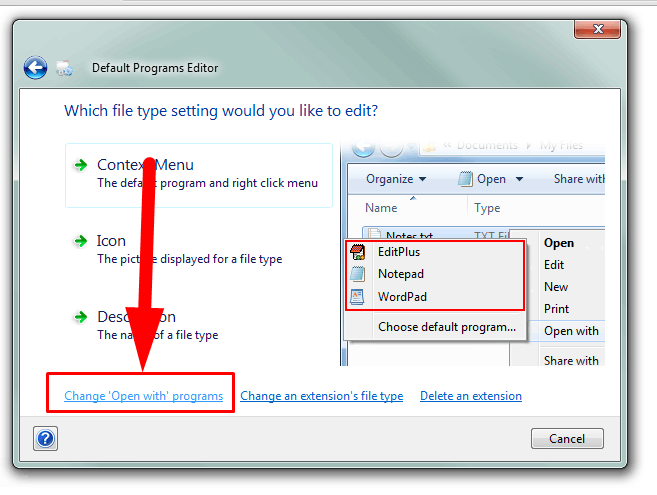
That's it.(Disclaimer: This is a non-Microsoft website. The page appears to be providing accurate, safe information. Watch out for ads on the site that may advertise products frequently classified as a PUP (Potentially Unwanted Products). Thoroughly research any product advertised on the site before you decide to download and install it.)
Thank you once again (and for your patients).
Again, followed the instructions. But this has made no difference to the "open with" menu.
I selected the file "stl" and clicked next. The window that then opens already has the programs that open the file in it.
These solutions seem to be more for if a particular file can't be opened by a certain program. Which isn't my issue. The programs i want to the open these stl files do open them. The programs simply don't appear in the immediate list, apart from the meshmixer program. I assumed that as this program is in the list, that others can be added to it save the extra steps everytime.
' cx='32' cy='32' r='32' /%3E%3Ctext x='50%25' y='55%25' dominant-baseline='middle' text-anchor='middle' fill='%23FFF' %3EPG%3C/text%3E%3C/svg%3E)