Developer technologies | Transact-SQL
A Microsoft extension to the ANSI SQL language that includes procedural programming, local variables, and various support functions.
This browser is no longer supported.
Upgrade to Microsoft Edge to take advantage of the latest features, security updates, and technical support.
' cx='32' cy='32' r='32' /%3E%3Ctext x='50%25' y='55%25' dominant-baseline='middle' text-anchor='middle' fill='%23FFF' %3ES%3C/text%3E%3C/svg%3E)
Hi All,
I have a scenario where I need to parse text based on known delimiter. The input string will always have 2 commas in between the full string but very rarely could have 1 comma sometimes because of typo error.
So input string looks like below...
Scenario-1):
Declare @InputString as varchar(100) = 'FirstName, LastName, Age' -- contains Fname, lastname and age. So split them into 3 columns.
Scenario-2):
Declare @InputString as varchar(100) = 'LastName, Age' -- contains only lastname and age. Still split them into 3 columns though Firstname is missing.
I want SQL code to get the output into 3 columns based on comma delimiter.
Note: FirstName , LastName could vary by length.
Thanks,
RH
' cx='32' cy='32' r='32' /%3E%3Ctext x='50%25' y='55%25' dominant-baseline='middle' text-anchor='middle' fill='%23FFF' %3EYK%3C/text%3E%3C/svg%3E)
@SQL9 ,
While asking a question you need to provide a minimal reproducible example:
(1) DDL and sample data population, i.e. CREATE table(s) plus INSERT, T-SQL statements.
(2) What you need to do, i.e. logic, and your attempt implementation of it in T-SQL.
(3) Desired output based on the sample data in the #1 above.
(4) Your SQL Server version (SELECT @@version;)

This assumes that there are no dots in the data. Then you can take this shortcut:
; WITH replace AS (
    SELECT replace(col, ',', '.') ASdottedcol
    FROM tbl
)
SELECT parsename(dottedcol, 3) AS firstname,
     parsename(dottedcol,  2) AS lastname,
     parsename(dottedcol, 1) AS age
FROM  replace
If there are dots in the data, you will need to use a traditional string splitter with CROSS APPLY. I have more details in this article on my web site: https://www.sommarskog.se/arrays-in-sql.html.
Thank you it worked as expected.
' cx='32' cy='32' r='32' /%3E%3Ctext x='50%25' y='55%25' dominant-baseline='middle' text-anchor='middle' fill='%23FFF' %3EG%3C/text%3E%3C/svg%3E)
Try this:
DECLARE @T TABLE (
    InputString varchar(100)
);

INSERT INTO @T VALUES
('FirstName1, LastName1, Age1'),
('LastName2, Age2');

;WITH CTE AS (
    SELECT CASE WHEN PATINDEX ('%,%,%', InputString) = 0 THEN ',' + InputString ELSE InputString END AS InputString
    FROM @T
)

SELECT  LEFT(InputString, CHARINDEX(',', InputString) - 1) AS FirstName,
        LTRIM(SUBSTRING(InputString, CHARINDEX(',', InputString) + 1, LEN(InputString) - CHARINDEX(',', InputString) - CHARINDEX(',', REVERSE(InputString)))) AS LastName,
        LTRIM(RIGHT(InputString, CHARINDEX(',', REVERSE(InputString)) - 1)) AS Age
FROM CTE;
Thank you Yaun. It worked.
' cx='32' cy='32' r='32' /%3E%3Ctext x='50%25' y='55%25' dominant-baseline='middle' text-anchor='middle' fill='%23FFF' %3EEM%3C/text%3E%3C/svg%3E)
Hi @SQL9 ,
Please also check another method:
CREATE TABLE #test(col varchar(55))
INSERT INTO #test values ('FirstName, LastName, Age'),
 ('LastName2, Age2')

;WITH cte as (
SELECT REVERSE(RIGHT(REVERSE(col),LEN(col)-CHARINDEX(',',REVERSE(col)))) Remain
,REVERSE(LEFT(REVERSE(col),CHARINDEX(',',REVERSE(col))-1)) AS Age
FROM #test)

SELECT IIF(CHARINDEX(',',Remain)>0 ,
LEFT(Remain,CHARINDEX(',',Remain)-1),'') AS FirstName,
IIF(CHARINDEX(',',Remain)>0
,RIGHT(Remain,LEN(Remain)-CHARINDEX(',',Remain)),Remain) AS LastName,Age
FROM cte
Output:
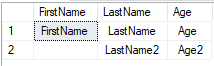
If you have any question, please feel free to let me know.
Regards
Echo
If the answer is helpful, please click "Accept Answer" and upvote it.
Thank you EchoLiu. It worked.