Developer technologies | .NET | Xamarin
A Microsoft framework for building cross-platform mobile apps using .NET and C# with native performance and user interfaces.
This browser is no longer supported.
Upgrade to Microsoft Edge to take advantage of the latest features, security updates, and technical support.
' cx='32' cy='32' r='32' /%3E%3Ctext x='50%25' y='55%25' dominant-baseline='middle' text-anchor='middle' fill='%23FFF' %3ECG%3C/text%3E%3C/svg%3E)
Hey,
Im trying to make the inner stack layount center but dosent get it to work...
When im reading on stackoverflow then i do right but it dosent work...
Any ideas?
    <ContentPage.Content>
        <Frame StyleId="FrameContent">
            <StackLayout Spacing="20" BackgroundColor="LightPink">
                <StackLayout>
                    <Image Source="Base_Logo.png"></Image>
                </StackLayout>


                <StackLayout VerticalOptions="Center"
                             HorizontalOptions="Center"

                             BackgroundColor="LightBlue">
                    <Label x:Name="WelcomeHeaderLbl"
                           StyleId="LblHeader"
                           FontSize="28"
                           HorizontalOptions="Center">
                    </Label>
                    <Picker x:Name="LanguagePicker"
                            StyleId="LanguagePicker"
                            HorizontalOptions="Center"
                            VerticalOptions="Center"
                            Title="Choose Language">
                    </Picker>
                </StackLayout>


                <StackLayout>
                    <Button x:Name="ContinueButton"
                            StyleId="ContinueButton"
                            Clicked="ContinueButton_Clicked"
                            HorizontalOptions="Center">
                    </Button>
                </StackLayout>
            </StackLayout>
        </Frame>
    </ContentPage.Content>
The stacklayout with space around it is the one that should be center...
A Microsoft framework for building cross-platform mobile apps using .NET and C# with native performance and user interfaces.
Answer accepted by question author

Hello,
Welcome to our Microsoft Q&A platform!
Try to change the VerticalOptions from value Center to VerticalOptions.
VerticalOptions="CenterAndExpand"
The code is:
<ContentPage.Content>
    <Frame StyleId="FrameContent">
        <StackLayout Spacing="20" BackgroundColor="LightPink">
            <StackLayout>
                <Image Source="image.png"></Image>
            </StackLayout>

            <StackLayout VerticalOptions="CenterAndExpand"
                          HorizontalOptions="Center"

                          BackgroundColor="LightBlue">
                <Label x:Name="WelcomeHeaderLbl"
                        StyleId="LblHeader"
                        FontSize="28"
                        HorizontalOptions="Center">
                </Label>
                <Picker x:Name="LanguagePicker"
                         StyleId="LanguagePicker"
                         HorizontalOptions="Center"
                         VerticalOptions="Center"
                         Title="Choose Language">
                </Picker>
            </StackLayout>
            <StackLayout>
                <Button x:Name="ContinueButton"
                        Text="test button"
                         StyleId="ContinueButton"
                         HorizontalOptions="Center">
                </Button>
            </StackLayout>
        </StackLayout>
    </Frame>
</ContentPage.Content>
The result is:
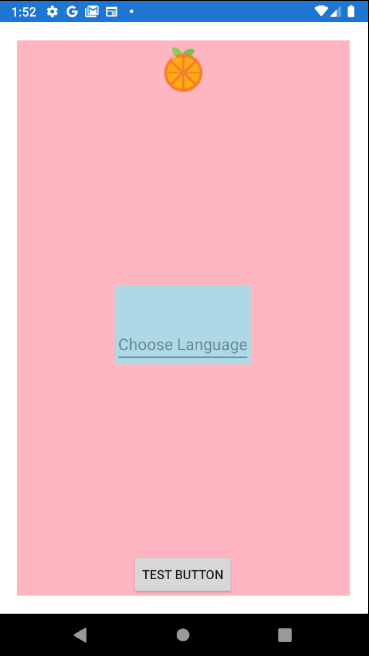
Best Regards,
Jessie Zhang
---
If the response is helpful, please click "Accept Answer" and upvote it.
Note: Please follow the steps in our documentation to enable e-mail notifications if you want to receive the related email notification for this thread.
Thanks, It works... So little can do so much...