Hi Amelia,
Thank you!
Stan
This browser is no longer supported.
Upgrade to Microsoft Edge to take advantage of the latest features, security updates, and technical support.
' cx='32' cy='32' r='32' /%3E%3Ctext x='50%25' y='55%25' dominant-baseline='middle' text-anchor='middle' fill='%23FFF' %3ESD%3C/text%3E%3C/svg%3E)
I've spent quite a few time searching on the matter, no luck so far, decided to post my question here.
I wonder is there a way at all to add (concatenate) TLog (rollforward) application throughput (speed) detail to the existing information in SQL Log for Standby database.
That is, literally, this
"RESTORE LOG successfully processed 24011 pages in 1.264 seconds (148.403 MB/sec)."
to this
"
Message
Log was restored. Database: <a user database name>, creation date(time): 2018/02/16(01:17:50), first LSN: 47072:120299:1, last LSN: 47076:54786:1, number of dump devices: 1, device information: (FILE=1, TYPE=DISK: {'<path>\<db_name>_backup_2021_05_17_170006_0460796.trn'}). This is an informational message. No user action is required
"
to be something like
"
Message
Log was restored. Database: <a user database name>, creation date(time): 2018/02/16(01:17:50), first LSN: 47072:120299:1, last LSN: 47076:54786:1, number of dump devices: 1, device information: (FILE=1, TYPE=DISK: {'<path>\<db_name>_backup_2021_05_17_170006_0460796.trn'}). This is an informational message. No user action is required
RESTORE LOG successfully processed 24011 pages in 1.264 seconds (148.403 MB/sec).
"
?
Thank you!
Stan
Hi Amelia,
Thank you!
Stan
' cx='32' cy='32' r='32' /%3E%3Ctext x='50%25' y='55%25' dominant-baseline='middle' text-anchor='middle' fill='%23FFF' %3EAM%3C/text%3E%3C/svg%3E)
Hi StanislavDinkelis-7675,
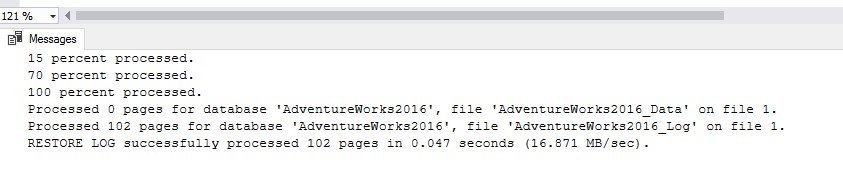
I haven't found a Trace Flag that can help add “RESTORE LOG successfully processed xxxxx pages in xxx seconds (xxx MB/sec)” message to the error log.
I think we may not be able to add such message to error log, this may be by design.
And it seems we only can view the “RESTORE LOG successfully processed xxxxx pages in xxx seconds (xxx MB/sec).” in the message when restoring log in T-SQL.
Best Regards,
Amelia
If the answer is helpful, please click "Accept Answer" and upvote it.
Note: Please follow the steps in our documentation to enable e-mail notifications if you want to receive the related email notification for this thread.