Azure Functions
An Azure service that provides an event-driven serverless compute platform.
This browser is no longer supported.
Upgrade to Microsoft Edge to take advantage of the latest features, security updates, and technical support.
' cx='32' cy='32' r='32' /%3E%3Ctext x='50%25' y='55%25' dominant-baseline='middle' text-anchor='middle' fill='%23FFF' %3ECM%3C/text%3E%3C/svg%3E)
One of my Functions is not allowing me to use the Portal editor, the option seems to be greyed out when the file would usually be listed in the dropdown for selection.
Ex.
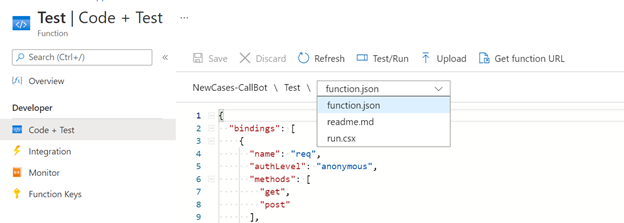
What would cause this to happen? Other Functions on my same subscription seem to let me edit just fine.
' cx='32' cy='32' r='32' /%3E%3Ctext x='50%25' y='55%25' dominant-baseline='middle' text-anchor='middle' fill='%23FFF' %3ENK%3C/text%3E%3C/svg%3E)
There are a few different configuration options for Azure Functions where if deployed using the setup you will not be able to edit the code directly from Portal. In your case, you mentioned above that this Function is coded in Go. Since this is an unsupported language, to create a working Function in it a custom handler would be used. When using a custom handler, it is expected behavior that the Function becomes read-only from the Portal.
See more information on custom handlers here- Azure Functions custom handlers | Microsoft Learn