Currently I'm having some rather intermittent and varied issues with my PC, across a wide variety of programs. The symptoms are as follows
Computer will randomly be restarted
Destiny 2 will randomly crash with error code Broccoli (indicates an error detecting the GPU/driver), or experience sudden significant frame drops despite low GPU usage in Task Manager Performance View
Chrome and Edge tabs will randomly crash with a Status_Access_Violation error
*Unsure if related, but internet will occasionally blip out for 10-15 seconds while on ethernet, router itself does not seem to indicate internet loss
Attempted fixes:
Running Memtest indicates no issues with the memory, and computer temperatures are normal when under stress (e.g. playing a game.)
Attempted reseating GPU and RAM
Restarted computer
Updated drivers/Windows
Checking the event log reveals a variety of events I am unable to determine the source of, including a Kernel-Power System 41 event, and roughly 12327 WHEA-Logger System 17 events, as seen here:
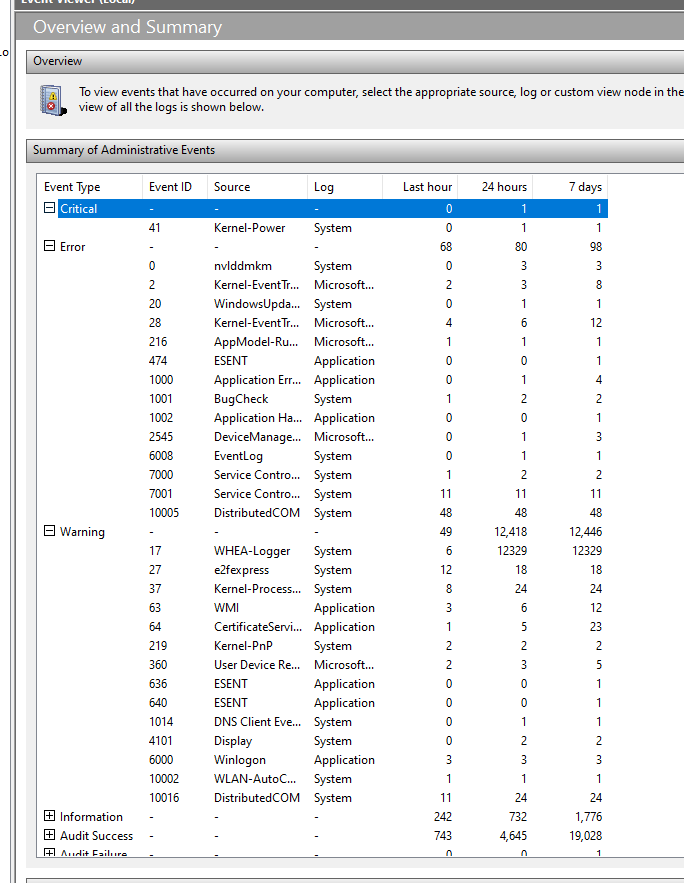
I attempted to run Driver Verifier, based on recommended troubleshooting for WHEA-Logger issues, which resulted in an immediate BSOD on startup, however I am unsure how to interpret the data provided by it. Dump file I believe: MEMORY.DMP
System itself:
CPU: Intel Core i9-12900k
Motherboard: Asus Rog Strix Z690-E Gaming Wifi
GPU: Asus TUF RTX 3080TI 12gb
RAM: 32 GB DDR5
The setup as a whole is roughly a year old, and the problems only recently started occurring within the last month or so.
Any assistance would be much appreciated!
' cx='32' cy='32' r='32' /%3E%3Ctext x='50%25' y='55%25' dominant-baseline='middle' text-anchor='middle' fill='%23FFF' %3EA%3C/text%3E%3C/svg%3E)

' cx='32' cy='32' r='32' /%3E%3Ctext x='50%25' y='55%25' dominant-baseline='middle' text-anchor='middle' fill='%23FFF' %3EIL%3C/text%3E%3C/svg%3E)