Hi, I recently bought a new laptop yesterday due to my previous one going bust (critical irrepairable hardware error) and it naturally came with Windows 11 (Home). It is an Asus VivoBook, the model being X1502ZA. As with all new computers, there are a lot of initial updates for system efficiency, and I ran them as usual. However, I noticed something strange with Windows Update today, because all of my updates are displaying "Download Error" with error codes. As a result, I ran the windows update troubleshooter and analysed the advanced details section, which gave me a thorough evaluation. It displayed the following:
| Some security settings are missing or have been changedSome security settings are missing or have been changed |
Issue not present |
|
| Check for missing or corrupt filesCheck for missing or corrupt files |
Issue not present |
|
| Service registration is missing or corruptService registration is missing or corrupt |
Issue not present |
|
At first, I thought it might have been missing or corrupt files and vice versa, but it was not. However, it also displayed this:
| IsPostback_RC_PendingUpdates |
|
|
|
|
|
IsPostback: False |
<br> |
--- |
|
| WaaSMedicService |
|
|
|
|
|
Issue found by:BinaryHealthPlugin;DynamicProtectionPlugin |
<br> |
--- |
|
| IsPostback_RC_PendingUpdates |
|
|
|
|
|
IsPostback: True |
<br> |
--- |
|
| Service Status |
|
|
|
|
|
Problem with BITS service : The requested service has already been started. System.Management.Automation.RemoteException More help is available by typing NET HELPMSG 2182. System.Management.Automation.RemoteException |
<br> |
--- |
|
| Service Status |
|
|
|
|
|
Problem with BITS service : The requested service has already been started. System.Management.Automation.RemoteException More help is available by typing NET HELPMSG 2182. System.Management.Automation.RemoteException |
<br> |
--- |
|
Also, here are the set of failed updates. The Intel MEDIA updates first display signs of progress like downloading and installing but then fail shortly after:
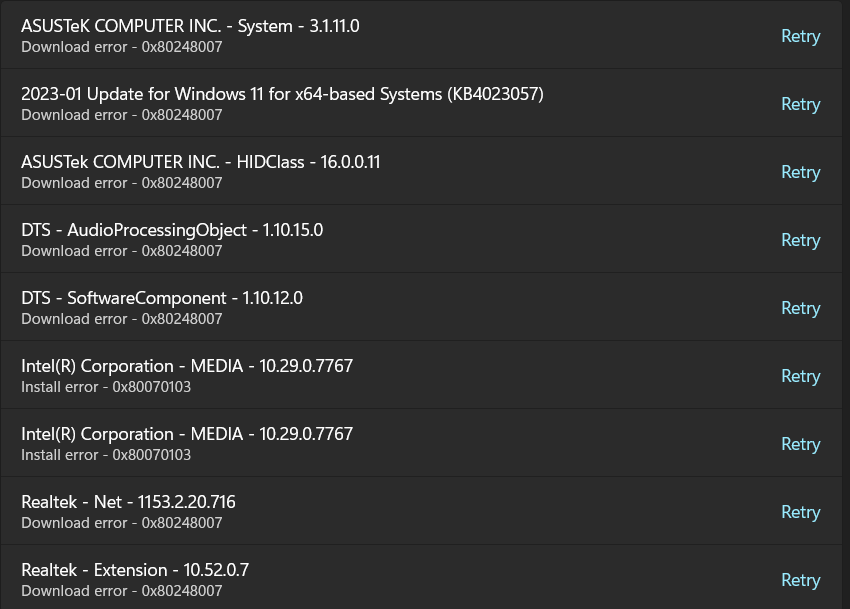
Also, I have already tried sfc /scannow and dism /Online /Cleanup-Image /RestoreHealth.
I would gladly appreciate it if I received some help on this issue.
' cx='32' cy='32' r='32' /%3E%3Ctext x='50%25' y='55%25' dominant-baseline='middle' text-anchor='middle' fill='%23FFF' %3EA%3C/text%3E%3C/svg%3E)

' cx='32' cy='32' r='32' /%3E%3Ctext x='50%25' y='55%25' dominant-baseline='middle' text-anchor='middle' fill='%23FFF' %3EVM%3C/text%3E%3C/svg%3E)