RDP connection error

Md. Rubiat Haque 156 Reputation points
2021-06-03T04:30:26.847+00:00

Hi, I am Rubiat.

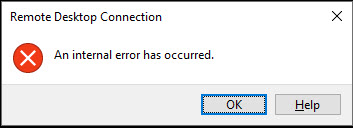
I patched my all servers of my organizations two days ago. After reboot all machines, I can't access only two servers via remote desktop and getting "an internal error has occurred". These two servers are Windows 2012R2 and I installed latest patch of May month. But one thing that, if I uncheck network level authentication of remote desktop enable from these two servers, I can access easily via remote desktop connection but it has to be according to the policy of my organization. Now how to fix this RDP issue without uncheck network level authentication?

Thank You101878-2021-06-03-10-14-18.jpg

Windows for business | Windows Client for IT Pros | User experience | Remote desktop services and terminal services
0 comments No comments
{count} votes

1 answer

Sort by: Most helpful
  1. Carl Fan 6,886 Reputation points
    2021-06-03T10:16:02.59+00:00

    Hi,
    you could try the below steps on RD session host server.

    1. Open group policy (gpedit.msc).
    2. Under Computer configuration ->Administrative Templates ->Windows components ->Remote desktop services->RD Session host ->Security
    3. Set "Require use of specific security layer for RDP connections" to RDP.

    Hope this helps and please help to accept as Answer if the response is useful.
    Best Regards,
    Carl

Your answer

Answers can be marked as 'Accepted' by the question author and 'Recommended' by moderators, which helps users know the answer solved the author's problem.