Azure Synapse Analytics
An Azure analytics service that brings together data integration, enterprise data warehousing, and big data analytics. Previously known as Azure SQL Data Warehouse.
This browser is no longer supported.
Upgrade to Microsoft Edge to take advantage of the latest features, security updates, and technical support.
' cx='32' cy='32' r='32' /%3E%3Ctext x='50%25' y='55%25' dominant-baseline='middle' text-anchor='middle' fill='%23FFF' %3ERD%3C/text%3E%3C/svg%3E)
What I am trying to do?
Glue-Athena-like process.
Problem I am facing in Azure Cloud
~Trying to replicate the above process using Azure Synapse Analytics~
Is there any python library to make T-SQL calls to the external tables created in Azure Synapse workspace?
Thank you so much for your reply!
But PySpark may not be the solution to what we are trying to do:
import pyodbc
server = <azure synapse serverless endpoint>
database = <db_name>
username = <user_name>
password = <password>
driver= '{ODBC Driver 17 for SQL Server}'with pyodbc.connect('DRIVER='+driver+';SERVER='+server+';PORT=1433;DATABASE='+database+';UID='+username+';PWD='+ password+';') as conn:
with conn.cursor() as cursor:
cursor.execute("SELECT top 10 * FROM [dbo].[db_name]")
row = cursor.fetchone()
while row:
print (str(row[0]) + " " + str(row[1]))
row = cursor.fetchone()
But I am running into the issue:
pyodbc.ProgrammingError: ('42000', "[42000] [Microsoft][ODBC Driver 17 for SQL Server][SQL Server]External table 'dbo' is not accessible because content of directory cannot be listed. (16561) (SQLExecDirectW)")
So, Is this possible to query the external tables created in Azure Synapse from local?
Can we grant 'select' permission on the external tables or on the database?
Point of doing this is to query and get the csv data in tabular form (within Azure Synapse) and use Python locally to use T-SQL commands to retrieve the data and pump it in our own database. But I do not see support to connect to Azure Synapse and query Azure Synapse external tables locally using Python.
Please advise on this? Thanks!

Hello @Roohiya Dudekula ,
From the error message it looks like External table 'dbo' is not accessible because content of directory cannot be listed.
I'm able to query the external tables created in Azure Synapse from local.
From Azure Portal:

From Local using VS Code:
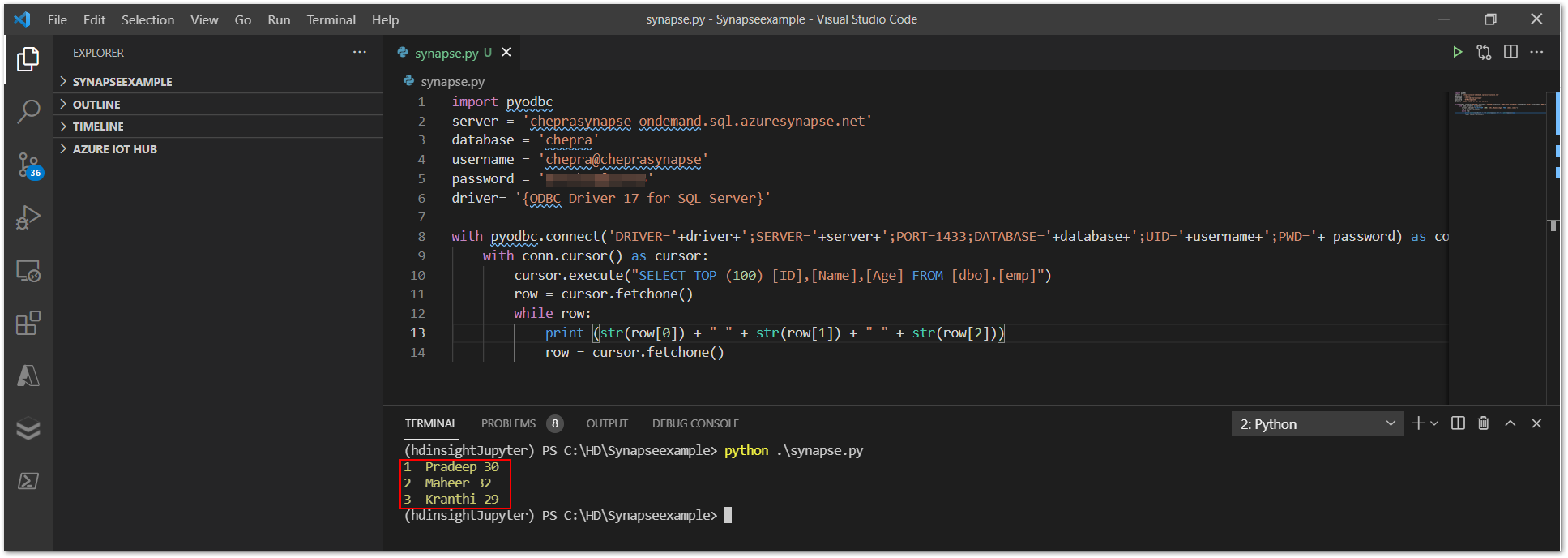
Hope this helps. Do let us know if you any further queries.
Thank you so much!!
I hadn't included scoped credentials for my external tables initially.
It actually worked after I created a scoped credential and use that to create datasource and the external tables on Azure Synapse.
Thanks for your help again 😊
Hello @Roohiya Dudekula ,
Glad to know that it helped.
If the above answers were helpful, click “Accept Answer” or “Up-Vote”, which might be beneficial to other community members reading this thread.
' cx='32' cy='32' r='32' /%3E%3Ctext x='50%25' y='55%25' dominant-baseline='middle' text-anchor='middle' fill='%23FFF' %3EUK%3C/text%3E%3C/svg%3E)
@Roohiya Dudekula
What is the procedure to create the scoped credentials ?
' cx='32' cy='32' r='32' /%3E%3Ctext x='50%25' y='55%25' dominant-baseline='middle' text-anchor='middle' fill='%23FFF' %3EYC%3C/text%3E%3C/svg%3E)
Can you share with the code you use the create the scoped credentials?
When you query the synapse database using python, the credentials you used for username and password is it the same as the one we set when setting up synapse workspace?
Thanks
Hello @Roohiya Dudekula ,
Welcome to the Microsoft Q&A platform.
Yes, Azure Synapse Analytics supports python.
Azure Synapse Analytics is a limitless analytics service that brings together data integration, enterprise data warehousing and big data analytics. It gives you the freedom to query data on your terms, using either serverless or dedicated resources—at scale. Azure Synapse brings these worlds together with a unified experience to ingest, explore, prepare, manage and serve data for immediate BI and machine learning needs.
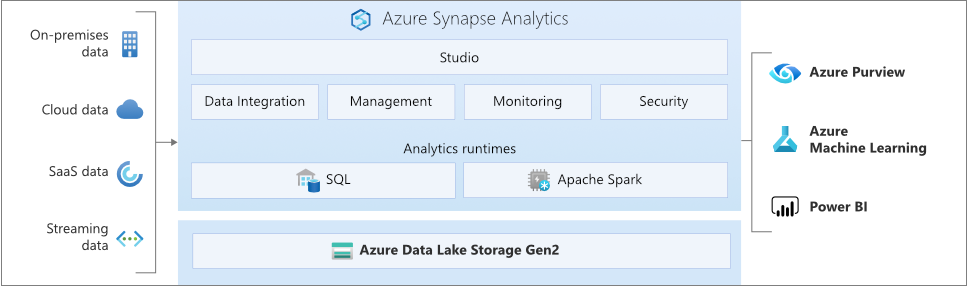
Key Service Capabilities in Azure Synapse Analytics:
Note: Only following magic commands are supported in Synapse pipeline : %%pyspark, %%spark, %%csharp, %%sql.
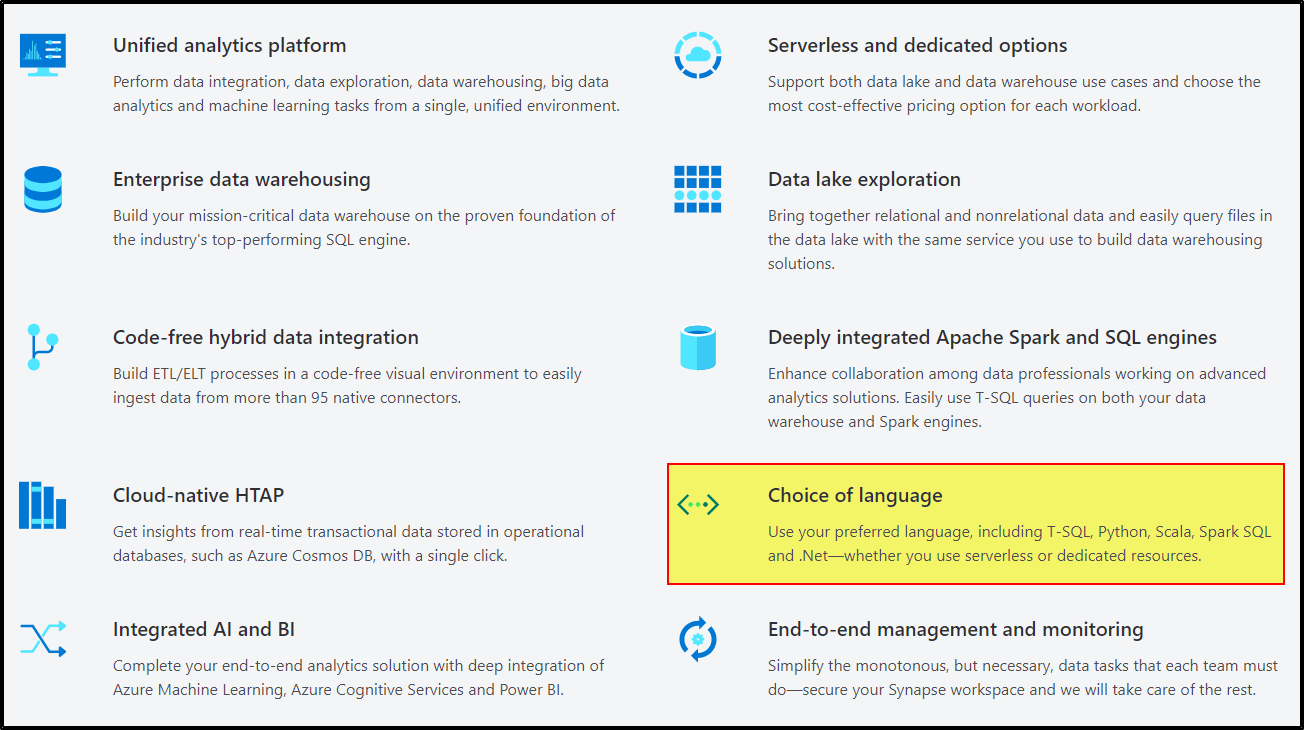
For more information, refer to What is Azure Synapse Analytics? and Magic commands in Synapse Analytics.
Hope this helps. Do let us know if you any further queries.
---------------------------------------------------------------------------
Please "Accept the answer" if the information helped you. This will help us and others in the community as well.
Hey, added my comment as an answer below :)
@PRADEEPCHEEKATLA , I am getting the same issue. But I am not able to solve it. I am trying to query the synapse database from jupyter notebook.
Anw, do you have any suggestion on how we could compare the performance in between synapse and MySQL?
Thanks