Azure SQL Database
An Azure relational database service.
This browser is no longer supported.
Upgrade to Microsoft Edge to take advantage of the latest features, security updates, and technical support.
' cx='32' cy='32' r='32' /%3E%3Ctext x='50%25' y='55%25' dominant-baseline='middle' text-anchor='middle' fill='%23FFF' %3EBW%3C/text%3E%3C/svg%3E)
We have an Azure SQL database with no public access and a private endpoint. In our small data movement network we use azure dns, and thus pick up the IP via the private zone created.
However, we have another subnet which does not use azure DNS, and the owners of this network do not want to add in the dns records for the private endpoint.
I understand that Azure SQL is behind a load balancer, hence it needs to know what actual "server" you are connecting to.
Is there a way (in SSMS or otherwise) to connect via IP but also pass along the "name" it wants to connect to? Kind of like a host header in http?
The only alternative is a hosts file, which really is not a great solution.
Thanks

Hi @Bill Williamson Thank you for posting your question on Microsoft Q&A.
After that open SSMS and give Server Name as IP and in username give adminusername followed by servername with @.
Find the screenshot below.
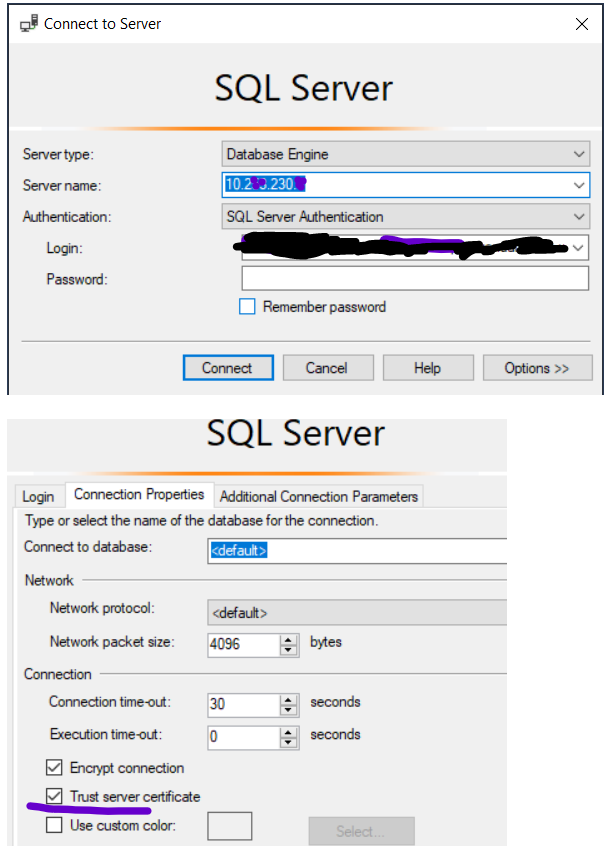
Also check the Trust server certificate checkbox in connection properties.
Please let me know if the answer helped.
Regards,
Oury
Hi @Bill Williamson Just checking if you had the chance to follow instructions i shared above. Please let me know if you have additional query.
Best Regards,
Oury
Hi @Bill Williamson Were you able to try the above workaround?
Please let us know if more assistance is needed.
Regards,
Oury
' cx='32' cy='32' r='32' /%3E%3Ctext x='50%25' y='55%25' dominant-baseline='middle' text-anchor='middle' fill='%23FFF' %3EA%3C/text%3E%3C/svg%3E)
OMG, This works.
@Oury Ba-MSFT would you mind putting this into official docs.
This is quite useful with a setup of P2S VPN since we do not need to modify the Host file to connect to private endpoint.
Do you have any similar trick to connect with AAD MFA in Management Studio?