Microsoft 365 Insider | Loop | Windows
A collaborative workspace app in Microsoft 365 designed to help teams co-create, stay organized, and work together in real time across apps and devices.

This browser is no longer supported.
Upgrade to Microsoft Edge to take advantage of the latest features, security updates, and technical support.
' cx='32' cy='32' r='32' /%3E%3Ctext x='50%25' y='55%25' dominant-baseline='middle' text-anchor='middle' fill='%23FFF' %3EA%3C/text%3E%3C/svg%3E)
I have followed all the instructions to enable loop (and the application works, and components work in some areas such as whiteboard) but not in word online yet, which given all the notes/articles, it should. Are there any other steps to enabling this?
I also note that Loop is out of preview (as some of the previous answers to similar questions say it is still in beta so might not work), but given it is now generally available, this likely doesn't hold anymore.
Thanks heaps :)
Locked Question. This question was migrated from the Microsoft Support Community. You can vote on whether it's helpful, but you can't add comments or replies or follow the question.
Good morning, Zachary!
Thanks for reaching out to our Microsoft Community Forum.
I understand that you're missing the Microsoft Loop button in Word Online.
Microsoft Loop is indeed generally available for customers with Microsoft 365-Business Standard, Business Premium, E3, and E5-on web and mobile according to the link below.
That same link does also state that some components are rolling out early next year. Thus, it's highly recommended that you keep monitoring the article below and even commenting on it for updates on features that don't work for you.
In addition, send us your feedback in the app to help us shape the journey. In the bottom right corner, select Help> Give feedback.
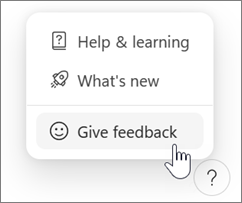
On Android or iOS, tap your profile picture at the top left to find Help and feedback.
Thanks again for choosing Microsoft! We’re here when you need us.
Sincerely,
Glenn Rue
Moderator
Microsoft Community
Hey Glenn,
Thanks for your response feedback.
That article specifically mentions a lot of features rolling out by the end of this year / early next, however, it does not say the word online feature for loop components is 'pending'. The online mention of Word is WRT the whiteboard component and security/compliance.
It appears that the issue may be that I had not moved from standard release to targeted release for the org. I am trying this now.
CXXKXK
After having moved to targeted release, I am now able to insert loop components in Word Online.
This is great - but it would be awesome if the disparate instructions were centralised so as not to have to search a dozen pages for each of the enabling elements (if I just missed this, 100% my fault haha).
Thanks for the update, Zachary.
Glad to know that everything is working now. We appreciate your efforts in finding a solution to this issue. At Microsoft, we greatly value our customers' initiative and resourcefulness.
To help other customers searching for help on related issues, please mark the response you found most helpful by clicking “Yes” on the bottom of that post. This will ensure the helpful responses are most visible when searching (and you can vote more than once if the solution was spread over multiple posts).
If you need help with other Microsoft products, feel free to start a new thread here in the community using the link below. It's always our goal to help you get the most out of said products.
https://answers.microsoft.com/en-us/newthread?threadtype=Questions&cancelurl=%2Fen-us%2F
Thanks again for choosing Microsoft! We’re here when you need us.
Respectfully,
Glenn