Developer technologies | ASP.NET | Other
A set of technologies in .NET for building web applications and web services. Miscellaneous topics that do not fit into specific categories.
This browser is no longer supported.
Upgrade to Microsoft Edge to take advantage of the latest features, security updates, and technical support.
' cx='32' cy='32' r='32' /%3E%3Ctext x='50%25' y='55%25' dominant-baseline='middle' text-anchor='middle' fill='%23FFF' %3EAA%3C/text%3E%3C/svg%3E)
I am using ajaxToolkit:AjaxFileUpload on my web form. I just want to style it differently like make the outline dotted with a background of blue color. Below is the image of how it looks like now. any help will be appreciated.

' cx='32' cy='32' r='32' /%3E%3Ctext x='50%25' y='55%25' dominant-baseline='middle' text-anchor='middle' fill='%23FFF' %3EYS%3C/text%3E%3C/svg%3E)
Hi @Anjali Agarwal ,
Do you want this:

<ajaxToolkit:AjaxFileUpload ID="AjaxFileUpload1" runat="server" BackColor="Blue" />
Best regards,
Yijing Sun
If the answer is helpful, please click "Accept Answer" and upvote it.
Note: Please follow the steps in our documentation to enable e-mail notifications if you want to receive the related email notification for this thread.
Hi @Anjali Agarwal ,
You could customize css to cover it. You could try to do like this:
 .ajax__fileupload {
       background:blue;
    }
Best regards,
Yijing Sun
If the answer is helpful, please click "Accept Answer" and upvote it.
Note: Please follow the steps in our documentation to enable e-mail notifications if you want to receive the related email notification for this thread.
Hi @YI JING Sun,
This is my file upload code:
<ajaxToolkit:AjaxFileUpload CssClass="ajax__fileupload_dropzone" ID="TrustFile" runat="server" OnUploadComplete="AjaxFileUpload1_UploadComplete" Mode="Auto" Width="1100px" />
This is my stylesheet:
.ajax__fileupload_dropzone
{
border:dotted 1px #B2D1E0 !important;
color:#B2D1E0 !important;
}
I dont see any change in the ajax fileupload control. I am not sure what am I doing wrong.
' cx='32' cy='32' r='32' /%3E%3Ctext x='50%25' y='55%25' dominant-baseline='middle' text-anchor='middle' fill='%23FFF' %3EAK%3C/text%3E%3C/svg%3E)
I use that control quite a bit.
the simple css rule can be applied here:
If a div or element has BOTH a ID and class? You are in luck, since in css you can then use the "ID" selector, and that will ALWAYS over ride the class!. and that is what we want.
There are two elements. The drop zone. So, you can get dashed lines and a color with this:
  <style>
                #AjaxFileUpload1_Html5DropZone
                {
                    border:4px;color:black;border-color:black;border:dashed;background-color:deepskyblue
                }
            </style>
            <ajaxToolkit:AjaxFileUpload ID="AjaxFileUpload1" runat="server" OnClientUploadStart="MyUpLoadStart" />
NOTE very close in above - we don't specify a class - but the actual control ID - and thus it will over-ride existing class. The above is for the drop zone, and thus we get this:
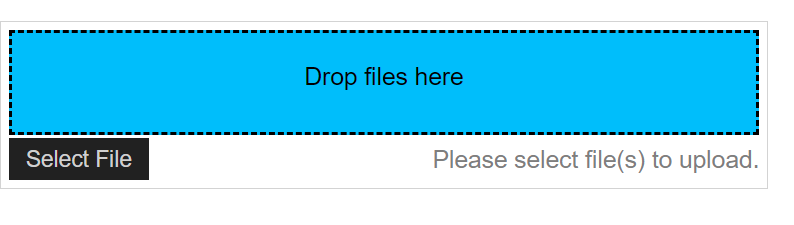
However, if you want the dashed line for the whole box, then use this:
   <style>
                #AjaxFileUpload1_ctl00
                {
                    border:4px;color:black;border-color:black;border:dashed;background-color:deepskyblue
                }
            </style>
            <ajaxToolkit:AjaxFileUpload ID="AjaxFileUpload1" runat="server" OnClientUploadStart="MyUpLoadStart" />
And we get this:
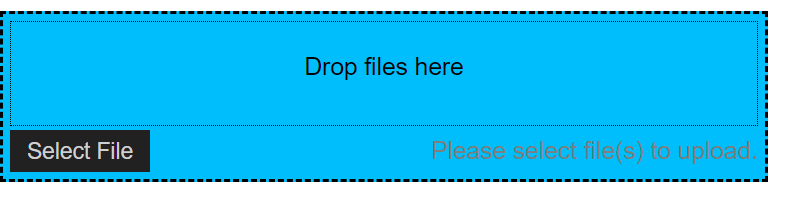
So, in place of a css class selector, you can use one of the above two control ID for the div. This will get you the dashed-line for that div.
Regards,
Albert D. Kallal (Access MVP 2003-2017)
Edmonton, Alberta Canada