Microsoft Security | Intune | Other
Other Intune-related topics, including unsupported scenarios and platform-specific behaviors

This browser is no longer supported.
Upgrade to Microsoft Edge to take advantage of the latest features, security updates, and technical support.
' cx='32' cy='32' r='32' /%3E%3Ctext x='50%25' y='55%25' dominant-baseline='middle' text-anchor='middle' fill='%23FFF' %3ENP%3C/text%3E%3C/svg%3E)
We are experiencing issues with a number of pcs whereas intune in marking them non-compliant due to secure boot not being enabled but it is enabled
' cx='32' cy='32' r='32' /%3E%3Ctext x='50%25' y='55%25' dominant-baseline='middle' text-anchor='middle' fill='%23FFF' %3ELD%3C/text%3E%3C/svg%3E)
Hi @NigelPrattley-0904, hope everything goes well with you.
Have you tried to check the TPM version of the device? please feel free to let me know for any concern.
@NigelPrattley-0904 Thanks for posting in our Q&A. From your description, I know the devices that have enabled secure boot are still shown as Not Compliant in Intune.
Based as I know, the “Require Secure Boot to be enabled on the device” setting is supported on TPM 1.2 and 2.0 devices. For devices that don't support TPM 2.0 or later, the policy status in Intune may show as Not Compliant. For our issue, the possible reason is the TPM version of the devices don't meet the requirements of Intune. So we suggest to check if the TPM version of these devices are supported by Intune or not. We can get a detailed procedure in this document.
https://learn.microsoft.com/en-us/troubleshoot/mem/intune/secure-boot-enabled-device-shows-not-compliant
Hope it can help.
If the response is helpful, please click "Accept Answer" and upvote it.
Note: Please follow the steps in our documentation to enable e-mail notifications if you want to receive the related email notification for this thread.
Hi yes i have checked it is TPM.20 msinfo32 shows UEFI bios mode and secure boot state on, all out other machines are fine it is just this particular model (HP Prodesk 400 G6 Mini PC)
Hi, thanks for the update.
May i know that have you verified if PCR7 Configuration is Bound in msinfo32?
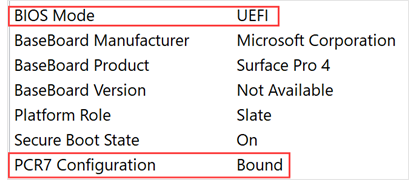
Hi no it is not bound but none of our other pcs are and they are fine, is that not for encryption ?
Hi,since we have excluded the possibble reasons as the document recorded, it seems to be a little complex for our issue.With Q&A limitation, we suggest to open a support ticket to get more help.
https://learn.microsoft.com/en-us/mem/get-support
Thanks for your understanding and have a nice day!