Developer technologies | Windows Presentation Foundation
A part of the .NET Framework that provides a unified programming model for building line-of-business desktop applications on Windows.
This browser is no longer supported.
Upgrade to Microsoft Edge to take advantage of the latest features, security updates, and technical support.
' cx='32' cy='32' r='32' /%3E%3Ctext x='50%25' y='55%25' dominant-baseline='middle' text-anchor='middle' fill='%23FFF' %3ER7%3C/text%3E%3C/svg%3E)
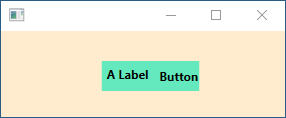
Assume a grid in a wpf window. I want a "cell" of that grid to be a specified color and I want the controls in that cell to be centered. For example, consider the window below which contains a 2x2 grid with a StackPanel in cell (1,1) generated by the following XAML:
<StackPanel
	Background="#64E8BE"
	Grid.Column="1"
	Grid.Row="1"
	Margin="0,0,5,0"
	HorizontalAlignment="Center"
	Orientation="Horizontal">
	<Label
		Content="A Label"
		FontSize="12"
		FontWeight="Bold"
		Margin="0,0,5,0">
	</Label>
	<Button
		Background="Transparent"
		BorderThickness="0"
		Content="Button"
		FontSize="12"
		FontWeight="Bold">
	</Button>
</StackPanel>
which yields:
If I remove the HorizontalAlignment="Center" line from the StackPanel, I get:
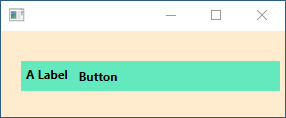
In summary, I can get the controls centered OR I can color the whole cell but I cannot figure out how to get both.
' cx='32' cy='32' r='32' /%3E%3Ctext x='50%25' y='55%25' dominant-baseline='middle' text-anchor='middle' fill='%23FFF' %3EEH%3C/text%3E%3C/svg%3E)
Use Grid inside Grid like this:
<Grid Margin="20">
    <Grid.RowDefinitions>
        <RowDefinition/>
        <RowDefinition/>
    </Grid.RowDefinitions>
    <Grid.ColumnDefinitions>
        <ColumnDefinition/>
        <ColumnDefinition/>
    </Grid.ColumnDefinitions>
    <Grid Background="#64E8BE">
        <Grid.ColumnDefinitions>
            <ColumnDefinition/>
            <ColumnDefinition/>
        </Grid.ColumnDefinitions>
        <Label Content="A Label"
               FontSize="12"
               FontWeight="Bold"
               HorizontalAlignment="Center"
               VerticalAlignment="Center"/>

        <Button Grid.Column="1"
                Background="Transparent"
                HorizontalAlignment="Center"
                BorderThickness="0"
                Content="Button"
                FontSize="12"
                FontWeight="Bold"/>
    </Grid>
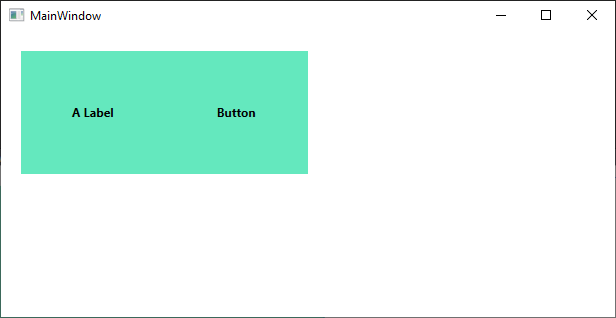
to have something like this: