Azure Files
An Azure service that offers file shares in the cloud.
This browser is no longer supported.
Upgrade to Microsoft Edge to take advantage of the latest features, security updates, and technical support.
' cx='32' cy='32' r='32' /%3E%3Ctext x='50%25' y='55%25' dominant-baseline='middle' text-anchor='middle' fill='%23FFF' %3EK%3C/text%3E%3C/svg%3E)
Setting the user permission on a Azure file share so that the individual users are able to see & access only the folders with their user ID.
I have an azure filestore where multiple users are expected to write their data. This happens to be on Az file storage which is AD enabled and as such all the users (part of share_user group) have SMB Share Contributor role on the userdata folder.
\azurefileshare\userdata\
Under these I intend to create sub folders with each user ID like user1 , user 2 , user 3 etc.
Expectation is to ensure that when the users add the file share network drive and be able to see only 1 folder which is for their name / id.
Steps :
Created the file share on Azure and provided the group - share_user as SMB Share Contributor role
Logged on to one of the VMs as admin(used the shared ID and Access keys to login) and created sub folders for each user.
In Security tab, removed the user / administrator users from advanced tab( Removed inheritance)
Added the particilar user (eg: user 1 for folder user1) to have read, write, list folder contents permissions to user 1.
With these :
The users are able to access the directory :
\azurefileshare\userdata\
Can see all sub folders like user1, user2,user3 - but can access only their respective folders.
With this though the user data is safe however intention was to ensure each user just sees their own directory.
Please advise, if I need to create a sub folder and then place the user directories inside.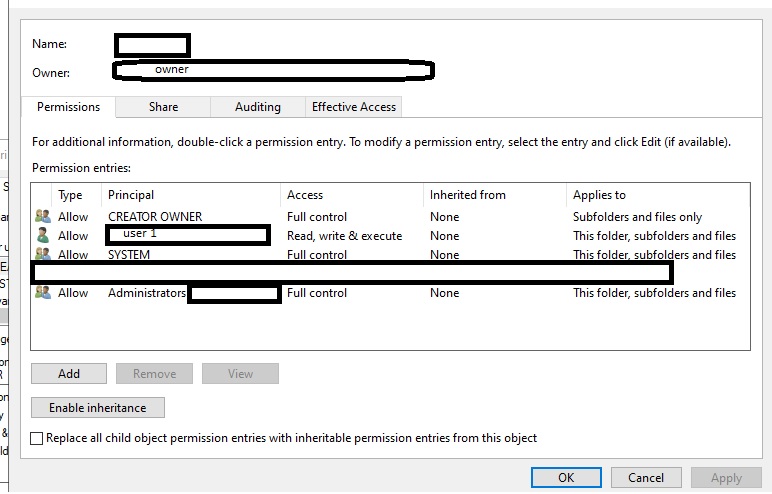

@Kaushik I assume you are using the AD identity? Is the user 1 is able to access the share(I mean the folders)?
Most probably they have cached their credentials and its not going through the AD auth
You can also check if you have cached credentials by following these steps: 1. Cmdkey /list