Exchange | Exchange Server | Management
The administration and maintenance of Microsoft Exchange Server to ensure secure, reliable, and efficient email and collaboration services across an organization.
This browser is no longer supported.
Upgrade to Microsoft Edge to take advantage of the latest features, security updates, and technical support.
' cx='32' cy='32' r='32' /%3E%3Ctext x='50%25' y='55%25' dominant-baseline='middle' text-anchor='middle' fill='%23FFF' %3EAA%3C/text%3E%3C/svg%3E)
I am trying to launch exchange management shell in my lab and get this error. It is Exchange 2019
VERBOSE: Connecting to EX01.teksite.org.
New-PSSession : [ex01.teksite.org] Connecting to remote server ex01.teksite.org failed with the following error
message : The WinRM client cannot process the request. It cannot determine the content type of the HTTP response from
the destination computer. The content type is absent or invalid. For more information, see the
about_Remote_Troubleshooting Help topic.
At line:1 char:1
close this I will reinstall my lapsetup

Check, if the Exchange Backend website bindings have a certificate assigned and is valid. Usually, a self signed SSL certificate is assigned. If not, assign it properly. If there is any issue like certificate expired or something, you may create a new certificate and assign it
I did that and restarted the iis still the same
' cx='32' cy='32' r='32' /%3E%3Ctext x='50%25' y='55%25' dominant-baseline='middle' text-anchor='middle' fill='%23FFF' %3EYS%3C/text%3E%3C/svg%3E)
Hi @asif ahamed ,
close this I will reinstall my lapsetup
Have you already proceeded to reinstall the setup? If haven't, I'd suggest having a check via IIS manager to make sure it's point to the correct path:
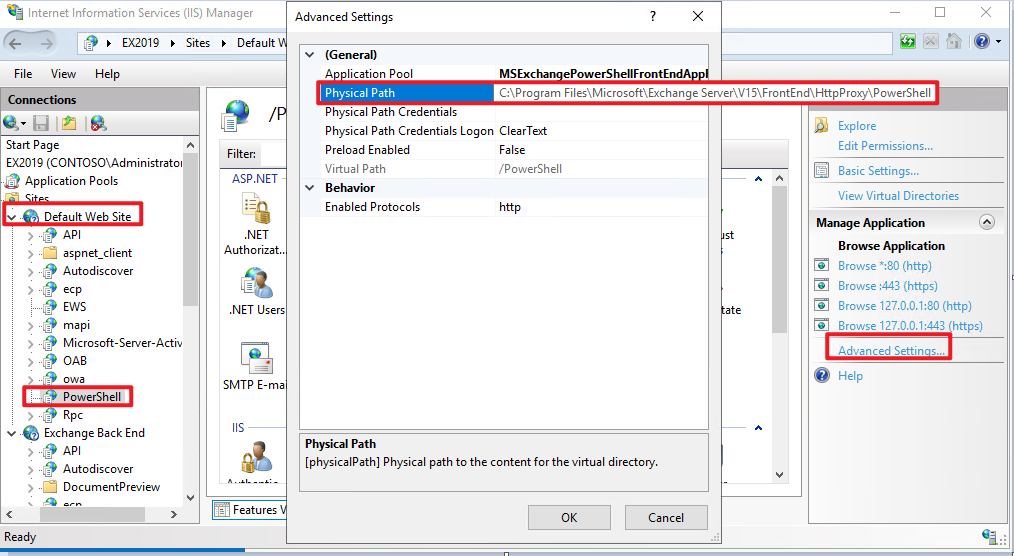
If it still doesn't help, agree with you that a reinstallation might be a quicker way to sort things out considering that it's a lab environment.
And by the way, to close a question, you can click on the Gear icon for the question or answer(at the upper right corner) and choose "Close", see Closing a question.
If an Answer is helpful, please click "Accept Answer" and upvote it.
Note: Please follow the steps in our documentation to enable e-mail notifications if you want to receive the related email notification for this thread.