Developer technologies | VB
An object-oriented programming language developed by Microsoft that can be used in .NET.
This browser is no longer supported.
Upgrade to Microsoft Edge to take advantage of the latest features, security updates, and technical support.
' cx='32' cy='32' r='32' /%3E%3Ctext x='50%25' y='55%25' dominant-baseline='middle' text-anchor='middle' fill='%23FFF' %3EH%3C/text%3E%3C/svg%3E)
Hallo,
I am looking for a code to export Datagridview contents with its formatting to Excel. I have found following as potential solution but i dont know how to use it. Could anyone please let me know how to use the imported dll. I dont find any documentation on how to use it.
https://archive.codeplex.com/?p=exporttoexcel
thanks

Can you be more specific with formatting as the formatting done in a DataGridView does not match that of a Excel WorkSheet.
Lets say i want only colors of the header row and alternating row color and cell borders

See c# - Export the dataGridView to Excel with all the cells format - Stack Overflow. It might help.
Hallo ,
i am close to get the desired result. i am struggling to set row font style to datagridview row font style (e.g Bold or regular) below is my code . i want to set my excel row font to bold if my datagridview row is bold. Any idea what is wrong here? thanks
                        With xlSH.Range(xlSH.Cell(i + 2, 1), xlSH.Cell(i + 2, jk))
                            .Style.Fill.BackgroundColor = XLColor.FromArgb(dgv.Rows(i).DefaultCellStyle.BackColor.ToArgb)
                            .Style = dgv.Rows(i).DefaultCellStyle.Font.Style
                            .Style.Font.FontColor = XLColor.FromArgb(dgv.Rows(i).DefaultCellStyle.ForeColor.ToArgb)
                        End With
' cx='32' cy='32' r='32' /%3E%3Ctext x='50%25' y='55%25' dominant-baseline='middle' text-anchor='middle' fill='%23FFF' %3EXZ%3C/text%3E%3C/svg%3E)
Hi @Hobbyist_programmer ,
As suggested in the reference SimpleSamples provided:
https://stackoverflow.com/a/39314154/12666543
I make a test on my side, and the code works for me.
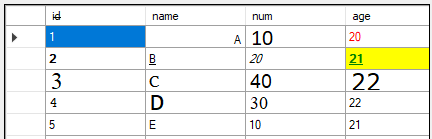
Data in my datagridview.
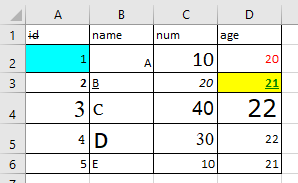
Result in Excel.
I use it this way.
Imports Excel = Microsoft.Office.Interop.Excel

    Private Sub Button1_Click(sender As Object, e As EventArgs) Handles Button1.Click
        DataGridView1.AllowUserToAddRows = False
        Dim dgvToHTMLTable As String = ConvertDataGridViewToHTMLWithFormatting(DataGridView1)
        Clipboard.SetText(dgvToHTMLTable)

        Dim xlWorkBook As Excel.Workbook
        Dim xlWorkSheet As Excel.Worksheet
        Dim xlApp As Excel.Application = New Excel.Application()
        xlApp.Visible = False
        xlApp.UserControl = True

        xlWorkBook = xlApp.Workbooks.Add(Type.Missing)
        xlApp.ActiveWorkbook.Sheets(1).Activate()
        xlWorkSheet = CType(xlWorkBook.Worksheets(1), Excel.Worksheet)
        xlWorkSheet.PasteSpecial(Missing.Value, False, False, Missing.Value, Missing.Value, Missing.Value, Missing.Value)
        xlWorkBook.SaveAs("your file path")

        xlWorkBook.Close()
        xlApp.Quit()

    End Sub
Hope it could be helpful.
Best Regards,
Xingyu Zhao
*
If the answer is helpful, please click "Accept Answer" and upvote it.
Note: Please follow the steps in our documentation to enable e-mail notifications if you want to receive the related email notification for this thread.