Developer technologies | ASP.NET | Other
A set of technologies in .NET for building web applications and web services. Miscellaneous topics that do not fit into specific categories.
This browser is no longer supported.
Upgrade to Microsoft Edge to take advantage of the latest features, security updates, and technical support.
' cx='32' cy='32' r='32' /%3E%3Ctext x='50%25' y='55%25' dominant-baseline='middle' text-anchor='middle' fill='%23FFF' %3ESI%3C/text%3E%3C/svg%3E)
Hi. I have the following scenario:
Two model which are
 public class Customer
        {
            public string CustomerID { get; set; }
            public string CompanyName { get; set; }
        }

public class Order
    {
        public int OrderID { get; set; }
        public int CustomerID { get; set; }
        public DateTime OrderDate { get; set; }
        public DateTime RequiredDate { get; set; }
        public string ItemName { get; set; }
        public int QTY { get; set; }
    }
The CustomerController is:
    public ActionResult Index()
            {
                return View(db.Query<Customer>("CustomerList", commandType: CommandType.StoredProcedure).ToList());
            }
 public JsonResult GetList(int id)
        {
            DynamicParameters paraDetails = new DynamicParameters();
            paraDetails.Add("@CustomerID",id);
            var _orderList = db.Query<Order>("CustOrdersOrders", paraDetails, commandType: CommandType.StoredProcedure).ToList();
            return Json(_orderList, JsonRequestBehavior.AllowGet);
        }
The view is:
<table class="table table-bordered table-sm ">
    <thead class="thead-dark">
        <tr>
            <th>Column</th>
            <th>Column</th>
            <th>Column</th>
            <th>Column</th>
        </tr>
    </thead>
    @foreach (var item in Model)
    {

        <tr class="clickable" data-toggle="collapse" data-target="#group-of-rows-@item.CustomerID" aria-expanded="false" aria-controls="group-of-rows-@item.CustomerID">
            <td><i class="fa fa-folder"></i></td>
            <td>@Html.DisplayFor(modelItem => item.CustomerID)</td>
            <td>@Html.DisplayFor(modelItem => item.CompanyName)</td>
            <td>data</td>
        </tr>

        <tr id="group-of-rows-@item.CustomerID" class="collapse table-warning">
            <td><i class="fa fa-folder-open"></i> child row</td>
            <td></td>
            <td></td>
            <td></td>
        </tr>

    }
First I fill the table with information, only when I click on class="clickable" data-toggle="collapse" I want to fill the data with the JsonResult GetList(int id) and I got stuck to create javascript and fill the child row
$(document).ready(function() {
                $("#OrderList").change(function() {
                    $.ajax({
                        type: 'GET',
                        url: '@Url.Action("GetList")',
                        datatype: JSON,
                        data: {
                            'cutomerId': $("#OrderList").val()
                        },
                        success: function(data) {

                            });
                        },
                        error: function(data) {}
                    });
                });
            });
Please I need some help on how to get this working.
Thank you!
' cx='32' cy='32' r='32' /%3E%3Ctext x='50%25' y='55%25' dominant-baseline='middle' text-anchor='middle' fill='%23FFF' %3EYS%3C/text%3E%3C/svg%3E)
Hi @Strosala Ioan ,
First I fill the table with information, only when I click on class="clickable" data-toggle="collapse" I want to fill the data with the JsonResult GetList(int id) and I got stuck to create javascript and fill the child row
In your codes,I'm thinking you need to change $("#OrderList") value and return the data to the child row. And you should find the child row's parents' id and append it to the child row. You could refer to below codes:
125444-new-text-document-4.txt
Best regards,
Yijing Sun
If the answer is helpful, please click "Accept Answer" and upvote it.
Note: Please follow the steps in our documentation to enable e-mail notifications if you want to receive the related email notification for this thread.
Dear Yijing Sun. Thank you for help.
I tested your code, but does not work, it does not return an error either. I attache the code.125418-new-5.txt
That's what I want. Now let's just see where is the problem, because it fails to execute this part of code:
public JsonResult GetList(string id)
{
}
Best regards. Thank you for your support and I appreciate the support.
Hi @Strosala Ioan ,
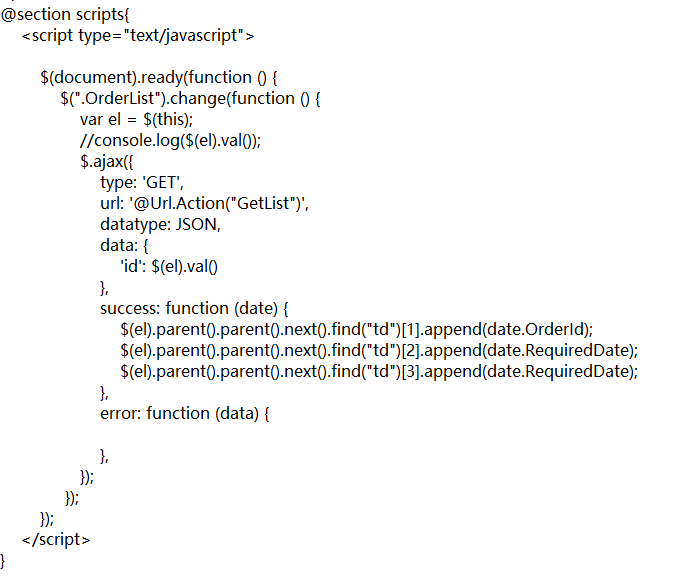
According to your codes that you post to us,I'm guessing that your problem is the ajax data don't correspond to the id paramater of the JsonResult method, so it cannot be executed.
I suggest that you can debug it to check wheather you run the method. And you could press F12 to check your ajax data.
You could check these lines codes:
$.ajax({
                    type: 'GET',
                    url: '@Url.Action("GetList")',
                    datatype: JSON,
                    data: {
                        'id': $(el).val()
                    },
                    success: function (date) {
                        $(el).parent().parent().next().find("td")[1].append(date.OrderId);
                        $(el).parent().parent().next().find("td")[2].append(date.RequiredDate);
                        $(el).parent().parent().next().find("td")[3].append(date.RequiredDate);
                    },
                    error: function (data) {

                    },
                });

 public JsonResult GetList(string id)
 {
 }
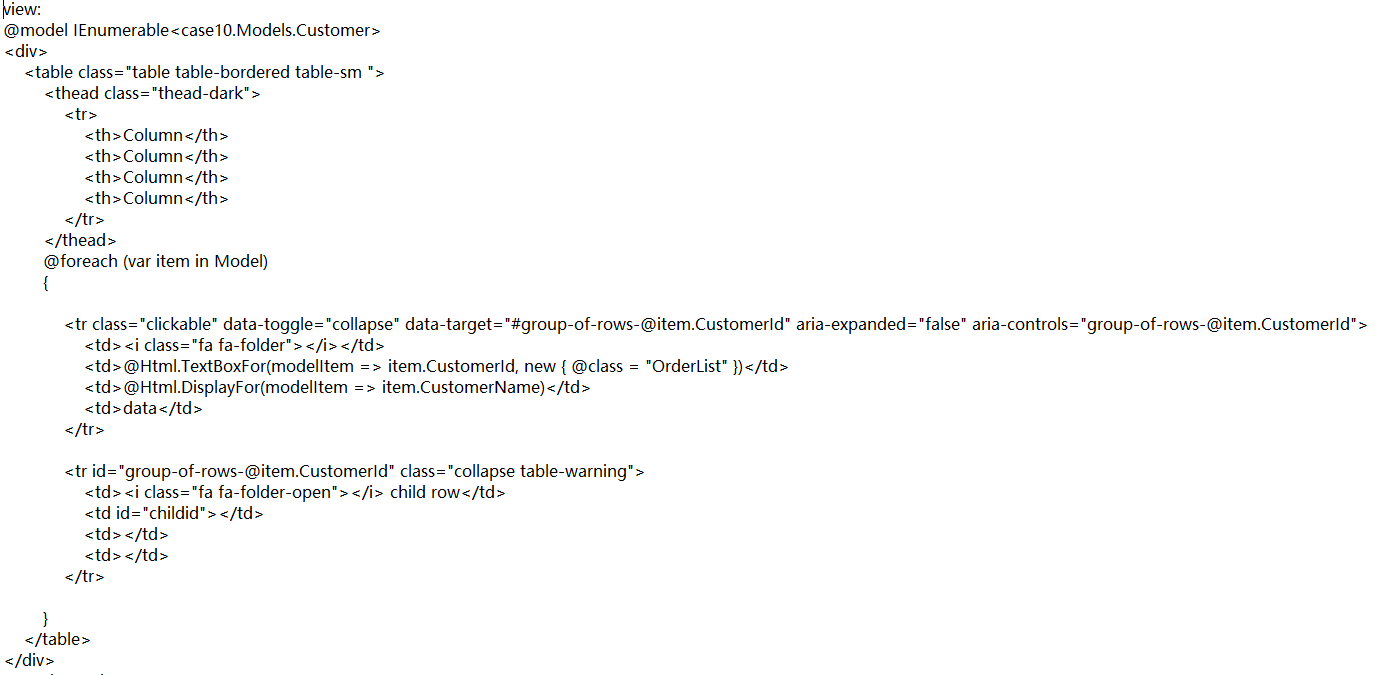
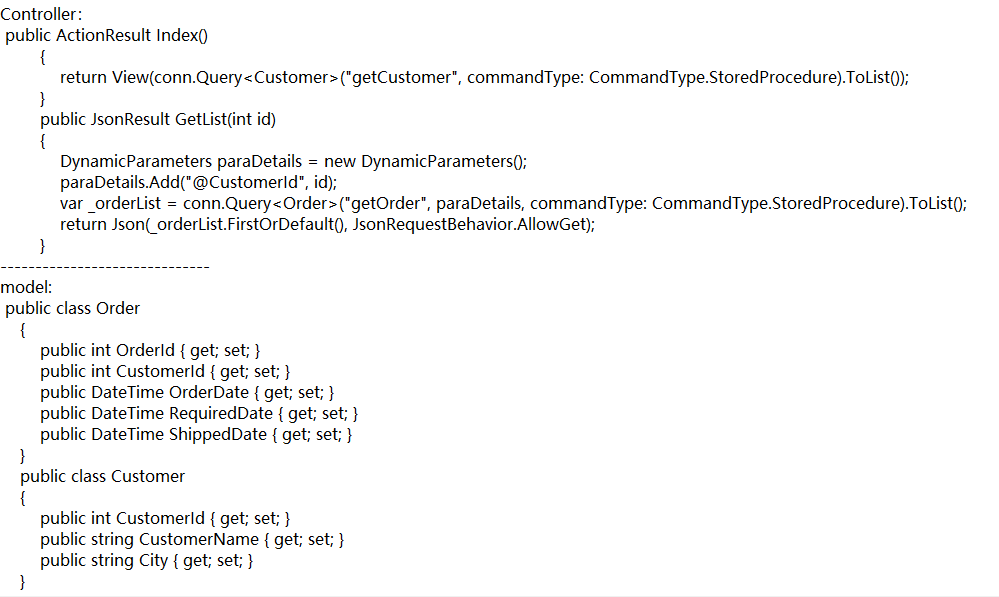
I will provide you with full codes to you and you can try it.
Best regards,
Yijing Sun
Dear Yijing Sun. Thank you for help. I fixed the problem in javascript and it works .
Best regards.