Microsoft 365 and Office | SharePoint | For business | Windows
A group of Microsoft Products and technologies used for sharing and managing content, knowledge, and applications.

This browser is no longer supported.
Upgrade to Microsoft Edge to take advantage of the latest features, security updates, and technical support.
' cx='32' cy='32' r='32' /%3E%3Ctext x='50%25' y='55%25' dominant-baseline='middle' text-anchor='middle' fill='%23FFF' %3ETD%3C/text%3E%3C/svg%3E)
Hi Guys, I have noticed weird behaviour on communication modern sites. When adding a new page as per the below screen ![126617-image.png][1] [1]: /api/attachments/126617-image.png?platform=QnA it is creating the page with a random name and then when we give a proper name to the page and then publish it, we end up with 2 pages, one with the random name and the other with the new name. It seems like a bug. Is it a bug, or am I missing something? Thanks

Hi anonymous user
As per my test, I reproduced this issue when I first create a page with a template:
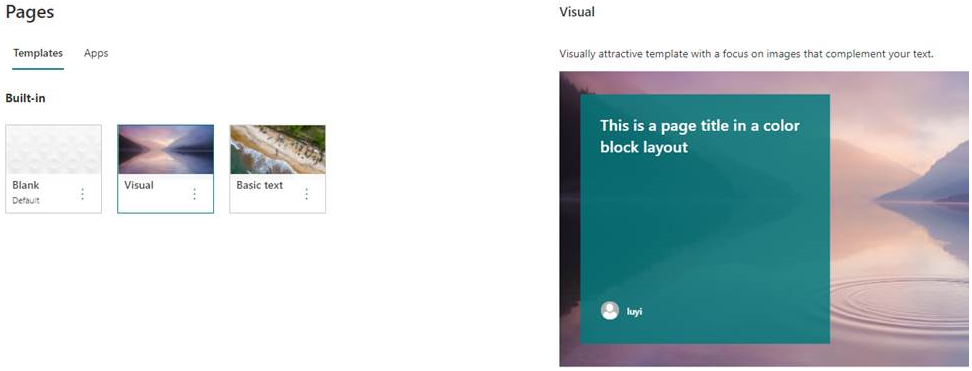
Then two pages appear: One of the page is with random name.
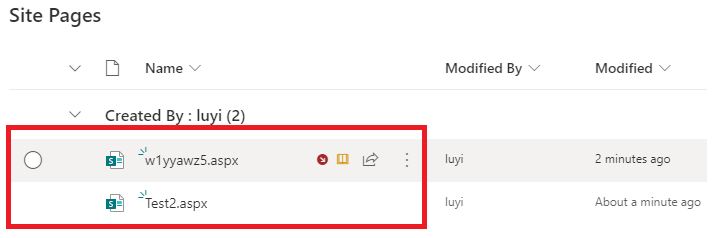
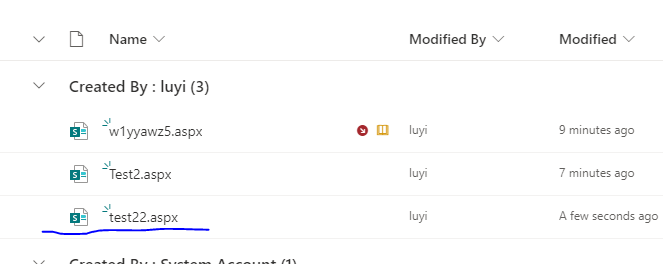
If the template page exists or you add a page without using a template, you will not meet the case.
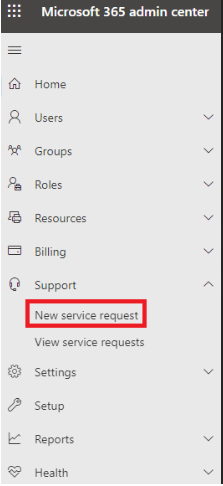
I would suggest you open a service request in Microsoft 365 admin center to confirm it with Microsoft.
If an Answer is helpful, please click "Accept Answer" and upvote it.
Note: Please follow the steps in our documentation to enable e-mail notifications if you want to receive the related email notification for this thread.