Developer technologies | Universal Windows Platform (UWP)
A Microsoft platform for building and publishing apps for Windows devices.
This browser is no longer supported.
Upgrade to Microsoft Edge to take advantage of the latest features, security updates, and technical support.
' cx='32' cy='32' r='32' /%3E%3Ctext x='50%25' y='55%25' dominant-baseline='middle' text-anchor='middle' fill='%23FFF' %3ENS%3C/text%3E%3C/svg%3E)
This is a question that I'm sure has been asked many times before, but I still have trouble finding the answer. I have a file (*.png) that I need to open as a WriteableBitmap. I have the Uri and am able to open it as a BitmapImage, but I cannot seem to create a WriteableBitmap from it. Can anybody help me here? Thanks.
' cx='32' cy='32' r='32' /%3E%3Ctext x='50%25' y='55%25' dominant-baseline='middle' text-anchor='middle' fill='%23FFF' %3EA%3C/text%3E%3C/svg%3E)
Are anonymous user-3316 and @Daniele 's solutions helpful to you? If it is, you could accept their reply as answer.

If you have the Uri then you can use RandomAccessStreamReference.CreateFromUri to create a stream (valid chemes are http, https, ms-appx, and ms-appdata, docs here), and read from the stream to create the WriteableBitmap.
Code sample:
private async Task<WriteableBitmap> UriToWriteableBitmap(Uri uri)
{
    var randomAccessStreamReference = RandomAccessStreamReference.CreateFromUri(uri);
    using (IRandomAccessStreamWithContentType stream = await randomAccessStreamReference.OpenReadAsync())
    {
        return await StreamToWriteableBitmap(stream);
    }
}

private static async Task<WriteableBitmap> StreamToWriteableBitmap(IRandomAccessStream stream)
{
    var decoder = await BitmapDecoder.CreateAsync(stream);
    var writeableBitmap = new WriteableBitmap((int)decoder.PixelWidth, (int)decoder.PixelHeight);
    stream.Seek(0);
    await writeableBitmap.SetSourceAsync(stream);
    return writeableBitmap;
}
You can use method StreamToWriteableBitmap above with StorageFile too:
using (IRandomAccessStreamWithContentType stream = await storageFile.OpenReadAsync())
{
    WriteableBitmap streamToWriteableBitmap = await StreamToWriteableBitmap(stream);
}
Here below another implementation of method StreamToWriteableBitmap that uses SoftwareBitmap class
private static async Task<WriteableBitmap> StreamToWriteableBitmap(IRandomAccessStream stream)
{
    var decoder = await BitmapDecoder.CreateAsync(stream);
    using (SoftwareBitmap softwareBitmap = await decoder.GetSoftwareBitmapAsync())
    {
        var writeableBitmap = new WriteableBitmap(softwareBitmap.PixelWidth, softwareBitmap.PixelHeight);
        softwareBitmap.CopyToBuffer(writeableBitmap.PixelBuffer);
        return writeableBitmap;
    }
}

Hi,
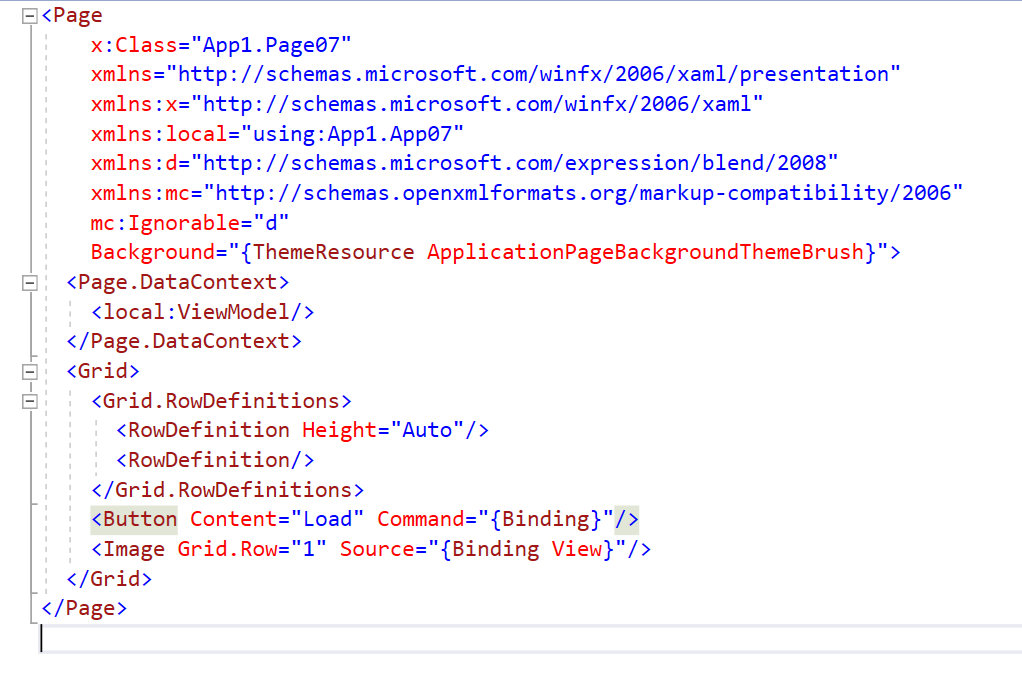
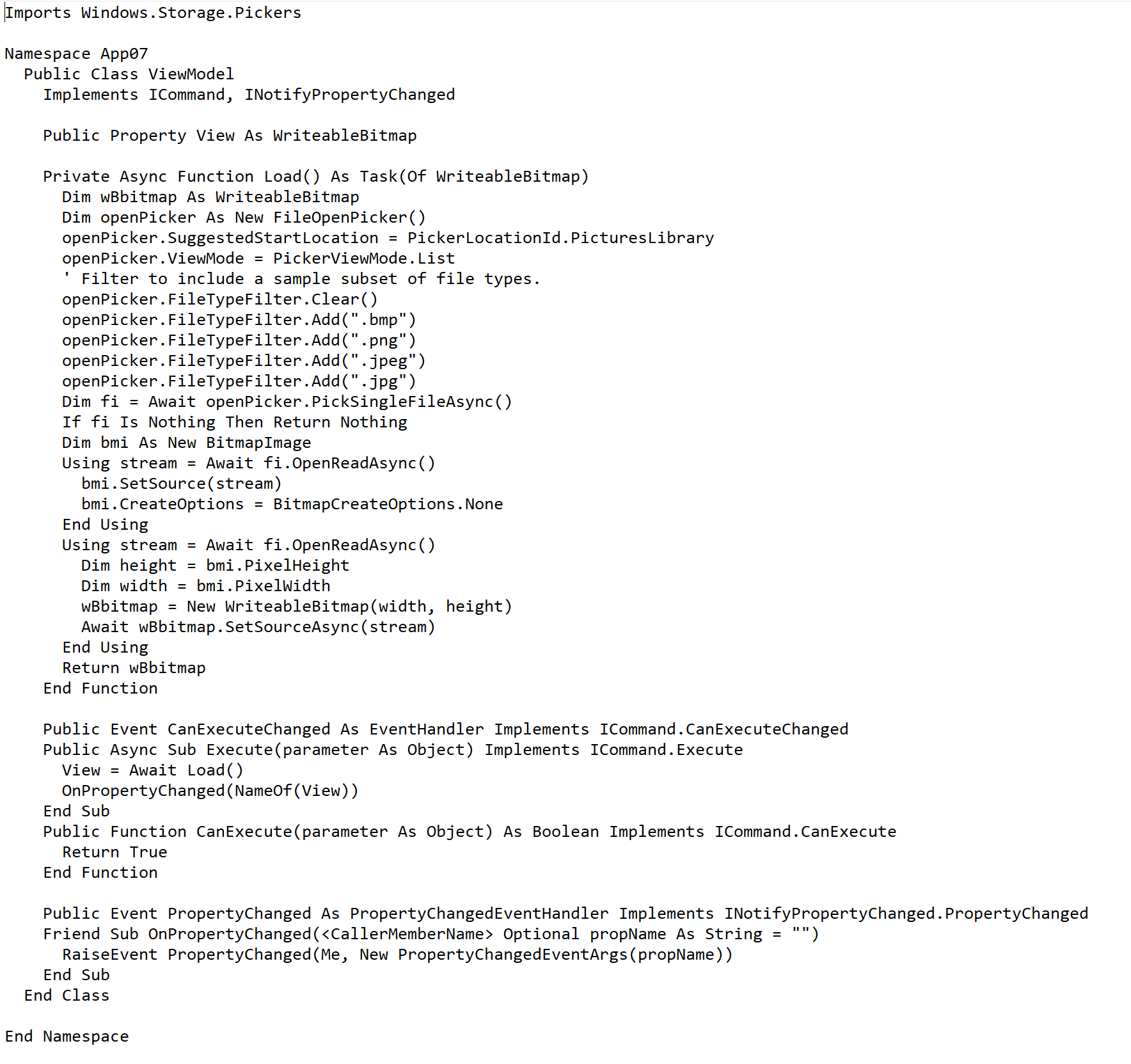
try following demo: