So last year the DBA installed an SSAS Tabular instance on our windows 2019 server.
Today we got a question asking if we can also have a multidimentional instance.
I have converted the SSAS instance from tabular to multi-dimentional before by editting the msmdsrv.ini and changed DeploymentMode from 2 to 0, so i know thats possible.
However having another/separate instance on the same server? Im not too sure how that works...
Ive tried connecting to the server from SSMS and just like I'd do for a sql database instance, I sepcified the server and instance as such: server\MSSQLSERVER, where MSSQLSERVER is the default instance based on the properties i see.

However, i got an error:
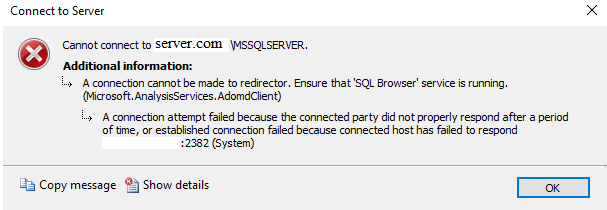
If i specify ONLY server.com, the connection works.
So how come if i specify the default instance, MSSQLSERVER it doesnt connect?
Does this mean that another instance cannot be created? or basically, should i answer the question by saying "Its not possible to create a separate multi-dimensional instance on the same server"?
' cx='32' cy='32' r='32' /%3E%3Ctext x='50%25' y='55%25' dominant-baseline='middle' text-anchor='middle' fill='%23FFF' %3EC%3C/text%3E%3C/svg%3E)
' cx='32' cy='32' r='32' /%3E%3Ctext x='50%25' y='55%25' dominant-baseline='middle' text-anchor='middle' fill='%23FFF' %3EAM%3C/text%3E%3C/svg%3E)
