SQL Server Migration Assistant
A Microsoft tool designed to automate database migration to SQL Server from Access, DB2, MySQL, Oracle, and SAP ASE.
This browser is no longer supported.
Upgrade to Microsoft Edge to take advantage of the latest features, security updates, and technical support.
' cx='32' cy='32' r='32' /%3E%3Ctext x='50%25' y='55%25' dominant-baseline='middle' text-anchor='middle' fill='%23FFF' %3EGR%3C/text%3E%3C/svg%3E)
Hello,
I am using SQLCMD to generate .txt file from SQL Query
command used :
sqlcmd -E -S AUE-P-SQL02 -d Assembly -W -i C:\GRV\test.sql -o c:\GRV\TEST.TXT -s '|'
Restult of .Text File is : as below.
| ETQ$NUMBER | SBD_MAT_PART_SKU_NUMBER_P | SUPPLIER_MATERIAL_NAME | SBD_MAT_COST_P | SBD_MAT_CURRENCY_TYPE_1_P | SBD_MAT_SAP_PLANT_NUMBER_P | SBD_MAT_SAP_SYSTEM_ID_P | SBD_SAP_MODIFIED_DATE_1_P |
|---|---|---|---|---|---|---|---|
| ~CLV1~NAC | .00000000000000000000 | USD | CLV1 | NAC | 20210406 | ||
| -~CLV1~NAC | - | trolley | 317.54700000000000000000 | USD | CLV1 | NAC | 20210406 |
| 10010~CLV1~NAC | 10010 | 20H208033 | .00000000000000000000 | USD | CLV1 | NAC | 20210813 |
| 10013~CLV1~NAC | 10013 | CHOOSE HANDLE | 448.84862000000000000000 | USD | CLV1 | NAC | 20210406 |
| 10014~CLV1~NAC | 10014 | CHOOSE HANDLE | 645.51967000000000000000 | USD | CLV1 | NAC | 20210406 |
| 10017~CLV1~NAC | 10017 | CHOOSE HANDLE | 533.02659000000000000000 | USD | CLV1 | NAC | 20210406 |
| 10018~CLV1~NAC | 10018 | CHOOSE HANDLE | 662.26467000000000000000 | USD | CLV1 | NAC | 20210406 |
| 10019~CLV1~NAC | 10019 | CHOOSE HANDLE | 639.13467000000000000000 | USD | CLV1 | NAC | 20210406 |
| 10020~CLV1~NAC | 10020 | CHOOSE HANDLE | 675.89467000000000000000 | USD | CLV1 | NAC | 20210406 |
| 10021~CLV1~NAC | 10021 | CHOOSE HANDLE | 549.77159000000000000000 | USD | CLV1 | NAC | 20210406 |
(10 rows affected)
I want to remove the ------ line came after column heading and after last line it shows (10 rows affected)
input file is with simple command like "Select top 10 * from Test"

Hi,
Not clear to me what come after the header, but simple to show. Can you please upload to the forum a file with sample result you get and a file with the expected result which you want to get. You can upload text file directly to the question/answer in the forum
Remove this "shows (10 rows affected)" is clear and is done by using SET NOCOUNT.
By the way, you can use the PowerShell command: Invoke-Sqlcmd instead of using the SQLCMD utility
This is much more flexible and allow to format the result in nice ways and store as file
https://learn.microsoft.com/en-us/powershell/module/sqlserver/invoke-sqlcmd?view=sqlserver-ps
' cx='32' cy='32' r='32' /%3E%3Ctext x='50%25' y='55%25' dominant-baseline='middle' text-anchor='middle' fill='%23FFF' %3ESX%3C/text%3E%3C/svg%3E)
Hi @Gund, Ramesh GRV ,
We have not received a response from you. Did the reply could help you? If the response helped, do "Accept Answer". If it doesn't work, please let us know the progress. By doing so, it will benefit all community members who are having this similar issue. Your contribution is highly appreciated.
Best regards,
Seeya
Please find the attached current output file :
if I use -h -1 ===> Then header row is disappears - As I expect that header record to be in o/p file.
Here in file after header display and before 1st row there are line with hyphen --------- ( need to suppress)
by using SET NOCOUNT ON below issue resolved
(10 rows affected) is suppressed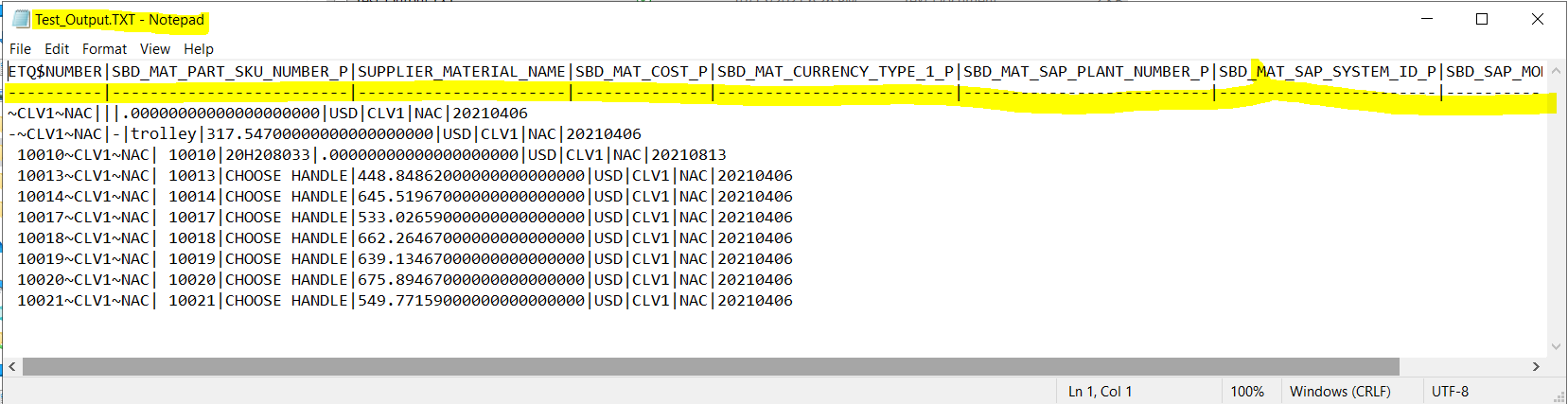
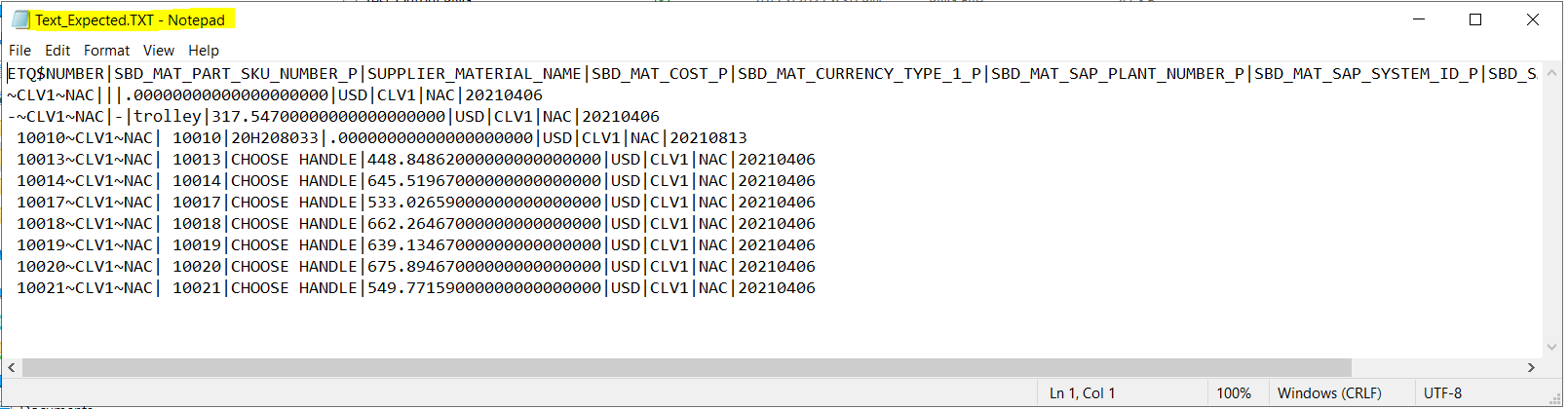
File : Test-output.png is current o/p from sqlcmd
File : Test expected-output.png is expected o/p -
Thanks : @Seeya Xi-MSFT - supress last line.
by -h -1 : this removes header line
I need to remove line between header row and 1st rows displayed
After Text result each header column is underlined by hyphens , The line between Header row and 1st row set need to be remove.
SET NOSOUNT ON - helped to remove row count from text o/p
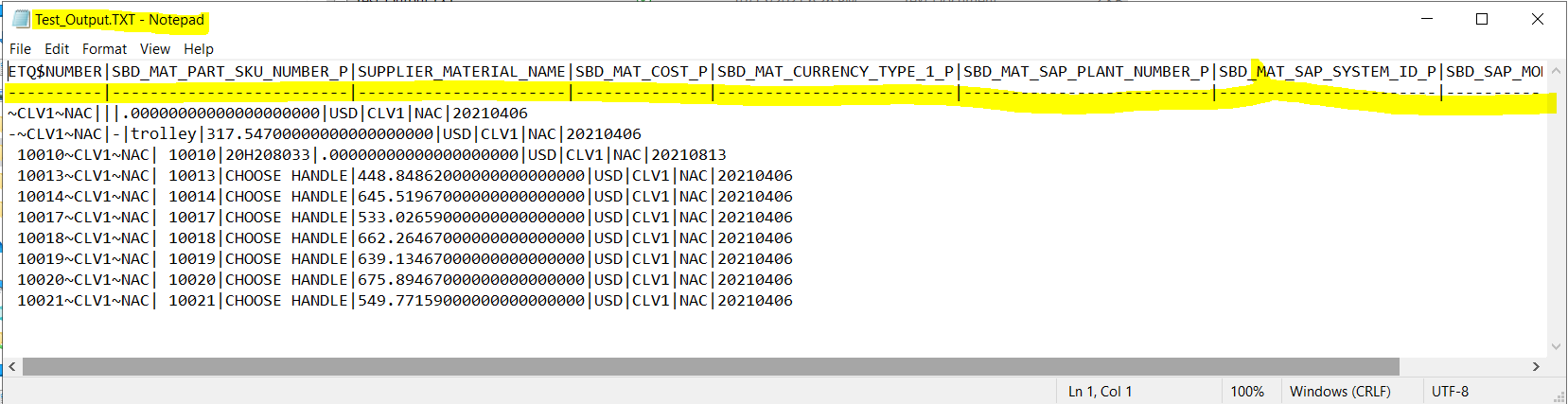
Yellow marked line need to be remove from o/p
' cx='32' cy='32' r='32' /%3E%3Ctext x='50%25' y='55%25' dominant-baseline='middle' text-anchor='middle' fill='%23FFF' %3ETP%3C/text%3E%3C/svg%3E)
There is no way to leave the header and remove the ---- between header and data.
OK... now it is clear, and the solution is simple :-)
I will add a solution as answer in the bottom
Hi @Gund, Ramesh GRV ,
Agree with Tom. >There is no way to leave the header and remove the ---- between header and data.
But I found a stupid method that you can try, which is to print the column name plus the -h -1 option.
In your sql script you can add statements as follows.
A simple example:
USE AdventureWorksLT2017
GO
SET NOCOUNT ON
print 'ProductID | Name | ProductNumber| Color | StandardCost | ListPrice | Size |  Weight | ProductCategoryID | ProductModelID | SellStartDate | SellEndDate | DiscontinuedDate | ThumbNailPhoto | ThumbnailPhotoFileName | rowguid | ModifiedDate'
select top 10 * from SalesLT.Product
Best regards,
Seeya
If the response is helpful, please click "Accept Answer" and upvote it.
Thanks Seeya,
Above solution is 100% worked for my expected o/p
Thanks
Ramesh Gund
SET NOCOUNT ON
print 'Field1 | Field2 | Field3 | Field4 | Fiend5'
select top 10 from Test
Note : In my example output fields are separated by pipe | symbol you can use , or other chare
Run Below command from Command prompt or you can create Test.bat file and run it
Command to run : c:\test>SQLCMD.exe -E -S MySqlServer -d MyDB -W -i c:\test\test.sql -h -1 -o c:\test\test.txt -s "|"