Developer technologies | Windows Presentation Foundation
A part of the .NET Framework that provides a unified programming model for building line-of-business desktop applications on Windows.
This browser is no longer supported.
Upgrade to Microsoft Edge to take advantage of the latest features, security updates, and technical support.
' cx='32' cy='32' r='32' /%3E%3Ctext x='50%25' y='55%25' dominant-baseline='middle' text-anchor='middle' fill='%23FFF' %3ESW%3C/text%3E%3C/svg%3E)
I want to display nested groups in a datagrid.
Currently one level of grouping is displayed with the help of expander control.
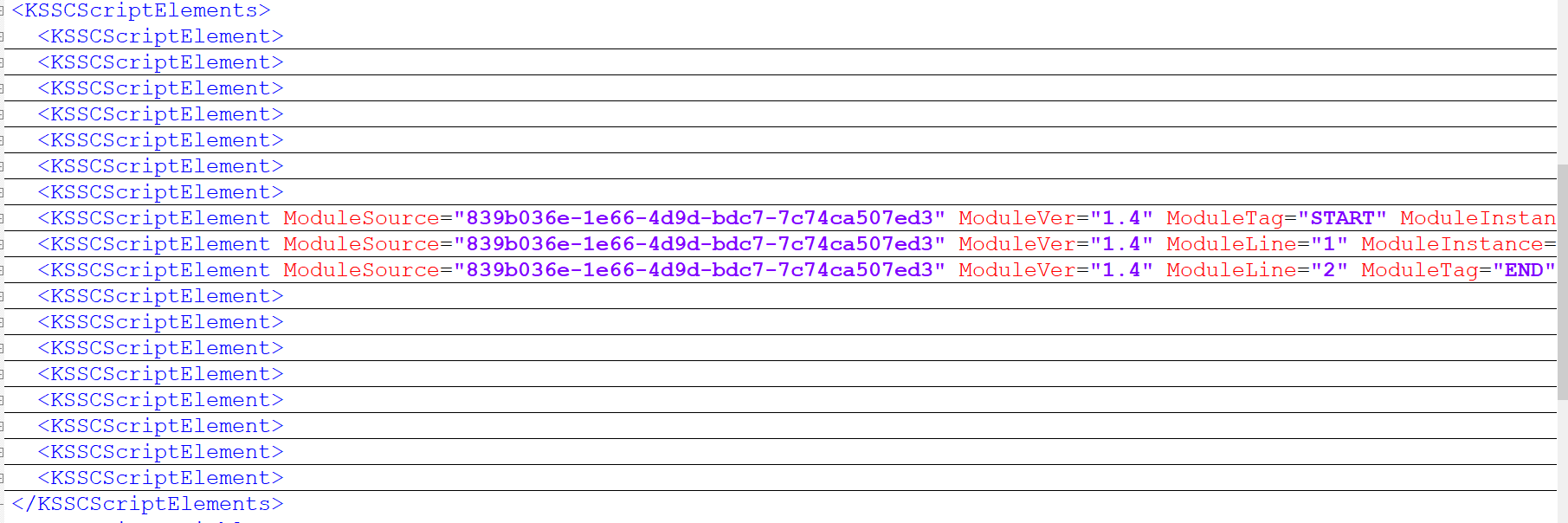
Groups are identified with the help of tag "ModuleTag"
Displayed on UI like this
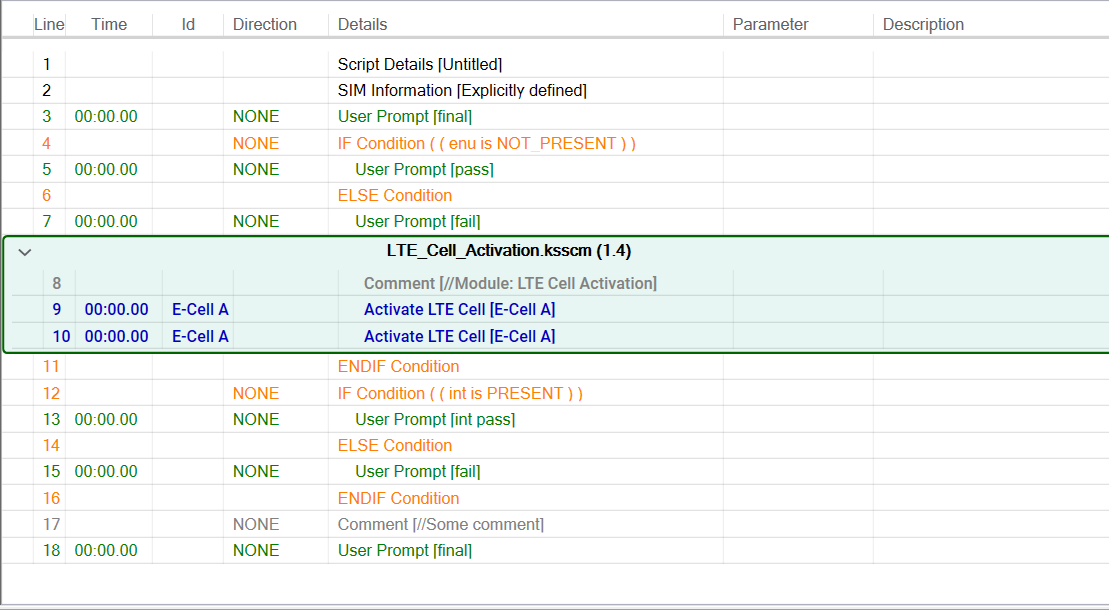
Now I want to add sub groups inside that group which should be displayed using expander.
<GroupStyle>
<GroupStyle.ContainerStyle>
<Style TargetType="{x:Type GroupItem}">
<Style.Triggers>
<DataTrigger Binding="{Binding Items[0].IsModuleStartTag}" Value="True">
<Setter Property="Template" Value="{StaticResource ExpanderControlTemplate}"/>
</DataTrigger>
<DataTrigger Binding="{Binding Items[0].IsModuleStartTag}" Value="False">
<Setter Property="Template" Value="{StaticResource NonExpanderControlTemplate}"/>
</DataTrigger>
</Style.Triggers>
</Style>
</GroupStyle.ContainerStyle>
</GroupStyle>
<ControlTemplate TargetType="{x:Type GroupItem}" x:Key="NonExpanderControlTemplate">
<StackPanel HorizontalAlignment="Stretch">
<ItemsPresenter/>
</StackPanel>
</ControlTemplate>
<ControlTemplate TargetType="{x:Type GroupItem}" x:Key="ExpanderControlTemplate">
<Grid Width="{Binding RelativeSource={RelativeSource TemplatedParent}, Path=ActualWidth}">
<Expander x:Name="GroupExapnder" IsExpanded="False" Style="{StaticResource ResourceKey=stylee}">
<ItemsPresenter/>
</Expander>
<TextBlock x:Name="ModuleHeader" Text="{Binding Items[0].ModuleDetails}" Width="{Binding Path=ActualWidth, ElementName=GroupExapnder}" Padding="180,5,0,0" Margin="60,0,0,0" HorizontalAlignment="Center"
VerticalAlignment="Top" Height="20" Foreground="Black" FontWeight="SemiBold" MouseDown="ModuleHeader_MouseDown" MaxWidth="1000" MouseMove="TextBlock_MouseMove" MouseLeave="ModuleHeader_MouseLeave"/>
</Grid>
</ControlTemplate>
' cx='32' cy='32' r='32' /%3E%3Ctext x='50%25' y='55%25' dominant-baseline='middle' text-anchor='middle' fill='%23FFF' %3EHL%3C/text%3E%3C/svg%3E)
You could try to refer to the code of the document.
I modified the <!-- style of the group under the top level--> part of the sample code to the following code. And the result is as follows, you can check if it works.
<!-- Style for groups under the top level. -->
    <GroupStyle>
                        <GroupStyle.ContainerStyle>
                            <Style TargetType="{x:Type GroupItem}">
                                <Setter Property="Margin" Value=" 0,0,0,5"/>
                                <Setter Property="Template">
                                    <Setter.Value>
                                        <ControlTemplate TargetType="{x:Type GroupItem}">
                                            <Expander IsEnabled="True" Background="LightBlue" >
                                                <Expander.Header>
                                                    <DockPanel>
                                                        <TextBlock Text="{Binding Path=Name, Converter={StaticResource completeConverter}}" Foreground="Blue" Margin="30,0,0,0" Width="100"/>
                                                        <TextBlock Text="{Binding Path=ItemCount}" Foreground="Blue"/>
                                                    </DockPanel>
                                                </Expander.Header>
                                                <Expander.Content>
                                                    <ItemsPresenter/>
                                                </Expander.Content>
                                            </Expander>
                                        </ControlTemplate>
                                    </Setter.Value>
                                </Setter>
                            </Style>
                        </GroupStyle.ContainerStyle>
                        <!--<GroupStyle.HeaderTemplate>
                            <DataTemplate>
                                <DockPanel Background="LightBlue">
                                    <TextBlock Text="{Binding Path=Name, Converter={StaticResource completeConverter}}" Foreground="Blue" Margin="30,0,0,0" Width="100"/>
                                    <TextBlock Text="{Binding Path=ItemCount}" Foreground="Blue"/>
                                </DockPanel>
                            </DataTemplate>
                        </GroupStyle.HeaderTemplate>-->
                    </GroupStyle>
The picture of result:
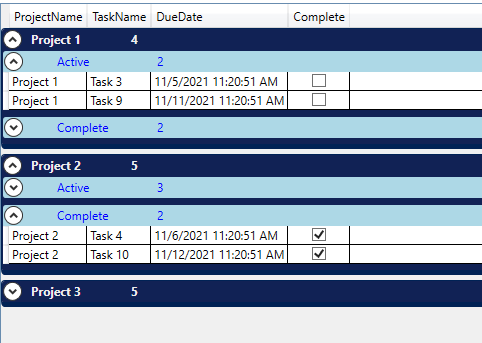
You could try to refer to the following method.
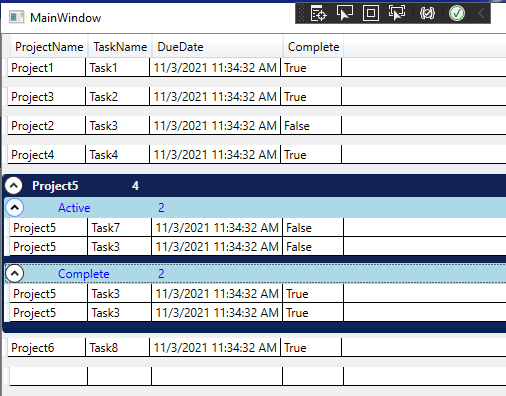
First set Style.Resource to add an ungrouped ControlTemplate. Then when ItemCount=1, bind ControlTemplate through DataTrigger to set no grouping.
<Window.Resources>
        <local:CompleteConverter x:Key="completeConverter" />
        <local:Tasks x:Key="tasks" />
        <CollectionViewSource x:Key="cvsTasks" Source="{StaticResource tasks}"  >
            <CollectionViewSource.GroupDescriptions>
                <PropertyGroupDescription PropertyName="ProjectName"/>
                <PropertyGroupDescription PropertyName="Complete"/>
            </CollectionViewSource.GroupDescriptions>
        </CollectionViewSource>
    </Window.Resources>
    <Grid>
        <DataGrid x:Name="dataGrid1"  AutoGenerateColumns="False"
                   ItemsSource="{Binding Source={StaticResource cvsTasks}}">
            <DataGrid.GroupStyle>

                <GroupStyle>

                    <GroupStyle.ContainerStyle>
                        <Style TargetType="{x:Type GroupItem}">
                            <Style.Resources>
                                <ControlTemplate x:Key="notgroup" TargetType="{x:Type GroupItem}">
                                    <ItemsPresenter />
                                </ControlTemplate>
                            </Style.Resources>
                            <Setter Property="Template">
                                <Setter.Value>
                                    <ControlTemplate  x:Name="group" TargetType="{x:Type GroupItem}">
                                        <Expander IsExpanded="True" Background="#FF112255" BorderBrush="#FF002255" Foreground="#FFEEEEEE" BorderThickness="1,1,1,5">
                                            <Expander.Header>
                                                <DockPanel>
                                                    <TextBlock FontWeight="Bold" Text="{Binding Path=Name}" Margin="5,0,0,0" Width="100"/>
                                                    <TextBlock FontWeight="Bold" Text="{Binding Path=ItemCount}"/>
                                                </DockPanel>
                                            </Expander.Header>
                                            <Expander.Content>
                                                <ItemsPresenter/>
                                            </Expander.Content>
                                        </Expander>
                                    </ControlTemplate>
                                </Setter.Value>
                            </Setter>
                            <Setter Property="Margin" Value="0,0,0,5"/>
                            <Style.Triggers>
                                <DataTrigger Binding="{Binding ItemCount}" Value="1">
                                    <Setter Property="Template" Value="{StaticResource notgroup }"/>
                                </DataTrigger>
                            </Style.Triggers>
                        </Style>
                    </GroupStyle.ContainerStyle>
                </GroupStyle>
                <GroupStyle>
                    <GroupStyle.ContainerStyle>
                        <Style TargetType="{x:Type GroupItem}">
                            <Style.Resources>
                                <ControlTemplate x:Key="notgroup1" TargetType="{x:Type GroupItem}">
                                    <ItemsPresenter />
                                </ControlTemplate>
                            </Style.Resources>
                            <Setter Property="Margin" Value=" 0,0,0,5"/>
                            <Setter Property="Template">
                                <Setter.Value>
                                    <ControlTemplate TargetType="{x:Type GroupItem}">
                                        <Expander IsEnabled="True" Background="LightBlue" >
                                            <Expander.Header>
                                                <DockPanel>
                                                    <TextBlock Text="{Binding Path=Name, Converter={StaticResource completeConverter}}" Foreground="Blue" Margin="30,0,0,0" Width="100"/>
                                                    <TextBlock Text="{Binding Path=ItemCount}" Foreground="Blue"/>
                                                </DockPanel>
                                            </Expander.Header>
                                            <Expander.Content>
                                                <ItemsPresenter/>
                                            </Expander.Content>
                                        </Expander>
                                    </ControlTemplate>
                                </Setter.Value>
                            </Setter>
                            <Style.Triggers>
                                <DataTrigger Binding="{Binding ItemCount}" Value="1">
                                    <Setter Property="Template" Value="{StaticResource notgroup1 }"/>
                                </DataTrigger>
                            </Style.Triggers>
                        </Style>
                    </GroupStyle.ContainerStyle>
                </GroupStyle>
            </DataGrid.GroupStyle>
            <DataGrid.Columns>
                <DataGridTextColumn Header="ProjectName" Binding="{Binding ProjectName}" />
                <DataGridTextColumn Header="TaskName" Binding="{Binding TaskName}" />
                <DataGridTextColumn Header="DueDate" Binding="{Binding DueDate}" />
                <DataGridTextColumn Header="Complete" Binding="{Binding Complete}" />
            </DataGrid.Columns>
        </DataGrid>
    </Grid>
The code of xaml.cs :
For testing, I modified the MainWindow() method to the following code.
public MainWindow()
    {
      InitializeComponent();
      Tasks _tasks = (Tasks)this.Resources["tasks"];
        _tasks.Add(new Task(){ ProjectName = "Project1 ", TaskName = "Task1 " , DueDate=DateTime.Now , Complete = true });
        _tasks.Add(new Task(){ ProjectName = "Project3 ", TaskName = "Task2 " , DueDate = DateTime.Now, Complete = true});
        _tasks.Add(new Task(){ ProjectName = "Project2 ", TaskName = "Task3 " , DueDate = DateTime.Now, Complete = false });
        _tasks.Add(new Task(){ ProjectName = "Project4 ", TaskName = "Task4 " , DueDate = DateTime.Now, Complete = true  });
        _tasks.Add(new Task(){ ProjectName = "Project5 ", TaskName = "Task7 " , DueDate = DateTime.Now, Complete = false});
        _tasks.Add(new Task(){ ProjectName = "Project5 ", TaskName = "Task3 " , DueDate = DateTime.Now, Complete = false });
        _tasks.Add(new Task(){ ProjectName = "Project5 ", TaskName = "Task3 " , DueDate = DateTime.Now, Complete = true });
        _tasks.Add(new Task(){ ProjectName = "Project5 ", TaskName = "Task3 " , DueDate = DateTime.Now, Complete = true });
        _tasks.Add(new Task(){ ProjectName = "Project6 ", TaskName = "Task8 " , DueDate = DateTime.Now, Complete = true  });

    }
The picture of result:
If the answer is the right solution, please click Accept Answer and kindly upvote it. If you have extra questions about this answer, please click Comment.
Note: Please follow the steps in our documentation to enable e-mail notifications if you want to receive the related email notification for this thread.
Hi @Hui Liu-MSFT
Thanks for the response. I have tried this approach as well.
I have one issue with this
Just like in the screenshot you see grouped(expander) and ungrouped(normal lines) are placed together in a sequence(what ever comes from the data source. ) Sequence should not change. Data coming will already be in grouped sequence. (As you can see from the XML screenshot).
Now I want the same behaviour inside the expander as well. Meaning it can have ungrouped lines then some grouped lines(expander inside and expander) and then some ungrouped lines.
Hi,@Saiyed Wahidunnisa .I updated my answer, you could check it out.
Hi Thanks, this works like a charm.
Hi @Hui Liu-MSFT
Thanks for the response. I have tried this approach as well.
I have one issue with this
Just like in the screenshot you see grouped(expander) and ungrouped(normal lines) are placed together in a sequence(what ever comes from the data source. ) Sequence should not change. Data coming will already be in grouped sequence. (As you can see from the XML screenshot).
Now I want the same behaviour inside the expander as well. Meaning it can have ungrouped lines then some grouped lines(expander inside and expander) and then some ungrouped lines.