Developer technologies | Transact-SQL
A Microsoft extension to the ANSI SQL language that includes procedural programming, local variables, and various support functions.
This browser is no longer supported.
Upgrade to Microsoft Edge to take advantage of the latest features, security updates, and technical support.
' cx='32' cy='32' r='32' /%3E%3Ctext x='50%25' y='55%25' dominant-baseline='middle' text-anchor='middle' fill='%23FFF' %3EGL%3C/text%3E%3C/svg%3E)
Hello, I need to send these print commands out to a text file. How is this done?
PRINT '@UserID, ' + Cast(@UserID AS VARCHAR(MAX));
PRINT '@UserDate, ' + Cast(@UserDate AS VARCHAR(MAX));
PRINT '@LocationID, ' + Cast(@LocationID AS VARCHAR(MAX));
PRINT '@CustomerID, ' + Cast(@CustomerID AS VARCHAR(MAX));
PRINT '@EquipmentID, ' + Cast(@EquipmentID AS VARCHAR(MAX));
PRINT '@ReadingDate, ' + Cast(@ReadingDate AS VARCHAR(MAX));
PRINT '@ReadingType, ' + Cast(@ReadingType AS VARCHAR(MAX));
PRINT '@NumberOfDays, ' + Cast(@NumberOfDays AS VARCHAR(MAX));
PRINT '@Consumption1, ' + Cast(@Consumption1 AS VARCHAR(MAX));
PRINT '@Consumption2, ' + Cast(@Consumption2 AS VARCHAR(MAX));
PRINT '@Consumption3, ' + Cast(@Consumption3 AS VARCHAR(MAX));
PRINT '@Reading, ' + Cast(@Reading AS VARCHAR(MAX));
PRINT '@PrevReadingValue, ' + Cast(@PrevReadingValue AS VARCHAR(MAX));
PRINT '@umBatchID ' + Cast(@umBatchID AS VARCHAR(MAX));
' cx='32' cy='32' r='32' /%3E%3Ctext x='50%25' y='55%25' dominant-baseline='middle' text-anchor='middle' fill='%23FFF' %3EEM%3C/text%3E%3C/svg%3E)
Could you please validate all the answers so far and provide any update?
If all of them are not working or helpful, please provide more sample data or details about your issue.
Please remember to accept the answers if they helped. Your action would be helpful to other users who encounter the same issue and read this thread.
Thank you for understanding!
' cx='32' cy='32' r='32' /%3E%3Ctext x='50%25' y='55%25' dominant-baseline='middle' text-anchor='middle' fill='%23FFF' %3EG%3C/text%3E%3C/svg%3E)
Here is the good example "How to Write in Text File from T-SQL in SQL Server?".
In the Second Step, you can replace the code at line 6 with the following code:
EXECUTE sp_OAMethod @FileID, 'WriteLine', Null, 'PRINT ''@UserID, '' + Cast(@UserID AS VARCHAR(MAX));
PRINT ''@UserDate, '' + Cast(@UserDate AS VARCHAR(MAX));
PRINT ''@LocationID, '' + Cast(@LocationID AS VARCHAR(MAX));
PRINT ''@CustomerID, '' + Cast(@CustomerID AS VARCHAR(MAX));
PRINT ''@EquipmentID, '' + Cast(@EquipmentID AS VARCHAR(MAX));
PRINT ''@ReadingDate, '' + Cast(@ReadingDate AS VARCHAR(MAX));
PRINT ''@ReadingType, '' + Cast(@ReadingType AS VARCHAR(MAX));
PRINT ''@NumberOfDays, '' + Cast(@NumberOfDays AS VARCHAR(MAX));
PRINT ''@Consumption1, '' + Cast(@Consumption1 AS VARCHAR(MAX));
PRINT ''@Consumption2, '' + Cast(@Consumption2 AS VARCHAR(MAX));
PRINT ''@Consumption3, '' + Cast(@Consumption3 AS VARCHAR(MAX));
PRINT ''@Reading, '' + Cast(@Reading AS VARCHAR(MAX));
PRINT ''@PrevReadingValue, '' + Cast(@PrevReadingValue AS VARCHAR(MAX));
PRINT ''@umBatchID '' + Cast(@umBatchID AS VARCHAR(MAX));'
Basically you need to replace the single quote with the double one around the variables.
Thank you GuoxiongYuan-7218. I assume I will need to do this for all the print commands then.
Yes, I updated my answer.
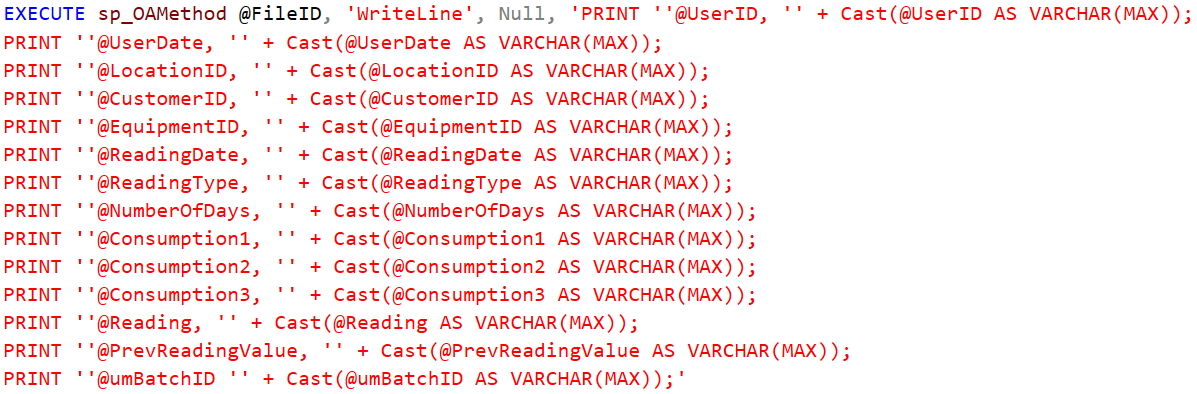
Replace the code at line 6 with the following one:
EXECUTE sp_OAMethod @FileID, 'WriteLine', Null, 'PRINT ''@UserID, '' + Cast(@UserID AS VARCHAR(MAX));
PRINT ''@UserDate, '' + Cast(@UserDate AS VARCHAR(MAX));
PRINT ''@LocationID, '' + Cast(@LocationID AS VARCHAR(MAX));
PRINT ''@CustomerID, '' + Cast(@CustomerID AS VARCHAR(MAX));
PRINT ''@EquipmentID, '' + Cast(@EquipmentID AS VARCHAR(MAX));
PRINT ''@ReadingDate, '' + Cast(@ReadingDate AS VARCHAR(MAX));
PRINT ''@ReadingType, '' + Cast(@ReadingType AS VARCHAR(MAX));
PRINT ''@NumberOfDays, '' + Cast(@NumberOfDays AS VARCHAR(MAX));
PRINT ''@Consumption1, '' + Cast(@Consumption1 AS VARCHAR(MAX));
PRINT ''@Consumption2, '' + Cast(@Consumption2 AS VARCHAR(MAX));
PRINT ''@Consumption3, '' + Cast(@Consumption3 AS VARCHAR(MAX));
PRINT ''@Reading, '' + Cast(@Reading AS VARCHAR(MAX));
PRINT ''@PrevReadingValue, '' + Cast(@PrevReadingValue AS VARCHAR(MAX));
PRINT ''@umBatchID '' + Cast(@umBatchID AS VARCHAR(MAX));'
It seems the posted code is blocked. Here is the screenshot:

If you want the output to file when you run from SSMS, you can press Ctrl-Shift-F to redirect the output to a file. (SSMS will prompt you for a file name.) This is also available in the Query->Results To submenu .
Another option is to use the command-line tool SQLCMD to run the script and use the -o option redirect the output to a file.
I'm mentioning this, as you may find this more lightweight than using sp_OAmethod.