Microsoft 365 and Office | SharePoint | Development
The process of building custom applications and tools that interact with Microsoft SharePoint, including SharePoint Online in Microsoft 365.

This browser is no longer supported.
Upgrade to Microsoft Edge to take advantage of the latest features, security updates, and technical support.
' cx='32' cy='32' r='32' /%3E%3Ctext x='50%25' y='55%25' dominant-baseline='middle' text-anchor='middle' fill='%23FFF' %3EAK%3C/text%3E%3C/svg%3E)
150436-orgchart.txtI am using List schema as TeamMember(PeoplePicker),FunctionalManager(PeoplePicker),Department(SingleLinetext) and using below thread to create org chart in SharePoint
But it only create first node where for top manager not the rest and also how to get image of TeamMember as well on different nodes x
not able to post my coder here as getting access denied but following below article but my list structure is having people picker
@Dennis Guo
could you please help here as you have answered a thread which am following
' cx='32' cy='32' r='32' /%3E%3Ctext x='50%25' y='55%25' dominant-baseline='middle' text-anchor='middle' fill='%23FFF' %3ER%3C/text%3E%3C/svg%3E)
Hi @Ashok Kumar ,
You can share the code by uploading txt file and could you please share some screenshots with more details for us to test?
hi @RaytheonXie_MSFT i
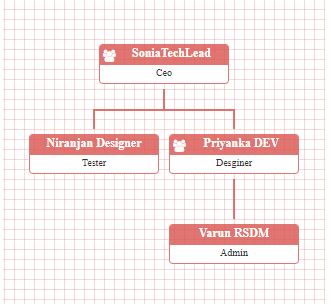
uploaded the txt file and image which i want as expected result it always first node only with people picker column as my json is not getting structured which i think is a issue
The result which i am getting from code is only first node where Manager is 0 other nodes are not coming
' cx='32' cy='32' r='32' /%3E%3Ctext x='50%25' y='55%25' dominant-baseline='middle' text-anchor='middle' fill='%23FFF' %3EAK%3C/text%3E%3C/svg%3E)
Have you got chance to look into this
Hi @Ashok Kumar ,
I will recommend spfx to achieve this. Please refer to the following code
https://github.com/pnp/sp-dev-fx-webparts/tree/main/samples/react-organization-chart
If the answer is helpful, please click "Accept Answer" and kindly upvote it. If you have extra questions about this answer, please click "Comment".
Note: Please follow the steps in our documentation to enable e-mail notifications if you want to receive the related email notification for this thread.