Azure Logic Apps
An Azure service that automates the access and use of data across clouds without writing code.
This browser is no longer supported.
Upgrade to Microsoft Edge to take advantage of the latest features, security updates, and technical support.
' cx='32' cy='32' r='32' /%3E%3Ctext x='50%25' y='55%25' dominant-baseline='middle' text-anchor='middle' fill='%23FFF' %3EBF%3C/text%3E%3C/svg%3E)
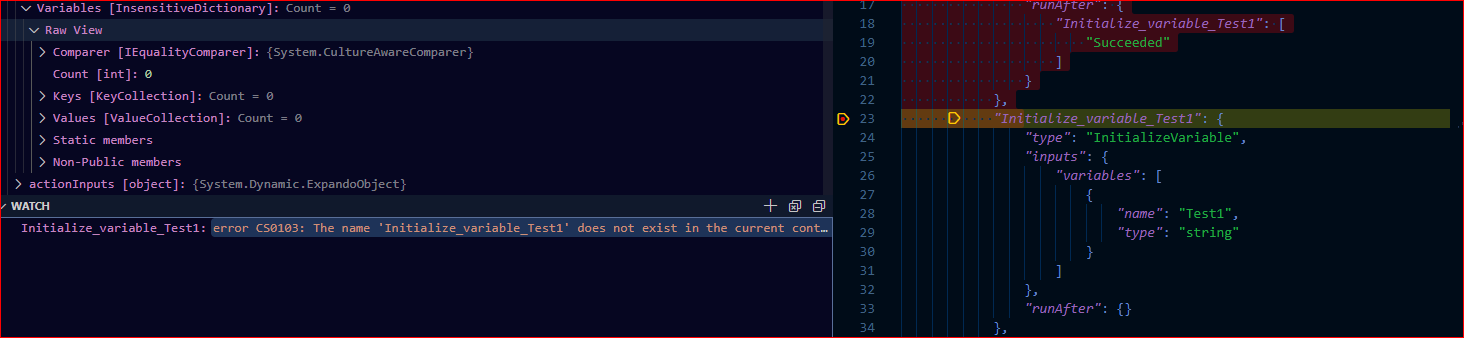
Here's Json: I'm trying to evaluate Initialize_variable_ResultScope action variables:
{
"definition": {
"$schema": "https://schema.management.azure.com/providers/Microsoft.Logic/schemas/2016-06-01/workflowdefinition.json#",
"actions": {
"Scope": {
"type": "Scope",
"actions": {
"Set_variable_Message": {
"type": "SetVariable",
"inputs": {
"name": "Message",
"value": "Test Message"
},
"runAfter": {}
}
},
"runAfter": {
"Initialize_variable_ResultScope": [
"Succeeded"
]
}
},
"Initialize_variable_ResultScope": {
"type": "InitializeVariable",
"inputs": {
"variables": [
{
"name": "ResultScope",
"type": "array"
}
]
},
"runAfter": {
"Initialize_variable_Message": [
"Succeeded"
]
}
},

@Bob Feller Apology for the delay. Manage breakpoints for debugging section should help examine the Variables pane. Are you facing any issues following it.
I read the article, but doesn't explain how to set up varaiables in the Watch window: