Microsoft 365 and Office | SharePoint | Development
The process of building custom applications and tools that interact with Microsoft SharePoint, including SharePoint Online in Microsoft 365.

This browser is no longer supported.
Upgrade to Microsoft Edge to take advantage of the latest features, security updates, and technical support.
' cx='32' cy='32' r='32' /%3E%3Ctext x='50%25' y='55%25' dominant-baseline='middle' text-anchor='middle' fill='%23FFF' %3ERP%3C/text%3E%3C/svg%3E)
Hi All,
I need some help with a simple task in a SharePoint list, but i can't get it right. I have 2 date columns in my list.
1 Customer required date (CCD)
2 Ready For Service date (RFS)
I want to compare the dates and give CCD a red color if RFS is past the CCD or els green. for the KPI measurements. I tried a view JSON solutions but somehow they are comparisons with "@now "
At the moment i am experimenting with the JSON below:
{
"$schema": "https://developer.microsoft.com/json-schemas/sp/v2/column-formatting.schema.json",
"elmType": "div",
"attributes": {
"class": "=if(@currentField) >= [$CCD_x0020_Date],'sp-field-severity--severeWarning','sp-field-severity--good')"
},
"children": [
{
"elmType": "span",
"style": {
"display": "inline-block",
"padding": "0 4px"
},
"attributes": {
"iconName": "=if(@currentField >= [$CCD_x0020_Date],'Like','Dislike')"
}
},
{
"elmType": "span",
"txtContent": "@currentField"
}
]
}

Hello @Richard Post ,
This is a quick note to let you know that we are performing research on this issue.
Thanks,
Echo Du
Hi @Richard Post ,
Welcome to Q&A Forum!
According to my understanding, your needs are:
If the RFS is later than the CCD, the CCD is displayed in green and Dislike is displayed;
If the RFS is earlier than the CCD, the CCD is displayed in red and shows Like;
For example: CCD is 2021-12-06,
If the RFS is 2021-12-07, the CCD is green, and the RFS mark is Dislike
If the RFS is 2021-12-05, the CCD is red, and the RFS mark is Like
Please use the below JSON formatting for the [CCD Date] column:
{
"$schema": "https://developer.microsoft.com/json-schemas/sp/v2/column-formatting.schema.json",
"elmType": "div",
"attributes": {
"class": "=if(@currentField > [$RFSDate],'sp-field-severity--severeWarning', 'sp-field-severity--good')"
},
"children": [
{
"elmType": "span",
"style": {
"display": "inline-block",
"padding": "0 4px"
},
"attributes": {
"iconName": "=if(@currentField >= [$RFSDate],'Like','Dislike')"
}
},
{
"elmType": "span",
"txtContent": "@currentField"
}
]
}
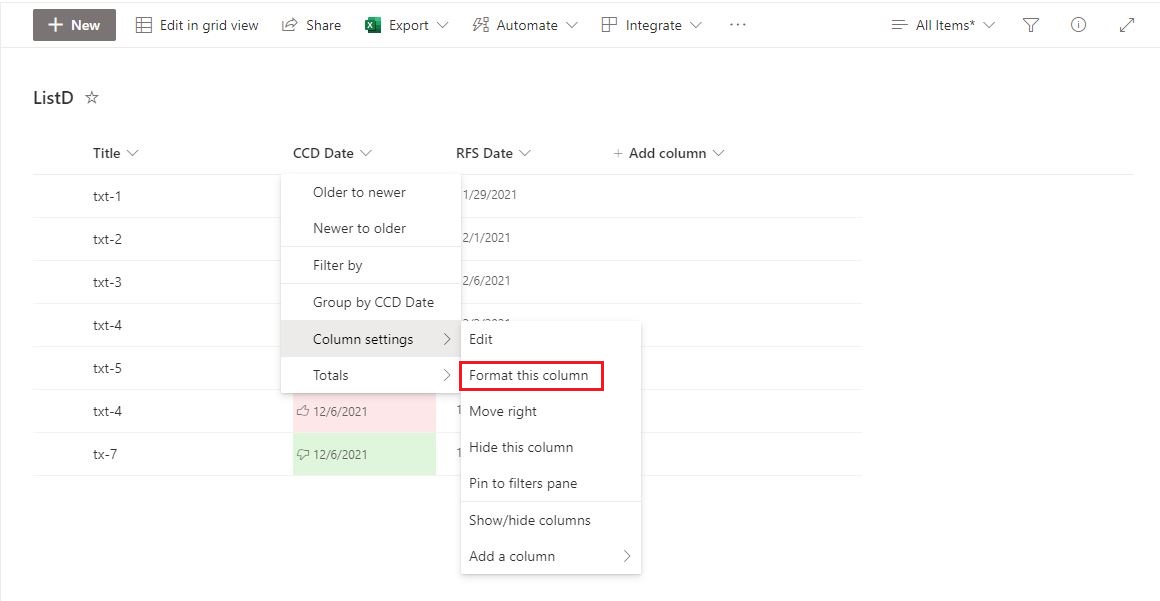
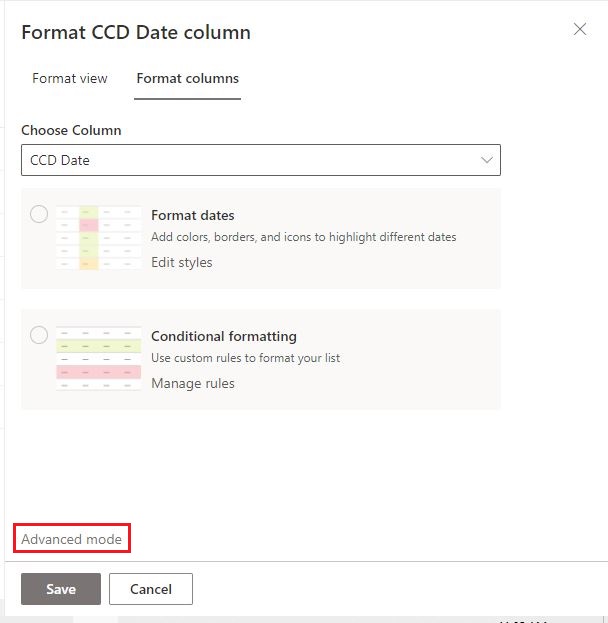
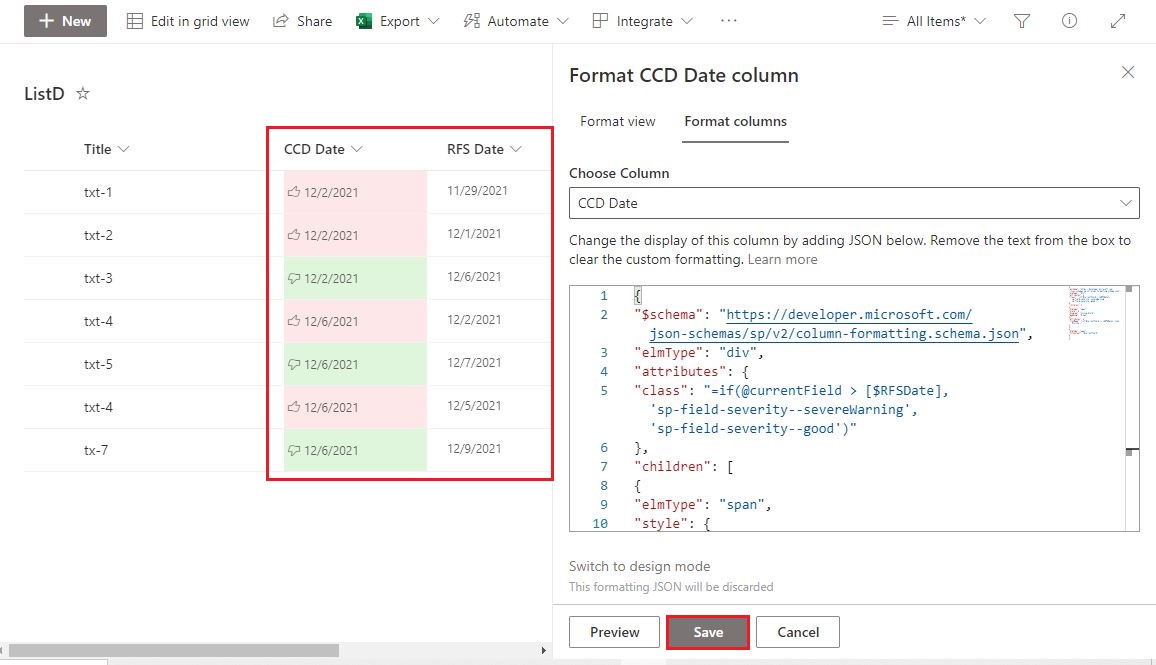
Thanks,
Echo Du
================================
If the answer is helpful, please click "Accept Answer" and kindly upvote it. If you have extra questions about this answer, please click "Comment".
Note: Please follow the steps in our documentation to enable e-mail notifications if you want to receive the related email notification for this thread.
Thanks a lot for this great explanation :)
Some how i get all dates in red and the blank cells in green for the "CCD" Date column. I can not find the issue at the moment.
Hi @Richard Post ,
Please use the below JSON formatting:
{
  "$schema": "https://developer.microsoft.com/json-schemas/sp/v2/column-formatting.schema.json",
  "elmType": "div",
  "txtContent": "@currentField",
  "style": {
    "background-color": "=if(Number([$CCDDate]) == 0, '#66ff66','#ff6666')"
  }
}
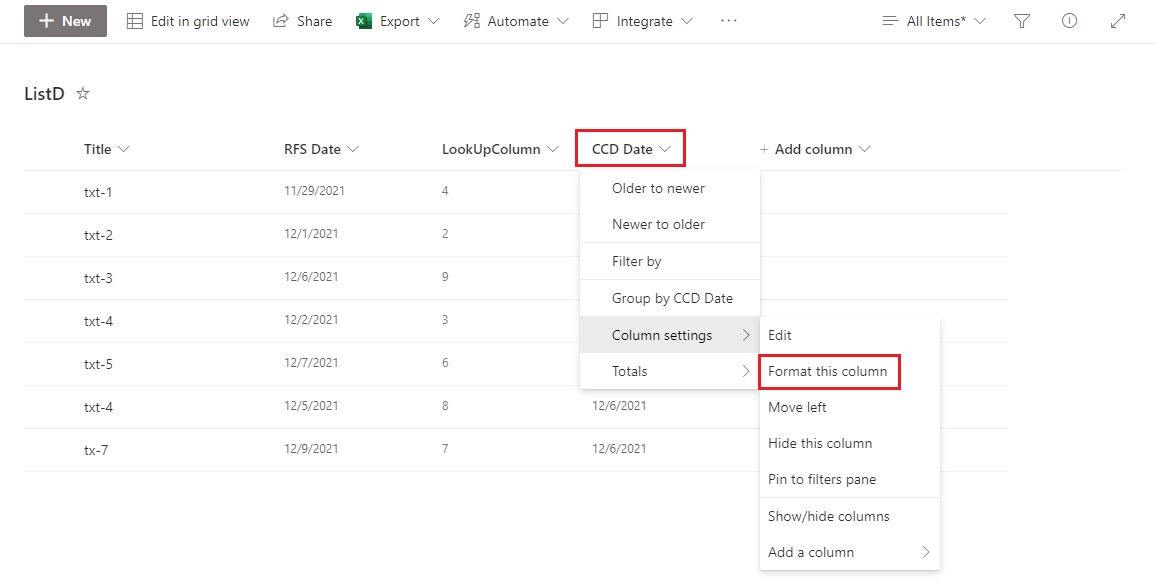
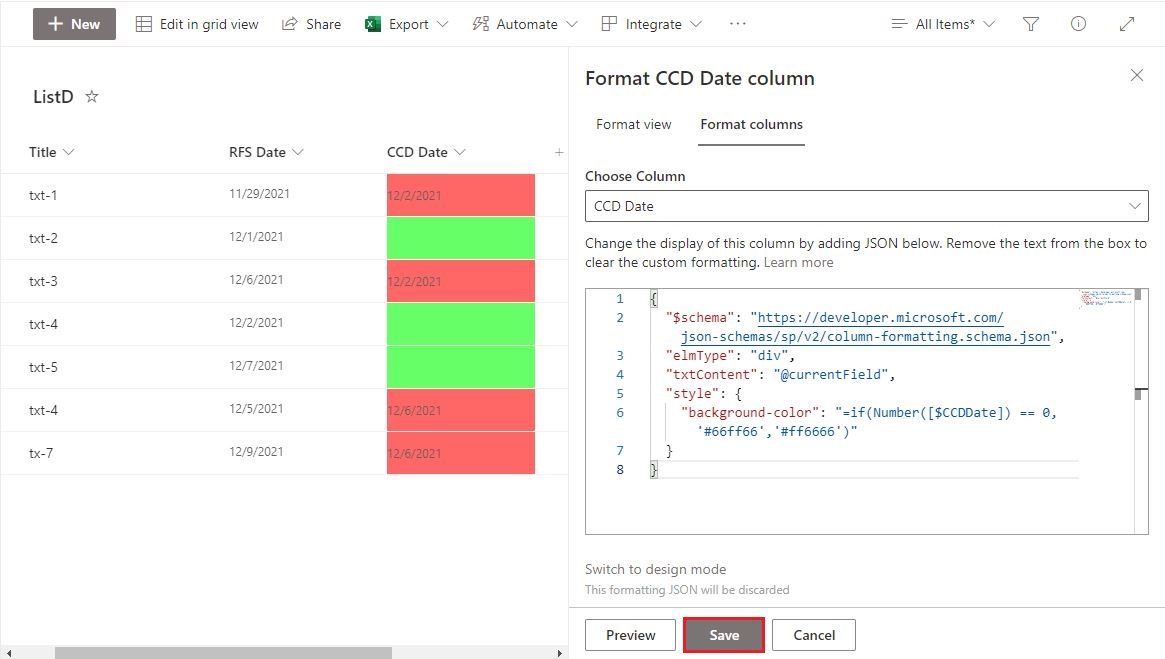
Thanks,
Echo Du
Hi @Richard Post ,
Is there anything else I can help with regarding this issue?
You can comment us at any time and we will continue to follow up.
Thanks,
Echo Du
Thanks again :), the thing behind this is that the KPI needs to be presented in a percentage (red or the greens) of the total in the column.
I am really new to JSON and try to under stand it, try to read and learn. I was think if it is a class instead of color properties, the calculation can be done without help of a hidden column which is set to a 0 or a 1.
Is there a reason why it fails in my case, is it because of the "Content Type" or just "Column order". I checked both columns and they aren't using time, just date.
If i use background-color it works fine, but when it is a class not.
Regards,
Richard
Hi @Richard Post ,
Thanks for your reply : )
1.WhetherJSON works normally has nothing to do with "Content Type" or "Column Order"
2.In my test, [CSS Date] and [RFS Date] also only display the date, not the time.
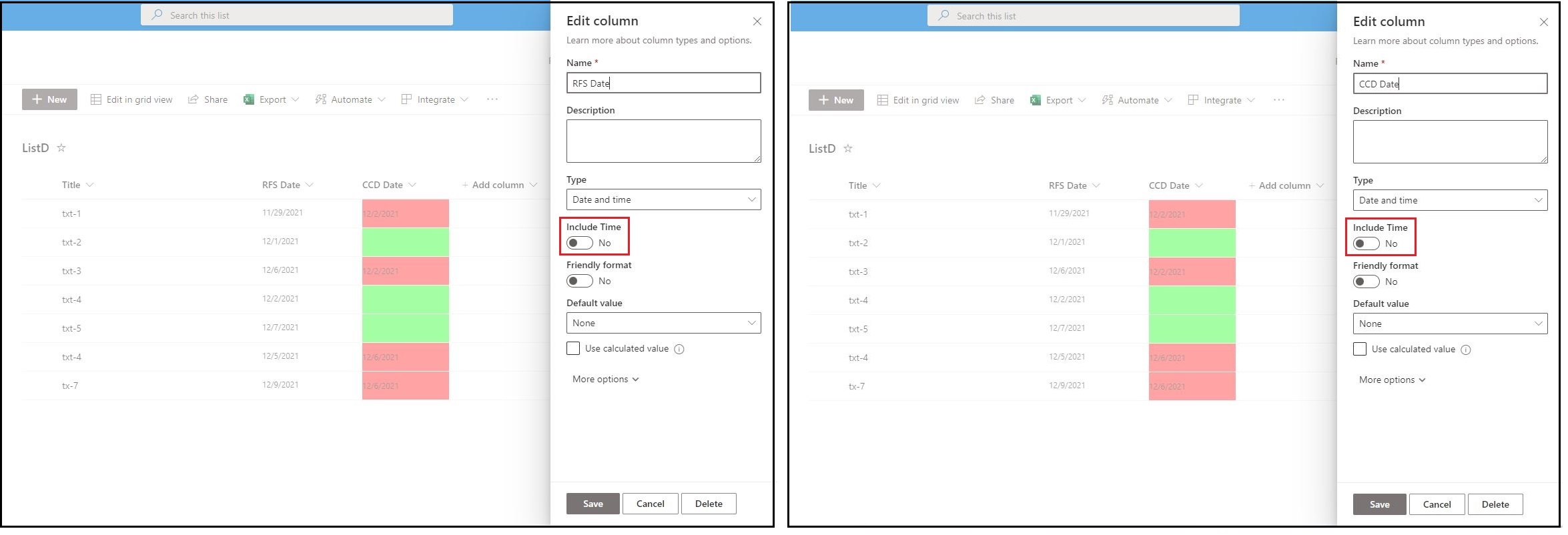
3.SharePoint JSON has CSS classes are used by the modern SharePoint UI. For more information, please see "SharePoint Online CSS Classes".
Can you tell me the details of the issue you faced? If you can, please attach screenshots. This will help us solve the problem better.
Thanks,
Echo Du
Hi @Richard Post ,
Is there anything else I can help with regarding this issue?
You can comment us at any time and we will continue to follow up.
Thanks,
Echo Du
Hi, thanks for all the help! Greetings from the Netherlands
I have the KPI working with the background color i will check the link for CSS Classes.
' cx='32' cy='32' r='32' /%3E%3Ctext x='50%25' y='55%25' dominant-baseline='middle' text-anchor='middle' fill='%23FFF' %3ETM%3C/text%3E%3C/svg%3E)
Hi.
I have read your article.
I have one question.
can you help me?