How to code this powershell script?

oemScript 81 Reputation points
2022-01-09T07:54:22.05+00:00

Referring to following powershell coding, I would like to know on why it fails to download Excel File

    $clnt = new-object System.Net.WebClient
    $url = "https://www.cmegroup.com/CmeWS/exp/voiProductsViewExport.ctl?media=xls&tradeDate=20220107&assetClassId=3&reportType=F&excluded=CEE,CEU,KCB"
    $file = "C:\sample.xls"
    try {
        $request = [System.Net.WebRequest]::Create($url)
        $request.Method = 'HEAD'
        $response = $request.GetResponse()
        $httpStatus = $response.StatusCode
        $urlIsValid = ($httpStatus -eq 'OK')
        $tryError = $null
        $response.Close()

        $clnt.DownloadFile($url,$file)

    }
    catch [System.Exception] {
        $httpStatus = $null
        $tryError = $_.Exception
        $urlIsValid = $false;
        Write-Host "There was an error downloading $file" 
        $j++
    }

Does anyone have any suggestions?
Thanks in advance

Windows for business | Windows Server | User experience | PowerShell
0 comments No comments
{count} votes

Answer accepted by question author
  1. Rich Matheisen 48,026 Reputation points
    2022-01-09T15:49:38.62+00:00

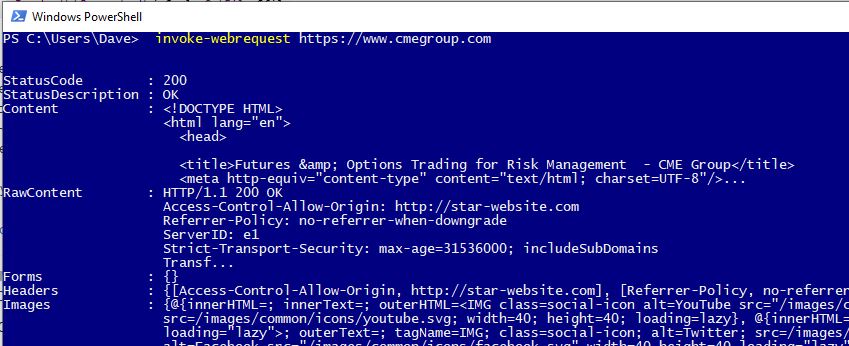
    It's possible (probable, actually) that the site no longer uses the defunct TLS version your code is trying to use.

    Add this to your code before contacting the web site:

    [Net.ServicePointManager]::SecurityProtocol = [Net.SecurityProtocolType]::Tls12
    

    Another problem may be that the site is using a self-signed certificate, an expired certificate, or a certificate that's not in your machines trusted sites list.

    0 comments No comments

3 additional answers

Sort by: Most helpful
  1. MotoX80 37,151 Reputation points
    2022-01-09T14:53:51.51+00:00

    I would like to know on why it fails

    For starters,, you have to display the error exception when you catch an error. Forum users would have no way of knowing what error your site is returning to you.

     Write-Host "There was an error downloading $file" 
     Write-Host $tryError 
    

    Second, I would not try to write to the C;\ root. The default permissions require you to run the process as an administrator. Better to use a download folder and set the proper permissions.

     $file = "C:\Downloads\sample.xls"
    

    Finally, why are doing a HEAD request first? Are you testing to see if the site is alive? Just try the download, if the site isn't accessible, you'll get the same error.

    Why don't you just use Invoke-WebRequest?

    Invoke-WebRequest -Uri $url -OutFile $file
    

    https://lazyadmin.nl/powershell/download-file-powershell/

    0 comments No comments

  2. oemScript 81 Reputation points
    2022-01-09T15:38:52.533+00:00

    When I run following coding, it shows below error
    Do you have any suggestions on what problem is?
    Thank you very much for any suggestions (^v^)

    $clnt = new-object System.Net.WebClient
    $url = "https://www.cmegroup.com/CmeWS/exp/voiProductsViewExport.ctl?media=xls&tradeDate=20220107&assetClassId=3&reportType=F&excluded=CEE,CEU,KCB"
    $file = "D:\sample.xls"
    Invoke-WebRequest -Uri $url -OutFile $file
    

    Invoke-WebRequest : The request was aborted: Could not create SSL/TLS secure channel.
    Locate Line:1 word:1

    • Invoke-WebRequest -Uri $url -OutFile $file
    • ~~~~~~~~~~~~~~~~~~~~~~~~~~~~~~~~~~~~~~~~~~
    • CategoryInfo : InvalidOperation: (System.Net.HttpWebRequest:HttpWebRequest) [Invoke-WebRequest],WebExce
      ption
    • FullyQualifiedErrorId : WebCmdletWebResponseException,Microsoft.PowerShell.Commands.InvokeWebRequestCommand

  3. Rich Matheisen 48,026 Reputation points
    2022-01-09T19:08:06.587+00:00

    Try running the script found at this URL: checking-ssl-and-tls-versions-with-powershell.html

    At least you'll know if the site accepts any of the security protocols your machine is using. Pick the most recent supported version to use.

    0 comments No comments

Your answer

Answers can be marked as 'Accepted' by the question author and 'Recommended' by moderators, which helps users know the answer solved the author's problem.
