Community Center | Not monitored
Tag not monitored by Microsoft.

This browser is no longer supported.
Upgrade to Microsoft Edge to take advantage of the latest features, security updates, and technical support.
' cx='32' cy='32' r='32' /%3E%3Ctext x='50%25' y='55%25' dominant-baseline='middle' text-anchor='middle' fill='%23FFF' %3ER%3C/text%3E%3C/svg%3E)
Hi,
I'm hoping that somebody on here can help me as I've been unable to find a way to do this in Powerquery and don't know enough about M Code to be able to obtain my desired solution.
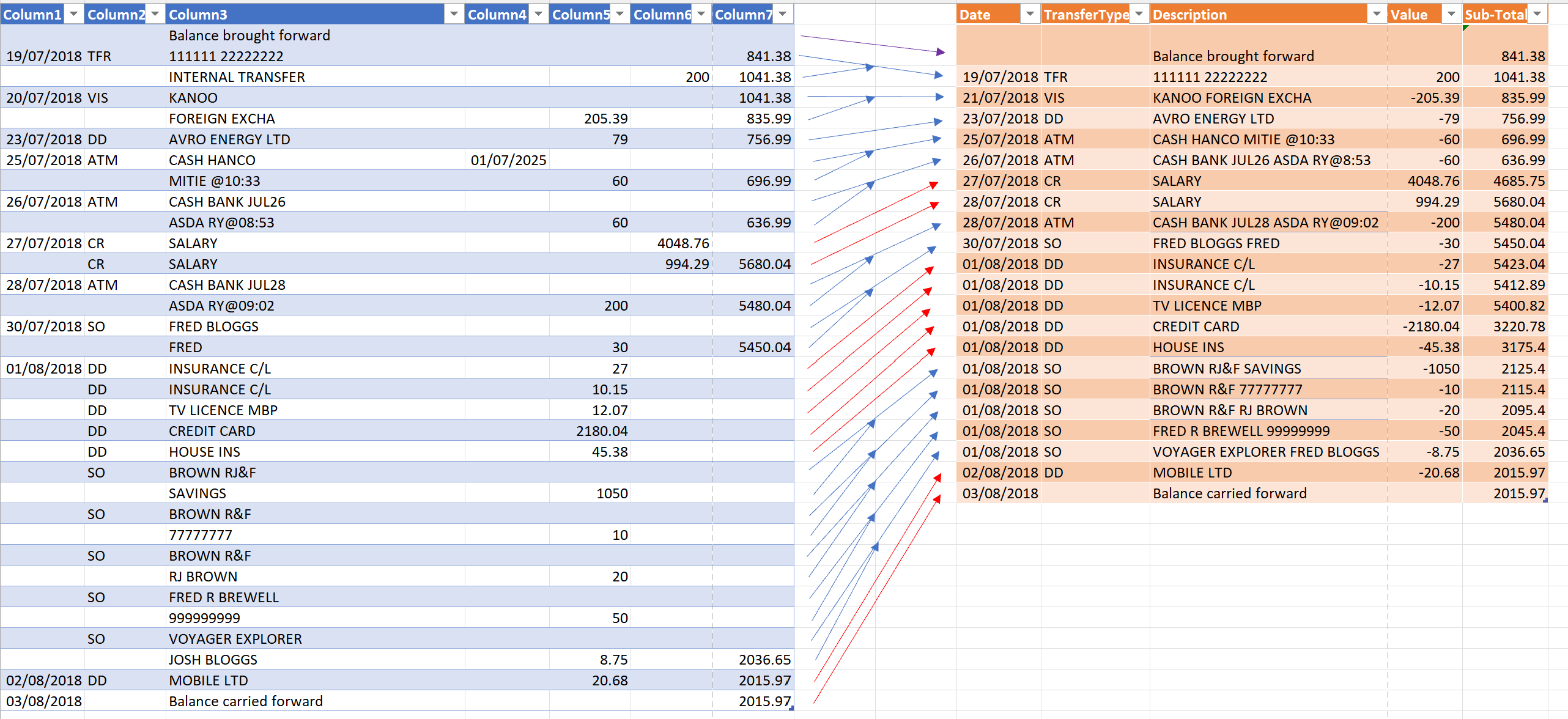
I've attached a Sample file showing my starting data, in the left-hand table, as imported into Powerquery and the desired result in the table in the right-hand table.
There are some rows that can be transferred directly (example being the row dated 23/07/2018) but some rows need to be combined (example being 20/07/2018 with the row below). I've tried to show this with the arrows.
The best explanation that I can give is that the rows that needs to be combined have, in the first row to be combined, a blank cell in both [Column 5] and [Column 6] and a blank in its corresponding [Column 2] on the second row.
Rows that can be transposed directly have data in [Column 2] and [Column 5] and OR [Column 6] exclusively - not both.
I hope that I've been clear enough and that one of you guys can help me with this frustrating puzzle. If it can be done using the standard editor I'd be interested to see how but I'd like the M Code so that I can learn how to achieve this too!
Thanks to you for your help!!
' cx='32' cy='32' r='32' /%3E%3Ctext x='50%25' y='55%25' dominant-baseline='middle' text-anchor='middle' fill='%23FFF' %3EA%3C/text%3E%3C/svg%3E)
Power query is not currently supported here on Q&A. The product group for Power Query actively monitors questions over at
https://community.powerbi.com/t5/Power-Query/bd-p/power-bi-services
--please don't forget to Accept as answer if the reply is helpful--