Microsoft Security | Microsoft Entra | Microsoft Entra ID
A cloud-based identity and access management service for securing user authentication and resource access

This browser is no longer supported.
Upgrade to Microsoft Edge to take advantage of the latest features, security updates, and technical support.
' cx='32' cy='32' r='32' /%3E%3Ctext x='50%25' y='55%25' dominant-baseline='middle' text-anchor='middle' fill='%23FFF' %3ERG%3C/text%3E%3C/svg%3E)
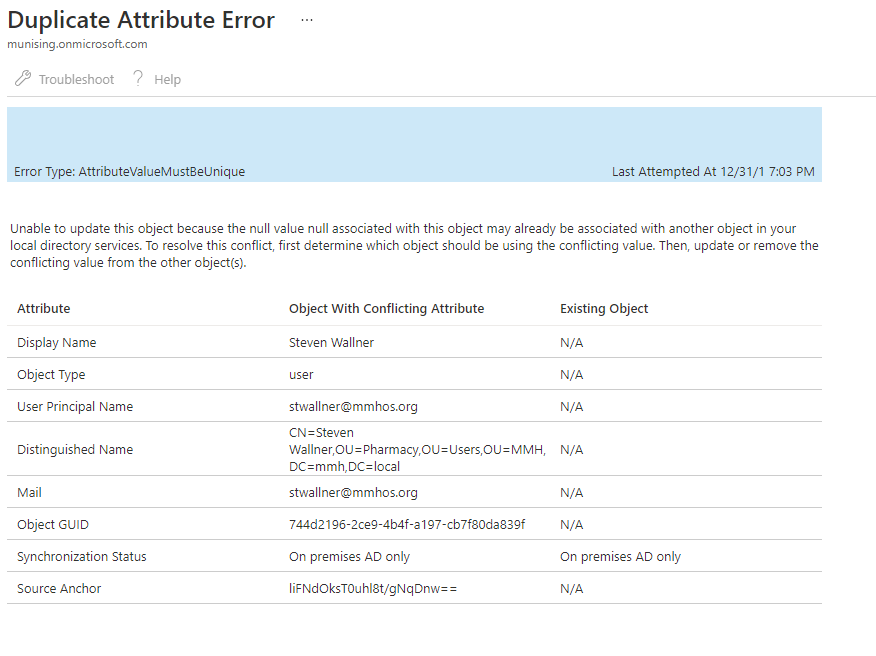
I have had AD connect running for some time and just added more OUs to it and one user is getting an error as seen below. Anybody have an idea what it could be?
' cx='32' cy='32' r='32' /%3E%3Ctext x='50%25' y='55%25' dominant-baseline='middle' text-anchor='middle' fill='%23FFF' %3EMT%3C/text%3E%3C/svg%3E)
Hi @Robert Greenhoe ,
I understand that you are seeing the "AttributeValueMustBeUnique" error after adding more OUs. You are also receiving the error:
Unable to update this object because the null value null associated with this object may already be associated with another object in your local directory services. To resolve this conflict, first determine which object should be using the conflicting value. Then, update or remove the conflicting value from the other object(s).
If there are accounts that are not matching, you may need to do a hard match via Powershell to fix the issue. To do this, you can follow these steps:
1) Get Object ID of the cloud user to be matched on the Azure portal (get-aduser -Identity “first name last name”). Then convert the Object GUID to a B64 value via Powershell:
$guid = "744e2196-2ce9-4b4f-cb7f80da839f"
$base64 = [system.convert]::ToBase64String(([GUID]$guid).ToByteArray())
$base64copy
2) Save the value and Connect Powershell to Microsoft 365:
3) Then log in by entering your Microsoft 365 admin account information and assignthe relevant Microsoft 365 user (UserPrincipalName) the previously saved B64 riff as ImmutableId:
Set-MsolUser -UserPrincipalName ******@mmhos.org -ImmutableId yourb64immutableid
4) If you receive an error message, check if there is any deleted user in the way and remove it if it is conflicting:
Get-MsolUser -ReturnDeletedUserscopy

Remove-MsolUser -UserPrincipalName  ******@yourdomain.org  -RemoveFromRecycleBin
5) Run a delta sync and check whether the match is success or not.
Additional reading:
Error Type: AttributeValueMustBeUnique
Duplicate or invalid attributes prevent directory synchronization in Office 365
Hard Match Users
Thank you for responding.
I am new to 365 syncing and didn't understand what it was saying was a duplicate.
I am also new to PowerShell, so please pardon my ignorance in the following questions.
Sorry, I am learning something new everyday.
Rob
I tried the last step to remove anyone in the deleted users group that may be a conflict and that resolved the issue.
Thank you @Marilee Turscak-MSFT
Thanks for confirming your solution!