Developer technologies | ASP.NET | Other
A set of technologies in .NET for building web applications and web services. Miscellaneous topics that do not fit into specific categories.
This browser is no longer supported.
Upgrade to Microsoft Edge to take advantage of the latest features, security updates, and technical support.
' cx='32' cy='32' r='32' /%3E%3Ctext x='50%25' y='55%25' dominant-baseline='middle' text-anchor='middle' fill='%23FFF' %3EC%3C/text%3E%3C/svg%3E)
Hi, I have a Web Application configured in I.I.S. in which windows authentication is enabled and timeout is set (as default) 20 minutes.
When timeout expires, I'm redirected to login page. This is ok, but I think that this is managed by I.I.S.
So, I want sometyhing like that: when session is idle from more than 20 minutes, a message must appear: YOUR SESSION IS EXPIRED PLEASE RE-LOGIN (or something like that) + button OK.
The user click on OK and the login page must appear. How I can do that by code in my C# controller?

Windows Authentication does not have or need a login page. If you see a login prompt then the browser is not setup to allow Windows authentication.
I'm sorry, I did not make explicit that my login page is only a button that, when click on it, it show the login form of browser
' cx='32' cy='32' r='32' /%3E%3Ctext x='50%25' y='55%25' dominant-baseline='middle' text-anchor='middle' fill='%23FFF' %3ELH%3C/text%3E%3C/svg%3E)
Hi @compile ,
I suggest you can try Javascript as redirecting from the server side requires a postback.
You can check the ses sion through the controller and return a value to determine if the ses sion ended.
You can refer to the code below:

Controller
public JsonResultSessionInfo()
        {
            if (Session["LoginUserName"] == null)
            {
                returnJson(true, JsonRequestBehavior.AllowGet);
            }
            return Json(false, JsonRequestBehavior.AllowGet);
        }
Best regards,
Lan Huang
If the answer is the right solution, please click "Accept Answer" and kindly upvote it. If you have extra questions about this answer, please click "Comment".
Note: Please follow the steps in our documentation to enable e-mail notifications if you want to receive the related email notification for this thread.

Hi @Trinity Compile ,
There are multiple ways to do this (or similar),
So, what do you want to do exactly? Did you want to just redirect to the login page when the user clicks the 'Button' and notify the right before session_end or did you want your users to be authenticated without any page refresh?
Bests,
Atakan ATALI
I'm sorry, I did not make explicit that my login page is only a button that, when click on it, it show the login form of browser
Still, your design makes little sense since a login page is not needed if Windows authentication is enabled in IIS.
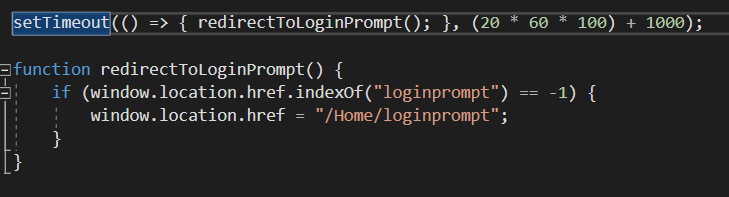
Anyway, create a JavaScript timeout timer that fires after 20 minutes and 1 second. Redirect to an MVC action in the timer callback. Add the code below to a js file that loads on every request. If you are using the default MVC template then try the site.js but make sure the layout.cshtml references the file. Also the code expects a /Home/loginprompt action and view.
The following code was tested and known to function as expected.
' cx='32' cy='32' r='32' /%3E%3Ctext x='50%25' y='55%25' dominant-baseline='middle' text-anchor='middle' fill='%23FFF' %3EBS%3C/text%3E%3C/svg%3E)
Windows authentication, cause authentication on every request. If you want a “session”, the easiest is to use a cookie. Just put a time stamp in the cookie, and update on every response. On every request check the time stamp.