Azure SQL Edge
An Azure service that provides a small-footprint, edge-optimized data engine with built-in artificial intelligence. Previously known as Azure SQL Database Edge.
This browser is no longer supported.
Upgrade to Microsoft Edge to take advantage of the latest features, security updates, and technical support.

Hello
I know there are multiple threads with a similar issue, however, nothing helped me so far.
Issue: unable to access the SQL Server : azure-sql-edge on Docker in Mac M1 ARM64. SQL Server is working as expected I believe.
YAML: password added as a secret.
apiVersion: apps/v1
kind: Deployment
metadata:
name: mssql-depl
spec:
replicas: 1
selector:
matchLabels:
app: mssql
template:
metadata:
labels:
app: mssql
spec:
containers:
apiVersion: v1
kind: Service
metadata:
name: mssql-clusterip-srv
spec:
type: ClusterIP
selector:
app: msql
ports:
apiVersion: v1
kind: Service
metadata:
name: mssql-loadbalancer
spec:
type: LoadBalancer
selector:
app: msql
ports:
it was failed to connect 6 times but connected.:
2022/02/26 08:48:53 [launchpadd] WARNING: Failed to connect to SQL because: dial tcp 127.0.0.1:1431: connect: connection refused, will reattempt connection.
2022/02/26 08:48:55 [launchpadd] INFO: Connection opened from 127.0.0.1:56076 to 127.0.0.1:1431
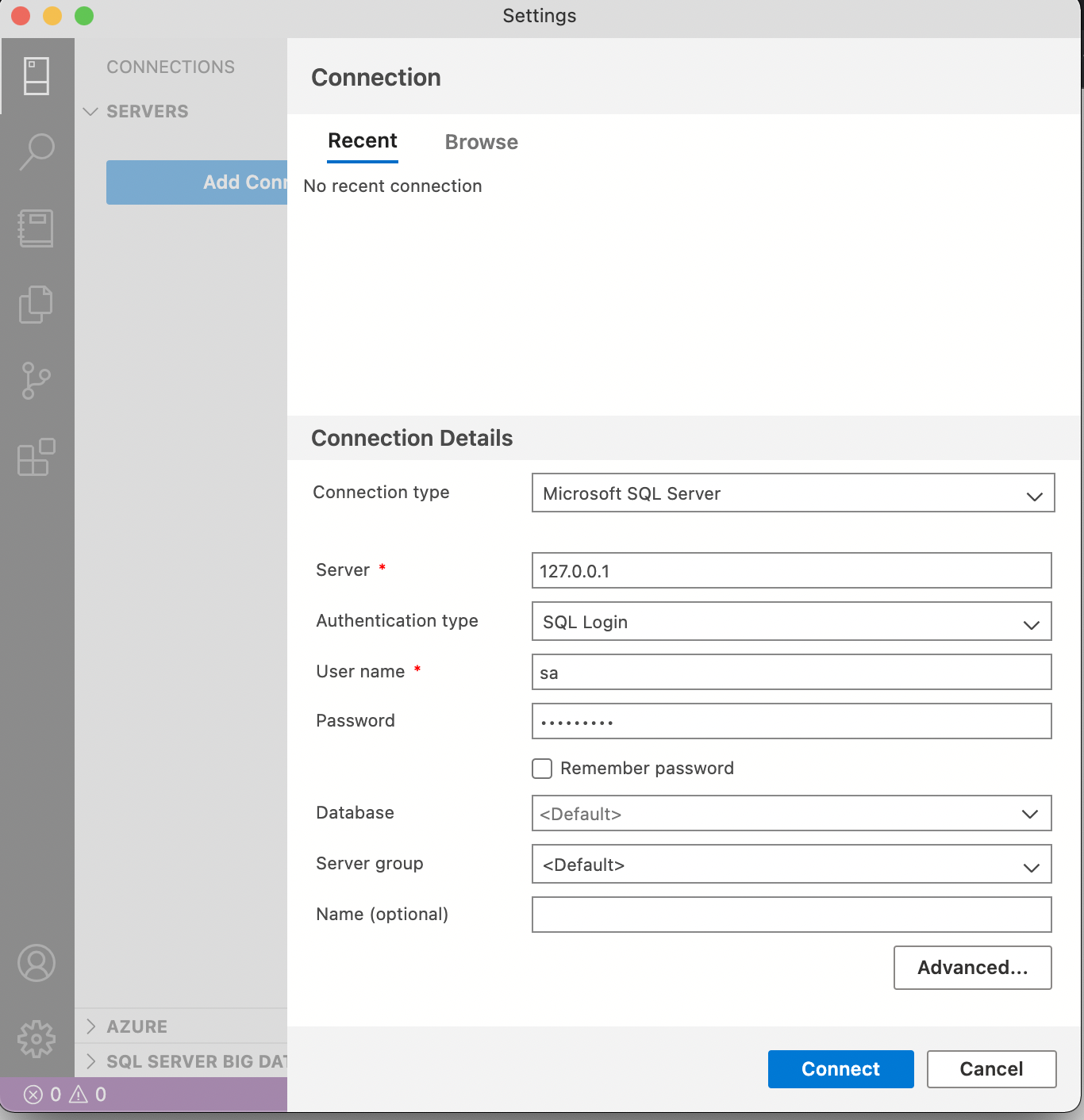
I am trying to connect to the SQL Server using Azure Data Studio, however unable to connect.
Connection Type: Microsoft SQL Server
Server: localhost
Authentication Type: SQL Login
User name: sa
ERROR:
Microsoft.Data.SqlClient.SqlException (0x80131904): A connection was successfully established with the server, but then an error occurred during the pre-login handshake. (provider: TCP Provider, error: 0 - Undefined error: 0)
at Microsoft.Data.SqlClient.SqlInternalConnection.OnError(SqlException exception, Boolean breakConnection, Action1 wrapCloseInAction) at Microsoft.Data.SqlClient.TdsParser.ThrowExceptionAndWarning(TdsParserStateObject stateObj, Boolean callerHasConnectionLock, Boolean asyncClose) at Microsoft.Data.SqlClient.TdsParserStateObject.ThrowExceptionAndWarning(Boolean callerHasConnectionLock, Boolean asyncClose) at Microsoft.Data.SqlClient.TdsParserStateObject.ReadSniError(TdsParserStateObject stateObj, UInt32 error) at Microsoft.Data.SqlClient.TdsParserStateObject.ReadSniSyncOverAsync() at Microsoft.Data.SqlClient.TdsParserStateObject.TryReadNetworkPacket() at Microsoft.Data.SqlClient.TdsParser.ConsumePreLoginHandshake(Boolean encrypt, Boolean trustServerCert, Boolean integratedSecurity, Boolean& marsCapable, Boolean& fedAuthRequired) at Microsoft.Data.SqlClient.TdsParser.Connect(ServerInfo serverInfo, SqlInternalConnectionTds connHandler, Boolean ignoreSniOpenTimeout, Int64 timerExpire, Boolean encrypt, Boolean trustServerCert, Boolean integratedSecurity, Boolean withFailover, SqlAuthenticationMethod authType) at Microsoft.Data.SqlClient.SqlInternalConnectionTds.AttemptOneLogin(ServerInfo serverInfo, String newPassword, SecureString newSecurePassword, Boolean ignoreSniOpenTimeout, TimeoutTimer timeout, Boolean withFailover) at Microsoft.Data.SqlClient.SqlInternalConnectionTds.LoginNoFailover(ServerInfo serverInfo, String newPassword, SecureString newSecurePassword, Boolean redirectedUserInstance, SqlConnectionString connectionOptions, SqlCredential credential, TimeoutTimer timeout) at Microsoft.Data.SqlClient.SqlInternalConnectionTds.OpenLoginEnlist(TimeoutTimer timeout, SqlConnectionString connectionOptions, SqlCredential credential, String newPassword, SecureString newSecurePassword, Boolean redirectedUserInstance) at Microsoft.Data.SqlClient.SqlInternalConnectionTds..ctor(DbConnectionPoolIdentity identity, SqlConnectionString connectionOptions, SqlCredential credential, Object providerInfo, String newPassword, SecureString newSecurePassword, Boolean redirectedUserInstance, SqlConnectionString userConnectionOptions, SessionData reconnectSessionData, Boolean applyTransientFaultHandling, String accessToken, DbConnectionPool pool) at Microsoft.Data.SqlClient.SqlConnectionFactory.CreateConnection(DbConnectionOptions options, DbConnectionPoolKey poolKey, Object poolGroupProviderInfo, DbConnectionPool pool, DbConnection owningConnection, DbConnectionOptions userOptions) at Microsoft.Data.ProviderBase.DbConnectionFactory.CreateNonPooledConnection(DbConnection owningConnection, DbConnectionPoolGroup poolGroup, DbConnectionOptions userOptions) at Microsoft.Data.ProviderBase.DbConnectionFactory.<>c__DisplayClass48_0.<CreateReplaceConnectionContinuation>b__0(Task1 _)
at System.Threading.Tasks.ContinuationResultTaskFromResultTask`2.InnerInvoke()
at System.Threading.ExecutionContext.RunInternal(ExecutionContext executionContext, ContextCallback callback, Object state)
--- End of stack trace from previous location ---
at System.Threading.Tasks.Task.ExecuteWithThreadLocal(Task& currentTaskSlot, Thread threadPoolThread)
--- End of stack trace from previous location ---
at Microsoft.SqlTools.ServiceLayer.Connection.ReliableConnection.ReliableSqlConnection.<>c__DisplayClass30_0.<<OpenAsync>b__0>d.MoveNext() in D:\a\1\s\src\Microsoft.SqlTools.ManagedBatchParser\ReliableConnection\ReliableSqlConnection.cs:line 312
--- End of stack trace from previous location ---
at Microsoft.SqlTools.ServiceLayer.Connection.ConnectionService.TryOpenConnection(ConnectionInfo connectionInfo, ConnectParams connectionParams) in D:\a\1\s\src\Microsoft.SqlTools.ServiceLayer\Connection\ConnectionService.cs:line 559
ClientConnectionId:c467241e-b3dc-46b7-9206-039ffefc3f2f

Hi @Rajith Alwis Thank you for posting your Question on Microsoft Q&A and for using Azure services.
Could you please clarify a bit your issue? Are you trying to connect to Azure SQL edge from data studio on a mac using docker?
Or you are trying to connect to SQL server from data studio on a mac using docker?
Regards,
Oury
' cx='32' cy='32' r='32' /%3E%3Ctext x='50%25' y='55%25' dominant-baseline='middle' text-anchor='middle' fill='%23FFF' %3ERA%3C/text%3E%3C/svg%3E)
This issue has been resolved after painful reviews and help from one of the MS Azure team members.
Env Background: Mac M1 ARM64 (macOS Monterey Version 12.2.1)
Issue:
mcr.microsoft.com/azure-sql-edge installed on Docker with ClusterIP and ingress load balancer on Kubernetes.
The issue was unable to connect to the Azure SQL Edge through "Azure Data Studio" which is equivalent to SSMS (on windows).
However, noted that "Azure SQL Edge" works on Docker in the native state without having any ClusterIP's and Load Balancers.
Solution:
apiVersion: v1
kind: Service
metadata:
name: mssql-clusterip-srv
spec:
type: ClusterIP
selector:
app: msql
ports:
apiVersion: v1
kind: Service
metadata:
name: mssql-loadbalancer
spec:
type: LoadBalancer
selector:
app: msql
ports:

Thank you for visiting the Microsoft QA forums! Have a great day!
Regards
Geetha
Hi
yes, I did that number of times. now again.. I am still getting the same error.
is it to do with the server name? docker is installed on my mac.
Microsoft.Data.SqlClient.SqlException (0x80131904): A connection was successfully established with the server, but then an error occurred during the pre-login handshake. (provider: TCP Provider, error: 0 - 36559399)
---> System.ComponentModel.Win32Exception (365593993): Unknown error: 365593993
at Microsoft.Data.SqlClient.SqlInternalConnection.OnError(SqlException exception, Boolean breakConnection, Action1 wrapCloseInAction) at Microsoft.Data.SqlClient.TdsParser.ThrowExceptionAndWarning(TdsParserStateObject stateObj, Boolean callerHasConnectionLock, Boolean asyncClose) at Microsoft.Data.SqlClient.TdsParserStateObject.ThrowExceptionAndWarning(Boolean callerHasConnectionLock, Boolean asyncClose) at Microsoft.Data.SqlClient.TdsParserStateObject.ReadSniError(TdsParserStateObject stateObj, UInt32 error) at Microsoft.Data.SqlClient.TdsParserStateObject.ReadSniSyncOverAsync() at Microsoft.Data.SqlClient.TdsParserStateObject.TryReadNetworkPacket() at Microsoft.Data.SqlClient.TdsParser.ConsumePreLoginHandshake(Boolean encrypt, Boolean trustServerCert, Boolean integratedSecurity, Boolean& marsCapable, Boolean& fedAuthRequired) at Microsoft.Data.SqlClient.TdsParser.Connect(ServerInfo serverInfo, SqlInternalConnectionTds connHandler, Boolean ignoreSniOpenTimeout, Int64 timerExpire, Boolean encrypt, Boolean trustServerCert, Boolean integratedSecurity, Boolean withFailover, SqlAuthenticationMethod authType) at Microsoft.Data.SqlClient.SqlInternalConnectionTds.AttemptOneLogin(ServerInfo serverInfo, String newPassword, SecureString newSecurePassword, Boolean ignoreSniOpenTimeout, TimeoutTimer timeout, Boolean withFailover) at Microsoft.Data.SqlClient.SqlInternalConnectionTds.LoginNoFailover(ServerInfo serverInfo, String newPassword, SecureString newSecurePassword, Boolean redirectedUserInstance, SqlConnectionString connectionOptions, SqlCredential credential, TimeoutTimer timeout) at Microsoft.Data.SqlClient.SqlInternalConnectionTds.OpenLoginEnlist(TimeoutTimer timeout, SqlConnectionString connectionOptions, SqlCredential credential, String newPassword, SecureString newSecurePassword, Boolean redirectedUserInstance) at Microsoft.Data.SqlClient.SqlInternalConnectionTds..ctor(DbConnectionPoolIdentity identity, SqlConnectionString connectionOptions, SqlCredential credential, Object providerInfo, String newPassword, SecureString newSecurePassword, Boolean redirectedUserInstance, SqlConnectionString userConnectionOptions, SessionData reconnectSessionData, Boolean applyTransientFaultHandling, String accessToken, DbConnectionPool pool) at Microsoft.Data.SqlClient.SqlConnectionFactory.CreateConnection(DbConnectionOptions options, DbConnectionPoolKey poolKey, Object poolGroupProviderInfo, DbConnectionPool pool, DbConnection owningConnection, DbConnectionOptions userOptions) at Microsoft.Data.ProviderBase.DbConnectionFactory.CreateNonPooledConnection(DbConnection owningConnection, DbConnectionPoolGroup poolGroup, DbConnectionOptions userOptions) at Microsoft.Data.ProviderBase.DbConnectionFactory.<>c__DisplayClass48_0.<CreateReplaceConnectionContinuation>b__0(Task1 _)
at System.Threading.Tasks.ContinuationResultTaskFromResultTask`2.InnerInvoke()
at System.Threading.ExecutionContext.RunInternal(ExecutionContext executionContext, ContextCallback callback, Object state)
--- End of stack trace from previous location ---
at System.Threading.Tasks.Task.ExecuteWithThreadLocal(Task& currentTaskSlot, Thread threadPoolThread)
--- End of stack trace from previous location ---
at Microsoft.SqlTools.ServiceLayer.Connection.ReliableConnection.ReliableSqlConnection.<>c__DisplayClass30_0.<<OpenAsync>b__0>d.MoveNext() in D:\a\1\s\src\Microsoft.SqlTools.ManagedBatchParser\ReliableConnection\ReliableSqlConnection.cs:line 312
--- End of stack trace from previous location ---
at Microsoft.SqlTools.ServiceLayer.Connection.ConnectionService.TryOpenConnection(ConnectionInfo connectionInfo, ConnectParams connectionParams) in D:\a\1\s\src\Microsoft.SqlTools.ServiceLayer\Connection\ConnectionService.cs:line 559
ClientConnectionId:f9341ccf-241e-48ed-a26b-f31efd98fbd7
Error Number:365593993,State:0,Class:20
Hi, @Rajith Alwis Thanks for sharing the screenshot.
Can you please share the docker run command you used to execute?
Regards
Geetha
Hi @GeethaThatipatri-MSFT
Please see the command below and the screenshot is attached.
docker run --cap-add SYS_PTRACE -e 'ACCEPT_EULA=1' -e 'MSSQL_SA_PASSWORD=pa55w0rd@' -p 1433:1433 --name SQLServer -d mcr.microsoft.com/azure-sql-edge
docker SQL log also attached.
Thank you very much.
Rajith

Hi, @Rajith Alwis Thanks for sharing the screenshot,
I see that you did not mention the same server you used to connect in the studio, can you please update the server name and retry

Regards
Geetha
Hi @GeethaThatipatri-MSFT
Its getting an error. Could you please double-check I am not sure that is the case here.. isn't the server on localhost or 127.0.0.1 ? Docker is installed on Mac? these details also on the docker SQL log.
Please see the error..

Hi, @Rajith Alwis are you trying to connect to localhost? or Azure MySQL server?
Regards
Geetha
it doesn't matter if I can connect to any of the env. what I am doing wrong here?
Thanks
Rajith
@Rajith Alwis yes it does not matter but the error message clearly says it does not exist in the subscription, use the same server name from mysql then it should work.
Regards
Geetha
