' cx='32' cy='32' r='32' /%3E%3Ctext x='50%25' y='55%25' dominant-baseline='middle' text-anchor='middle' fill='%23FFF' %3ELC%3C/text%3E%3C/svg%3E)

' cx='32' cy='32' r='32' /%3E%3Ctext x='50%25' y='55%25' dominant-baseline='middle' text-anchor='middle' fill='%23FFF' %3EFF%3C/text%3E%3C/svg%3E)
Hi @liuwei@cesm ,
According to my test on my Outlook version, when I click save attachment, the mapped network driver is displayed normally as the screenshot.
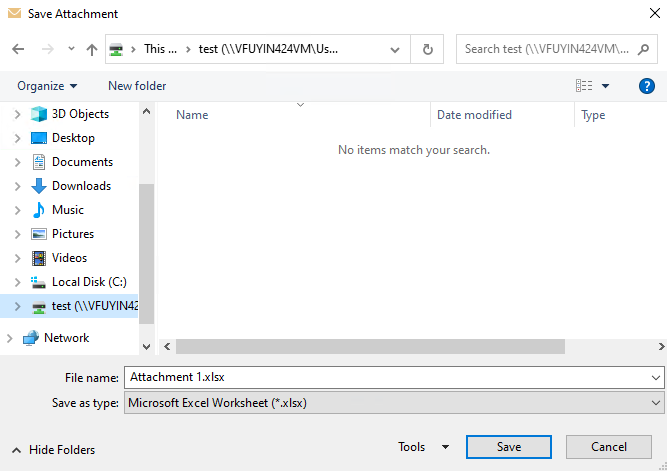
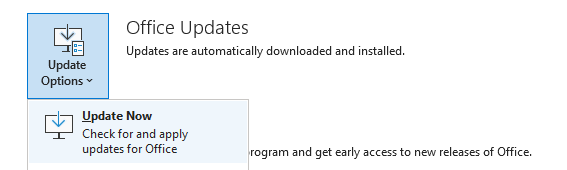
In order to verify, what detailed version of Outlook are you using?(File > Office Account > About Outlook)Please upgrde your Outlook to the latest version(File > Office Account > Office Updates > Update Now)

Based on my search, there are several scenarios in which you can't save the attachment as expected in Outlook 2016, here is an article for your reference.
If you are using an older Outlook build, you can work around it by saving the files to a temporary local location and then using the usual Windows methods to copy the files to the network location. Besides, you can also drag the attachment to the destination successfully.
If the answer is helpful, please click "Accept Answer" and kindly upvote it. If you have extra questions about this answer, please click "Comment".
Note: Please follow the steps in our documentation to enable e-mail notifications if you want to receive the related email notification for this thread.