Microsoft 365 and Office | Access | Development
The creation and customization of database applications using Microsoft Access

This browser is no longer supported.
Upgrade to Microsoft Edge to take advantage of the latest features, security updates, and technical support.
' cx='32' cy='32' r='32' /%3E%3Ctext x='50%25' y='55%25' dominant-baseline='middle' text-anchor='middle' fill='%23FFF' %3EFR%3C/text%3E%3C/svg%3E)
Hello,
I have the following crosstab query.
TRANSFORM Sum(qryBldg_2.[Valin repcur]) AS [SumOfValin repcur]
SELECT qryBldg_2.[Cost element name], Sum(qryBldg_2.[Valin repcur]) AS [Total Of Valin repcur]
FROM qryBldg_2
WHERE (((qryBldg_2.Location)="BCHM") AND ((qryBldg_2.[Fiscal Year])="2018"))
GROUP BY qryBldg_2.[Cost element name]
PIVOT qryBldg_2.[Order Type];
For [Order Type], there are (10) different types (Example: A thru J). Is there a way to group/sum the Order Types for Column Headers?
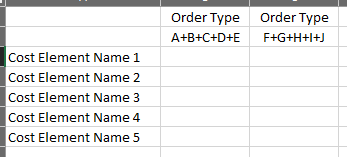

You'll need to add the CostElement column to the SELECT and GROUP BY clauses (which you'll add) of each part of the UNION ALL query. You'll then be able to build a crosstab query on that query, with the cost elements as the row headings, the OrderTypeGroup as the column headings and the TotalAmount as the values at the intersections. As the values are already summed in the source query you can use any aggregation operator to return the values.
Hello Ken,
I have enter as follows but receive a "syntax error in GROUP BY clause". Sorry, I tried to add the text but a character count was exceeded.

Hi Ken,
Got it! Finally got my syntax correct. Thanks for all your help!
Firstly, by means of a UNION ALL operation, return a result table which returns each group of orders independently. The following is a simple example which returns the total value of orders for two different groups of customers:
SELECT "Customer Group 1" AS CustomerGroup,
SUM(UnitPriceQuantity) AS TotalAmount
FROM Orders INNER JOIN OrderDetails
ON Orders.OrderID = OrderDetails.OrderID
WHERE CustomerID IN(1,2,3,4,5)
UNION ALL
SELECT "Customer Group 2",
SUM(UnitPriceQuantity)
FROM Orders INNER JOIN OrderDetails
ON Orders.OrderID = OrderDetails.OrderID
WHERE CustomerID IN(6,7,8,9,10);
You can then use the query as the basis for a crosstab query with, in this example, each customer group as the column headings.
Thanks for the response! As you suggested, I created the UNION ALL query as shown. When I run the initial 1/2, all works fine. When I added the UNION ALL and later 1/2 I receive the syntax error highlighting the "=" sign shown. Do you see my error?
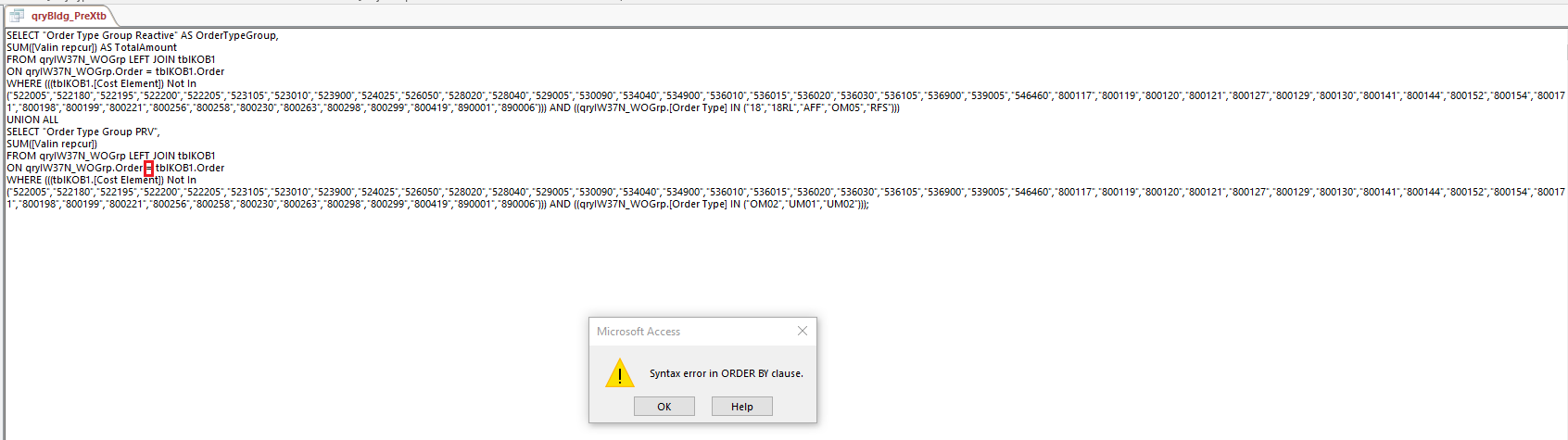
It looks like it might be treating the reference to the Order column as a keyword in this case. As an SQL keyword it's not advisable to use Order as an object name. Try wrapping the column name in square brackets - [Order].
I'd also point out that the LEFT JOIN serves no purpose here as there are restrictions on columns on the right side of the JOIN. This in effect turns it into an INNER JOIN.
For future reference, when posting SQL statements or VBA code, please do so as text not as screen shots. Not only are they easier to read, we can also edit them if necessary.
Ken,
Thanks again for the response.
As you suggested I used brackets and that resolved the issue (I also modified the LEFT JOIN to INNER JOIN). I will also use your suggestion regarding posts of text versus screen shots for future posts.
My only issue is how do I link/use this in a crosstab query? In my scenario, I now have the Order Type Groups as column headings but have not included the row heading information groups [Cost Element Name]. Does the [Cost Element Name] need to be included in the SELECT statements?

You can Pivot on an expression:
TRANSFORM Sum(qryBldg_2.[Valin repcur]) AS [SumOfValin repcur]
SELECT qryBldg_2.[Cost element name]
FROM qryBldg_2
WHERE qryBldg_2.Location = "BCHM" AND qryBldg_2.[Fiscal Year] = "2018"
GROUP BY qryBldg_2.[Cost element name]
PIVOT IIf(qryBldg_2.[Order Type] IN ("A","B","C","D"), "ABCD", "EFGH");
Thanks for the information!