Hi @FXE
I'm not sure what permissions have been assigned or where, but it does appears that they have been inherited from the root and sub OU. I've tried to create the same in my test environment but I haven't been successful, as I don't have enough info. This is what I have created in my environment
At the root, these permissions are assigned. Two read permissions assigned
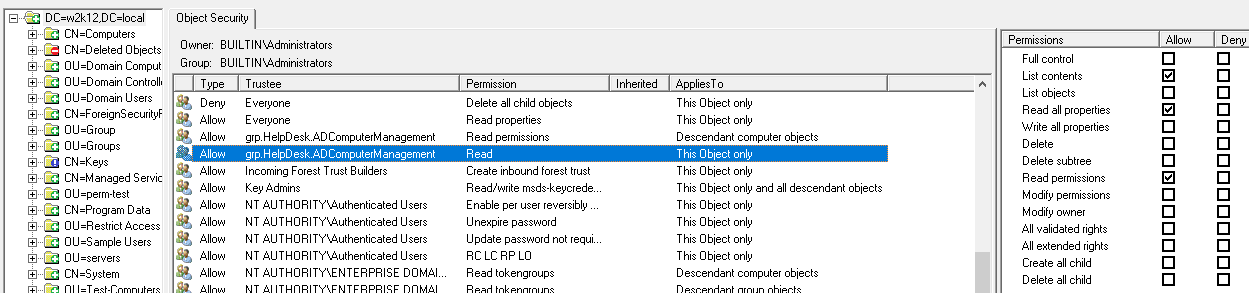
These are the test4 OU permissions, two permissions assigned which match the ones you have on your OU.

No additional permissions assigned on the test5 OU, just the permissions inherited from parent OUs

And the computer object in the test5 OU, which match the permissions on the OU

If you can check if you have the same permissions or provide a bit more information on where permissions are assigned and what are is the OU structure of the screenshots you shared.
If you have NetTools v1.30.11 beta or above, you can use the following AD Permissions Reporter filter to get a list where the grp.help.ADComputerManagement group has been assigned permissions. See this post on how to import the filter.
[check grp.HelpDesk.ADComputerManagement]
Count=1
Options=18437
Rule1_Enabled=1
Rule1_Options=1280
Rule1_SDControl=0
Rule1_SDNotControl=0
Rule1_SDNullAcl=0
Rule1_Prompt=0
Rule1_Trustee=grp.HelpDesk.ADComputerManagement
Rule1_Token=0
Rule1_Scope=12
Rule1_NotScope=0
Rule1_ACEType=0
Rule1_ACEFlags=0
Rule1_ACENotFlags=0
Rule1_Perms=0
Rule1_NotPerms=0
Rule1_MatchRules=546
Gary.
' cx='32' cy='32' r='32' /%3E%3Ctext x='50%25' y='55%25' dominant-baseline='middle' text-anchor='middle' fill='%23FFF' %3EF%3C/text%3E%3C/svg%3E)